


Mobile SDK Development Guide
 j
jOAuth 2.0 User-Agent Flow
This flow uses the OAuth 2.0 implicit grant type.
In the user-agent flow, the connected app, which integrates the client app with the Salesforce API, receives the access token as an HTTP redirection. The connected app requests that the authorization server redirects the user-agent to a web server or to an accessible local resource. The web server can extract the access token from the response and pass it to the connected app. For security, the token response is provided as a hash tag (#) fragment on the URL. This format prevents the token from being passed to the server or to any other servers in referral headers.
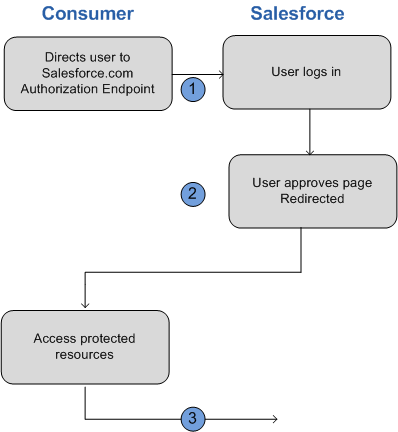
For example, you use Salesforce Mobile SDK to build a mobile app that looks up customer contact information from your Salesforce org. Mobile SDK implements the OAuth 2.0 user-agent flow for your connected app, integrating the mobile app with your Salesforce API and giving it authorized access to the defined data. The flow follows these steps.
- The user opens the mobile app.
- The connected app directs the user to Salesforce to authenticate and authorize the mobile app.
- The user approves access for this authorization flow.
- The connected app receives the callback from Salesforce to the redirect URL, which extracts the access and refresh tokens.
- The connected app uses the access token to access data on the user’s behalf.
User-Agent Flow in Mobile SDK 11.0 and On
If you want to continue using User-Agent Flow for your app in Mobile SDK 11.0 and on, the option can be enabled in the SalesforceSDKManager. Before initiating a login, call one of the following methods in your application class’s init method.
- Android
-
1SalesforceSDKManager.getInstance().setUseWebServerAuthentication(false) - iOS
- Swift
-
1SalesforceManager.shared.useWebServerAuthentication = false - Objective-C
-
1[SalesforceSDKManager sharedManager].useWebServerAuthentication = NO;