


Marketing Cloud API
 j
jCreating a Triggered Email Campaign Workflow
This page contains conceptual and procedural information on creating a triggered send email campaign using the Marketing Cloud SOAP API.
Why Create a Triggered Send Email Campaign
A triggered send email campaign takes a previously created email message and sends that message out in response to an outside request, such as a subscriber opting in to receive the message.
How To Create a Triggered Send Email Campaign
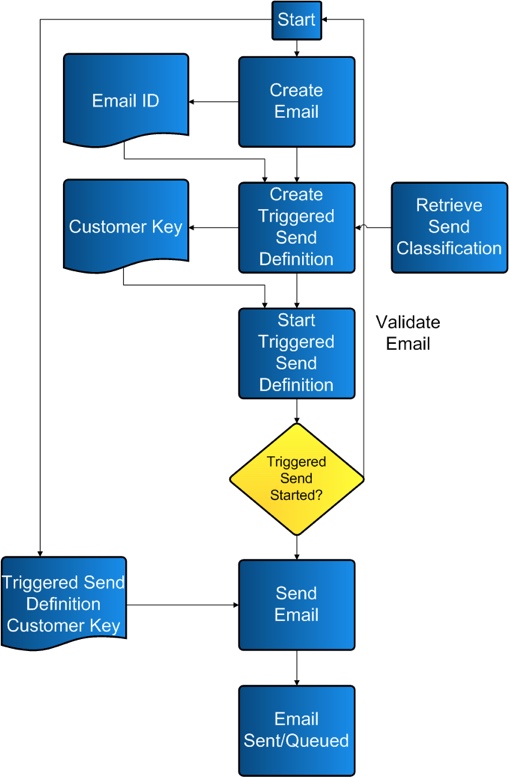
Use the flow chart and sample code as an example of how to create and order the processes necessary for the triggered email send campaign.
Triggered Send Email Campaign Workflow Process
Sample Code
This section contains sample code you can use to conduct your triggered sends.
Sample .NET Code
using System;
using System.Configuration;
using System.Data;
using System.Linq;
using System.Web;
using System.Web.Security;
using System.Web.UI;
using System.Web.UI.HtmlControls;
using System.Web.UI.WebControls;
using System.Web.UI.WebControls.WebParts;
using System.Xml.Linq;
using etAPI;
public partial class ETTriggeredSend : System.Web.UI.Page
{
    //Global Variables
    private SoapClient client = new SoapClient();
    protected void Page_Load(object sender, EventArgs e)
    {
        //Authenticate
        client.ClientCredentials.UserName.UserName = System.Configuration.ConfigurationSettings.AppSettings["wsUserName"];
        client.ClientCredentials.UserName.Password = System.Configuration.ConfigurationSettings.AppSettings["wsPassword"];
        if (!IsPostBack)
        {
        }
    }
    protected void btnSubmit_Click(object sender, EventArgs e)
    {
        try
        {
            //Create a GUID for ESD to ensure a unique name and customer key
            string strGUID = System.Guid.NewGuid().ToString();
            //Create TriggeredSendDefinition object [Messages > Email > Triggered]
            TriggeredSendDefinition tsd = new TriggeredSendDefinition();
            tsd.Name = "TSD_Name_" + strGUID;//required
            tsd.CustomerKey = strGUID;//recommended or the application assigns a number
            tsd.Description = "TSD_Description_" + strGUID;//recommended or the Description defaults to the Name
            //Set to delivery both Text and HTML versions.
            tsd.IsMultipart = true;//recommended as a best practice
            tsd.IsMultipartSpecified = true;//required
            //Set to track the links found in the email
            tsd.IsWrapped = true;//recommended to take advantage of Marketing Cloud's tracking
            tsd.IsWrappedSpecified = true;//required
            //Create Email object to refer to pre-create Email
            Email em = new Email();
            em.ID = 620046;//required //Available in Marketing Cloud UI [Content > My Emails > Properties]
            em.IDSpecified = true;//required
            //Apply Email object to the TriggeredSendDefinition object
            tsd.Email = em;//required
            //Create SendClassification
            tsd.SendClassification = new SendClassification();
            tsd.SendClassification.CustomerKey = "4201";//required //Available in Marketing Cloud UI [Setup > Send Management > Send Classifications > Edit Item > External Key]
            //tsd.TriggeredSendType = TriggeredSendTypeEnum.Continuous;
            //tsd.TriggeredSendTypeSpecified = true;
            //tsd.TriggeredSendStatus = TriggeredSendStatusEnum.New;
            //tsd.TriggeredSendStatusSpecified = true;
            //tsd.BatchInterval = 1;
            //tsd.BatchIntervalSpecified = true;
            //tsd.AutoAddSubscribers = true;
            //tsd.AutoAddSubscribersSpecified = true;
            //tsd.AutoUpdateSubscribers = true;
            //tsd.AutoUpdateSubscribersSpecified = true;
            //tsd.List = list;
            string cRequestID = String.Empty;
            string cStatus = String.Empty;
            try
            {
                //Call the Create method on the TriggeredSendDefinition object
                CreateResult[] cResults = client.Create(new CreateOptions(), new APIObject[] { tsd }, out cRequestID, out cStatus);
                //Display Results
                lblMessage.Text += "Overall Create Status: " + cStatus;
                lblMessage.Text += "<br/>";
                lblMessage.Text += "Number of Results: " + cResults.Length;
                lblMessage.Text += "<br/>";
                //Loop through each object returned and display the StatusMessage
                foreach (CreateResult cr in cResults)
                {
                    lblMessage.Text += "Status Message: " + cr.StatusMessage;
                    lblMessage.Text += "<br/>";
                }
            }
            catch (Exception exCreate)
            {
                //Set Message
                lblMessage.Text += "<br/><br/>CREATE TSD ERROR:<br/>" + exCreate.Message;
            }
            //Preceed if the above Create call was successful
            if (cStatus == "OK")
            {
                // *** MAKE TRIGGERED SEND DEFINITION ACTIVE
                tsd = new TriggeredSendDefinition();
                tsd.CustomerKey = strGUID;//required
                tsd.TriggeredSendStatus = TriggeredSendStatusEnum.Active;//necessary to set the TriggeredSendDefinition to "Running"
                tsd.TriggeredSendStatusSpecified = true;//required
                string uRequestID = String.Empty;
                string uStatus = String.Empty;
                try
                {
                    //Call the Create method on the EmailSendDefinition object
                    UpdateResult[] uResults = client.Update(new UpdateOptions(), new APIObject[] { tsd }, out uRequestID, out uStatus);
                    //Display Results
                    lblMessage.Text += "Overall Update Status: " + uStatus;
                    lblMessage.Text += "<br/>";
                    lblMessage.Text += "Number of Results: " + uResults.Length;
                    lblMessage.Text += "<br/>";
                    //Loop through each object returned and display the StatusMessage
                    foreach (UpdateResult ur in uResults)
                    {
                        lblMessage.Text += "Status Message: " + ur.StatusMessage;
                        lblMessage.Text += "<br/>";
                    }
                }
                catch (Exception exCreate)
                {
                    //Set Message
                    lblMessage.Text += "<br/><br/>UPDATE TSD ERROR:<br/>" + exCreate.Message;
                }
                //Preceed if the above Update call was successful
                if (uStatus == "OK")
                {
                    // *** SEND THE TRIGGER EMAIL
                    //Create a new Subscriber to send the Trigger to
                    Subscriber newSub = new Subscriber();
                    newSub.EmailAddress = "acruz@exaple.com";
                    newSub.SubscriberKey = "acruz@exaple.com";
                    //Create Subscriber Attributes
                    newSub.Attributes = new etAPI.Attribute[2];//Attributes are available in Marketing Cloud UI [Subscribers > Profile Management]
                    //1
                    newSub.Attributes[0] = new etAPI.Attribute();
                    newSub.Attributes[0].Name = "FromName";//Account Specific
                    newSub.Attributes[0].Value = "From John Doe";//Subscriber Specific
                    //2
                    newSub.Attributes[1] = new etAPI.Attribute();
                    newSub.Attributes[1].Name = "HTML__Content";//Account Specific
                    newSub.Attributes[1].Value = "This is a test <a href=\"httpgetwrap|http://google.com\" alias=\"Google Link\">link</a>"; //httpgetwrap| must be before the http for Marketing Cloud to track this URL //Subscriber Specific
                    //Create a new Subscriber to send the Trigger to
                    Subscriber newSub2 = new Subscriber();
                    newSub2.EmailAddress = "jdoe@example.com";
                    newSub2.SubscriberKey = "jdoe@example.com";
                    //Create Subscriber Attributes
                    newSub2.Attributes = new etAPI.Attribute[2];//Attributes are available in Marketing Cloud UI [Subscribers > Profile Management]
                    //1
                    newSub2.Attributes[0] = new etAPI.Attribute();
                    newSub2.Attributes[0].Name = "FromName";//Account Specific
                    newSub2.Attributes[0].Value = "From Angela Cruz";//Subscriber Specific
                    //2
                    newSub2.Attributes[1] = new etAPI.Attribute();
                    newSub2.Attributes[1].Name = "HTML__Content";//Account Specific
                    newSub2.Attributes[1].Value = "This is a test <a href=\"httpgetwrap|http://example.com\" alias=\"ET Link\">link</a>"; //httpgetwrap| must be before the http for Marketing Cloud to track this URL //Subscriber Specific
                    //Create a TriggeredSend object to referrence the earlier created TriggeredSendDefinition
                    TriggeredSend ts = new TriggeredSend();
                    ts.TriggeredSendDefinition = new TriggeredSendDefinition();
                    ts.TriggeredSendDefinition.CustomerKey = strGUID;//This is the External Key from the UI
                    ts.Subscribers = new Subscriber[] { newSub, newSub2 };//Add the Subscriber objects to the TriggeredSend object
                    string tsRequestID = "";
                    string tsStatus = "";
                    try
                    {
                        //Call the Create method on the TriggeredSend object
                        CreateResult[] tsResults = client.Create(new CreateOptions(), new APIObject[] { ts }, out tsRequestID, out tsStatus);
                        //Display Results
                        lblMessage.Text += "Overall Update Status: " + tsStatus;
                        lblMessage.Text += "<br/>";
                        lblMessage.Text += "Number of Results: " + tsResults.Length;
                        lblMessage.Text += "<br/>";
                        //Loop through each object returned and display the StatusMessage
                        foreach (CreateResult tscr in tsResults)
                        {
                            lblMessage.Text += "Status Message: " + tscr.StatusMessage;
                            lblMessage.Text += "<br/>";
                        }
                    }
                    catch (Exception exCreate)
                    {
                        //Set Message
                        lblMessage.Text += "<br/><br/>CREATE TS ERROR:<br/>" + exCreate.Message;
                    }
                }

        }
        catch (Exception exc)
        {
            //Set Message
            lblMessage.Text += "<br/><br/>###ERROR<br/>" + exc.Message;
        }
    }
}
Sample PHP Code
$attr1 = buildAttribute("FirstName", $fname);
$attr2 = buildAttribute("LastName", $lname);
$attributes = array($attr1, $attr2);
{
$attr = new Marketing Cloud_Attribute();
        $attr->Name = $name;
        $attr->Value = $value;
        return $attr;
}
// Create the subscriber object and define its attributes.
$sub = new Marketing Cloud_Subscriber();
$sub->EmailAddress = $email;
$sub->SubscriberKey = $email;
$sub->Attributes = $attributes;
// Create the Triggered Send Definition and set it CustomerKey value to the external key of the TriggeredSendDefinition.
$tsd = new Marketing Cloud_TriggeredSendDefinition();
$tsd->CustomerKey = $CustomerKey;
// Create the TriggeredSend and set its TriggeredSendDefinition and Subscribers properties.
$ts = new Marketing Cloud_TriggeredSend();
$ts->TriggeredSendDefinition = $tsd;
$ts->Subscribers = array();
$ts->Subscribers = $sub;
// Create the SoapVar object out of the TriggeredSend object.
$object = new SoapVar($ts, SOAP_ENC_OBJECT, 'TriggeredSend', $etnamespace);
// Create the Request object and add the SoapVar object to it. (Options can be NULL.)
$request = new Marketing Cloud_CreateRequest();
$request->Options = NULL;
$request->Objects = array($object);
// Execute the request.
$results = $client->Create($request);
SOAP Envelopes to Interact with Emails and Triggered Send Definitions
This section includes sample code you can use to create a triggered email send using the SOAP API.
SOAP Request to Retrieve Email from Marketing Cloud System
<soapenv:Body>
    <RetrieveRequestMsg xmlns="http://exacttarget.com/wsdl/partnerAPI">
        <RetrieveRequest>
            <ObjectType>Email</ObjectType>
            <Properties>ID</Properties>
            <Properties>CreatedDate</Properties>
            <Properties>Name</Properties>
            <Properties>Folder</Properties>
            <Properties>CategoryID</Properties>
            <Properties>HTMLBody</Properties>
            <Properties>TextBody</Properties>
            <Properties>Subject</Properties>
            <Properties>IsActive</Properties>
            <Properties>IsHTMLPaste</Properties>
            <Properties>Status</Properties>
            <Properties>EmailType</Properties>
            <Properties>CharacterSet</Properties>
            <Properties>HasDynamicSubjectLine</Properties>
            <Properties>ContentCheckStatus</Properties>
            <Properties>Client.PartnerClientKey</Properties>
            <Filter xsi:type="ns1:SimpleFilterPart" xmlns:ns1="http://exacttarget.com/wsdl/partnerAPI">
                <Property>Name</Property>
                <SimpleOperator>equals</SimpleOperator>
                <Value>Client1_Email_1</Value>
            </Filter>
        </RetrieveRequest>
    </RetrieveRequestMsg>
</soapenv:Body>
SOAP Response to Retrieve Email
<soap:Body>
    <RetrieveResponseMsg xmlns="http://exacttarget.com/wsdl/partnerAPI">
        <OverallStatus>OK</OverallStatus>
        <RequestID>af86580f-0c4e-4a0c-91ee-c21928bc198b</RequestID>
        <Results xsi:type="Email">
            <Client>
                <ID>123</ID>
            </Client>
            <CreatedDate>2009-08-07T10:57:24.943</CreatedDate>
            <ID>123</ID>
            <ObjectID xsi:nil="true"/>
            <Name>Client1_Email_1</Name>
            <Folder>Client1</Folder>
            <CategoryID>123</CategoryID>
            <HTMLBody>Welcome to Client1 emails.</HTMLBody>
            <TextBody/>
            <Subject>Client1_Email_1_Sub</Subject>
            <IsActive>true</IsActive>
            <IsHTMLPaste>true</IsHTMLPaste>
            <Status>New</Status>
            <EmailType>Normal</EmailType>
            <CharacterSet>us-ascii</CharacterSet>
            <HasDynamicSubjectLine>false</HasDynamicSubjectLine>
            <ContentCheckStatus>Not Checked</ContentCheckStatus>
        </Results>
    </RetrieveResponseMsg>
</soap:Body>
SOAP Request to Retrieve SendClassification
<soapenv:Body>
    <RetrieveRequestMsg xmlns="http://exacttarget.com/wsdl/partnerAPI">
        <RetrieveRequest>
            <ObjectType>SendClassification</ObjectType>
            <Properties>ObjectID</Properties> -- Use ObjectID to Create TE Definition
            <Properties>Client.ID</Properties>
            <Properties>Name</Properties>
            <Properties>CustomerKey</Properties>
            <Filter xsi:type="ns1:SimpleFilterPart"xmlns:ns1="http://exacttarget.com/wsdl/partnerAPI">
                <Property>Name</Property>
                <SimpleOperator>equals</SimpleOperator> -- Use filter if you know Name
                <Value>Default Commercial</Value>
            </Filter>
        </RetrieveRequest>
    </RetrieveRequestMsg>
</soapenv:Body>
SOAP Response to Retrieve SendClassification
<soap:Body>
    <RetrieveResponseMsg xmlns="http://exacttarget.com/wsdl/partnerAPI">
        <OverallStatus>OK</OverallStatus>
        <RequestID>c462d15d-70eb-47f0-8805-7ad8fb400f26</RequestID>
        <Results xsi:type="SendClassification">
            <Client>
                <ID>75741</ID>
            </Client>
            <ObjectID>4819efef-4527-dd11-8126-001a4be9433a</ObjectID>
            <CustomerKey>123</CustomerKey>
            <Name>Default Commercial</Name>
        </Results>
        <Results xsi:type="SendClassification">
            <Client>
                <ID>123</ID>
            </Client>
            <ObjectID>4919efef-4527-dd11-8126-001a4be9433a</ObjectID>
            <CustomerKey>123</CustomerKey>
            <Name>Default Transactional</Name>
        </Results>
        <Results xsi:type="SendClassification">
            <Client>
                <ID>123</ID>
            </Client>
            <ObjectID>86acfc8f-ad7b-de11-9ca2-00215adeb818</ObjectID>
            <CustomerKey>FromAndReply_Key</CustomerKey>
            <Name>FromAndReply</Name>
        </Results>
        <Results xsi:type="SendClassification">
            <Client>
                <ID>123</ID>
            </Client>
            <ObjectID>fe9a4e34-63d4-de11-8e63-00215adeb896</ObjectID>
            <CustomerKey>FromName _From_List_Key</CustomerKey>
            <Name>FromName _From_List</Name>
        </Results>
    </RetrieveResponseMsg>
</soap:Body>
SOAP Request to Create Triggered Send Defintion
<soap:Body>
    <CreateRequest xmlns="http://exacttarget.com/wsdl/partnerAPI">
        <Options/>
        <Objects xsi:type="TriggeredSendDefinition">
            <CustomerKey>TriggeredSendDefinition_75741_1</CustomerKey>
            <Name>TriggeredSendDefinition_75741_1</Name> - Name of TriggeredSend Definition
            <SendClassification>
                <ObjectID>4819efef-4527-dd11-8126-001a4be9433a</ObjectID>
                <SenderProfile>
                    <ObjectID xsi:nil="true"/>
                    <CustomerKey>123</CustomerKey>
                </SenderProfile>
            </SendClassification>
            <Email>
                <ID>123</ID>
                <ObjectID xsi:nil="true"/>
            </Email>
            <IsMultipart>true</IsMultipart>
            <AutoAddSubscribers>false</AutoAddSubscribers>
        </Objects>
    </CreateRequest>
</soap:Body>
SOAP Response to Create Triggered Send Defintion
<soap:Body>
    <CreateResponse xmlns="http://exacttarget.com/wsdl/partnerAPI">
        <Results>
            <StatusCode>OK</StatusCode>
            <StatusMessage>TriggeredSendDefinition created</StatusMessage>
            <OrdinalID>0</OrdinalID>
            <NewID>0</NewID>
            <NewObjectID>a7f8c057-cbdd-de11-8e63-00215adeb896</NewObjectID>
            <Object xsi:type="TriggeredSendDefinition">
                <ObjectID>a7f8c057-cbdd-de11-8e63-00215adeb896</ObjectID>
                <CustomerKey>TriggeredSendDefinition_75741_1</CustomerKey>
                <Name>TriggeredSendDefinition_75741_1</Name>
                <SendClassification>
                    <ObjectID>4819efef-4527-dd11-8126-001a4be9433a</ObjectID>
                    <SenderProfile>
                        <ObjectID xsi:nil="true"/>
                        <CustomerKey>1973</CustomerKey>
                    </SenderProfile>
                </SendClassification>
                <Email>
                    <ID>123</ID>
                    <ObjectID xsi:nil="true"/>
                </Email>
                <AutoAddSubscribers>false</AutoAddSubscribers>
                <EmailSubject>Tracking Check with iso-8859-1</EmailSubject>
                <IsMultipart>true</IsMultipart>
            </Object>
        </Results>
        <RequestID>3950934f-17a5-4c4a-b45a-6cb72a7410e8</RequestID>
        <OverallStatus>OK</OverallStatus>
    </CreateResponse>
</soap:Body>
SOAP Request to Start Triggered Send Definition (Update Call)
<soap:Body>
    <UpdateRequest xmlns="http://exacttarget.com/wsdl/partnerAPI">
        <Options/>
        <Objects xsi:type="TriggeredSendDefinition">
            <ObjectID xsi:nil="true"/>
            <CustomerKey>TriggeredSendDefinition_75741_2</CustomerKey>
            <TriggeredSendStatus>Active</TriggeredSendStatus> - Set status to Active
        </Objects>
    </UpdateRequest>
</soap:Body>
SOAP Response to Start Triggered Send Definition
<soap:Body>
    <UpdateResponse xmlns="http://exacttarget.com/wsdl/partnerAPI">
        <Results>
            <StatusCode>OK</StatusCode>
            <StatusMessage>TriggeredSendDefinition updated</StatusMessage>
            <OrdinalID>0</OrdinalID>
            <Object xsi:type="TriggeredSendDefinition">
                <ObjectID xsi:nil="true"/>
                <CustomerKey>TriggeredSendDefinition_75741_2</CustomerKey>
                <TriggeredSendStatus>Active</TriggeredSendStatus>
            </Object>
        </Results>
        <RequestID>3ca8d0e2-8909-452c-ab14-75c3c54edb03</RequestID>
        <OverallStatus>OK</OverallStatus> //If status is not OK, something is wrong
    </UpdateResponse>
</soap:Body>
SOAP Request to Send Triggered Email to Subscriber
<soapenv:Body>
    <CreateRequest xmlns="http://exacttarget.com/wsdl/partnerAPI">
        <Options/>
        <Objects xsi:type="ns1:TriggeredSend"xmlns:ns1="http://exacttarget.com/wsdl/partnerAPI">
        <TriggeredSendDefinition>
            <CustomerKey>TriggeredSendDefinition_75741_2</CustomerKey>
        </TriggeredSendDefinition>
            <Subscribers>
                <Attributes>
                    <Name>Sample_PHP</Name> - Replaceable Attributes in Email
                    <Value><![CDATA[<html><body><div align='center'><table border='1'cellspacing='0' cellpadding=0 width='95%' style='width:95.0%'><tr><td>Welcome, You are sending Email using TriggeredSend definition</td></tr></table></div><br>Testing API</body></html>]]></Value>
                </Attributes>
                <Attributes>
                    <Name>first_name</Name> - Replaceable Attributes in Email
                    <Value>John</Value>
                </Attributes>
                <SubscriberKey>johndoe_email_key</SubscriberKey>
                <EmailAddress>johndoe@example.com</EmailAddress>
            </Subscribers>
        </Objects>
    </CreateRequest>
</soapenv:Body>
SOAP Response to Send Triggered Email to Subscriber
<soap:Body>
    <CreateResponse xmlns="http://exacttarget.com/wsdl/partnerAPI">
        <Results xsi:type="TriggeredSendCreateResult">
            <StatusCode>OK</StatusCode>
            <StatusMessage>Created TriggeredSend</StatusMessage>
            <OrdinalID>0</OrdinalID>
            <NewID>0</NewID>
        </Results>
        <RequestID>2ea4bfb7-37dd-48d2-848d-cdb11e898097</RequestID>
        <OverallStatus>OK</OverallStatus>
    </CreateResponse>
</soap:Body>
Retrieve Send Classification and Create Triggered Send Definition - Sample PHP Code
<?php
require('exacttarget_soap_client.php');
$wsdl = 'https://YOUR_SUBDOMAIN.soap.marketingcloudapis.com/etframework.wsdl';
try{
        /* Create the Soap Client */
        $client = new Marketing CloudSoapClient($wsdl, array('trace'=>1));
        /* Set username and password here */
        $client->username = '<username>';
        $client->password = '<password>';
        $sfp = new Marketing Cloud_SimpleFilterPart();
        $sfp->Property = "SendClassificationType";
        $sfp->SimpleOperator = Marketing Cloud_SimpleOperators::equals;
        $sfp->Value = array("Default Commercial");
        $rr = new Marketing Cloud_RetrieveRequest();
        $rr->ObjectType = "SendClassification";
        $rr->Filter = new SoapVar($sfp, SOAP_ENC_OBJECT, 'SimpleFilterPart', "http://exacttarget.com/wsdl/partnerAPI");
        $rr->Properties = array("ObjectID", "SendClassificationType");
        $request = new Marketing Cloud_RetrieveRequestMsg();
        $request->RetrieveRequest = $rr;
        $results = $client->Retrieve($request);
echo("<pre>");
        var_dump($results);
echo("</pre>");
        $sc = $results->Results;
        $tsd = new Marketing Cloud_TriggeredSendDefinition();
        $tsd->CustomerKey = "Created via SOAP";
       $tsd->FromAddress = "email@domain.com";
        $tsd->FromName = "From Name";
        $tsd->TriggeredSendType = "Batched";
        $tsd->TriggeredSendTypeSpecified = true;
        $tsd->TriggeredSendStatus = "New";
        $tsd->TriggeredSendStatusSpecified = true;
        $tsd->Email = new Marketing Cloud_Email();
        $tsd->Email->ID = 3081575;
        $tsd->Email->IDSpecified = true;
        $tsd->Name = $tsd->CustomerKey;
        $tsd->SendClassification = $sc;
        $object = new SoapVar($tsd, SOAP_ENC_OBJECT, 'TriggeredSendDefinition', "http://exacttarget.com/wsdl/partnerAPI");
        $request = new Marketing Cloud_CreateRequest();
        $request->Options = NULL;
        $request->Objects = array($object);
        $results = $client->Create($request);
echo("<pre>");
        var_dump($results);
echo("</pre>");
} catch (SoapFault $e) {
    echo("<pre>");
    var_dump($e);
    echo("</pre>");
}
?>