


Embedded Service Chat SDK for Android Developer Guide
 j
jAuthentication with the Service Chat SDK for Android
The Service Chat SDK provides an authentication mechanism that allows your users
to access user-specific information in Service Cloud. To authenticate, implement two interfaces
and provide an access token to the SDK.
- AuthenticatedUser
-
AuthenticatedUser contains information about the user who wants to
be authenticated.
1public interface AuthenticatedUser { 2 @NonNull String getUserId (); 3} - AuthTokenProvider
-
AuthTokenProvider is an interface to the system that obtains the
access token. If the access token expires, the Service Chat SDK asks your
implementation to refresh the token.
1public interface AuthTokenProvider {
2  @Nullable String getToken ();
3  @Nullable String getTokenType ();
4  boolean canRefresh ();
5  void refreshToken (@NonNull ResponseSummary responseSummary);
6}
The following sequence diagram describes the basic authentication flow.
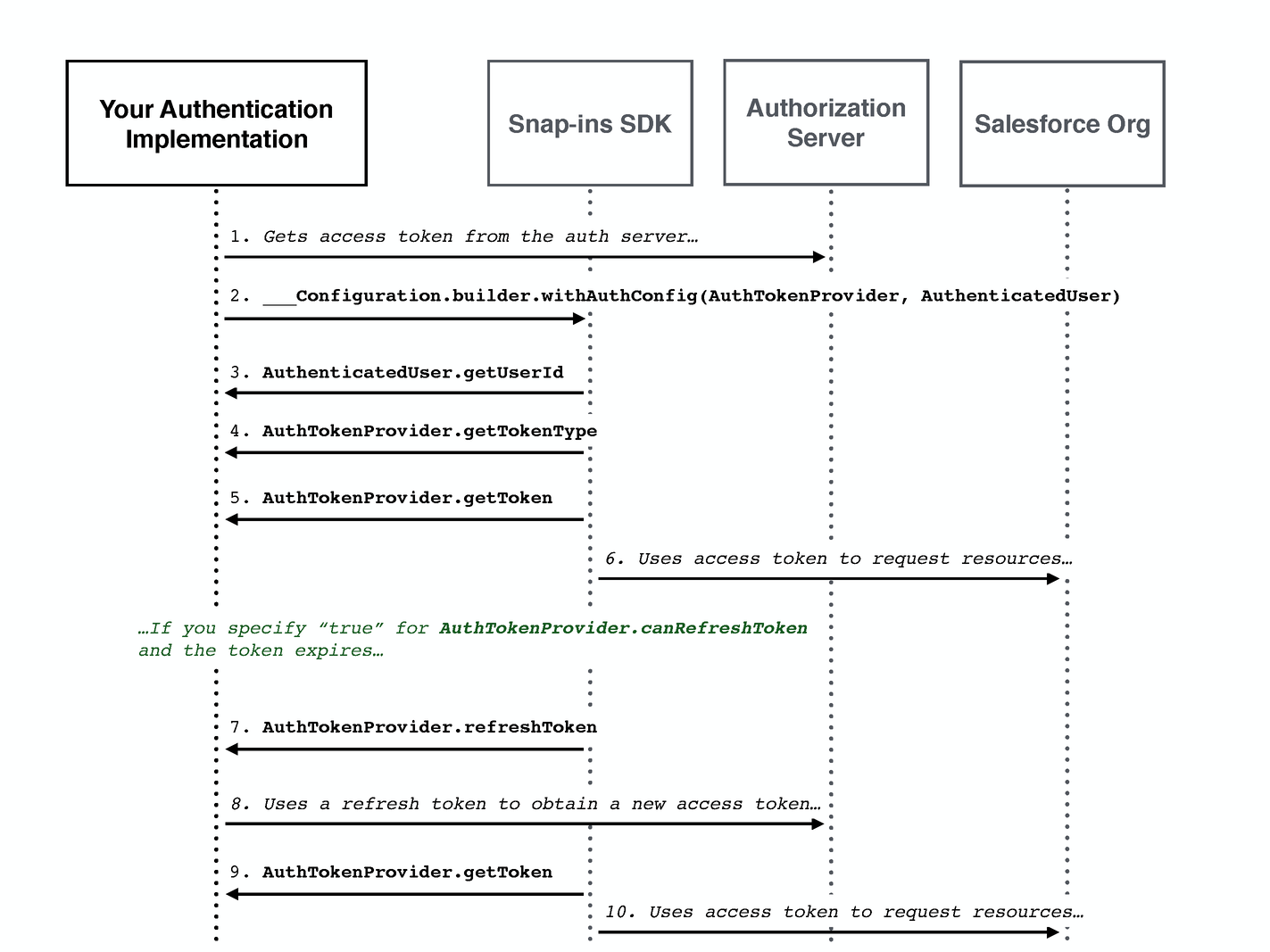
If you're using the Salesforce Mobile SDK, you can implement these classes as wrappers to existing authentication features. See Authenticating Using the Salesforce Mobile SDK for more information.
If you're not using the Salesforce Mobile SDK, make sure that your implementation can access whatever authorization server you're using to obtain the access token.