


Scoping Rules Developer Guide
 j
jUse the SOQL Operator in Scoping Rule Record Criteria
When a rule’s record criteria must refer to a field on an object other than the target
object, such as a junction object, use the SOQL operator in record criteria. To create or edit
scoping rules with the SOQL operator in the record criteria, use the Tooling or Metadata
API.
| Available in: Lightning Experience in Performance and Unlimited Editions |
| User Permissions Needed | |
|---|---|
| To create and manage scoping rules: | Manage Sharing |
| To view scoping rules: | View Setup & Configuration AND View Restriction and Scoping Rules |
This scoping rule scopes the account records that a banker sees by filtering according to the branch where the banker is working.
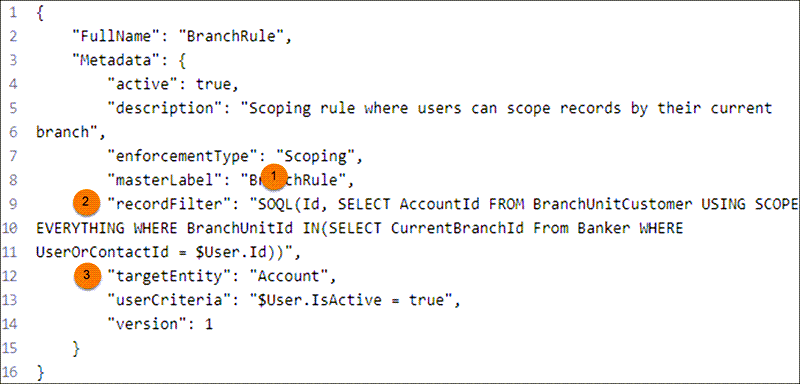
| 1 | SOQL Operator | The operator that tells Salesforce to run a SELECT statement on the junction object. |
| 2 | Record Filter | The record criteria in this expression is used to filter records when the users specified by the user criteria use a list view, report, or SOQL query. |
| 3 | Target Entity | The standard or custom object whose records are scoped by the scoping rule. Scoping rules support custom objects and the account, case, contact, event, lead, opportunity, and task standard objects only. |
Detail of Record Filter:
<recordFilter>SOQL(Id, SELECT AccountId FROM BranchUnitCustomer USING SCOPE EVERYTHING WHERE BranchUnitId IN(SELECT CurrentBranchId From Banker WHERE UserOrContactId = $User.Id))</recordFilter>- In your rule’s recordFilter, start a query between double quotes: "SOQL()".
- In the query, specify a left operand that is an ID or reference field from the target entity object that you want to retrieve. The left operand must query a single ID (primary key) or reference (foreign key) field.
-
Write a SELECT statement that specifies the field and
the object that stores the field.
Performance Considerations
Before you activate a scoping rule that includes the SOQL operator, test the record filter’s
performance impact by running the SELECT statement
separately in your API client of choice.
- Take the SELECT statement and run it.
- Evaluate whether the results that are returned make sense. Does the SELECT statement return the expected results rapidly? If it’s fast for a given user, the rule is likely to run efficiently.
- If the SELECT statement isn’t performant, isolate the field that is slowing performance. Work with Salesforce customer support to find out if the field can be indexed.
Other Considerations
- In a SOQL operator’s SELECT statement, the query’s junction object and the scoping rule’s targetEntity can’t be the same object.
- The SOQL operator doesn't support $User syntax except for $User.Id. Dynamic queries within the SOQL operator aren't supported, including on other user object fields.
- Don’t use objects that aren’t supported in subqueries in your record filter’s SELECT statement. See Comparison Operators for a list of valid operators that you can use in the field expression of a WHERE clause, which you use in a SELECT statement.