


Lightning Aura Components Developer Guide (Lightning Aura コンポーネント開発者ガイド)
 j
jレコード固有のアクションのコンポーネントの設定
force:hasRecordId はマーカーインターフェースです。マーカーインターフェースは、インターフェースの動作をコンポーネントに追加するよう伝える、コンポーネントのコンテナへの信号です。
recordId 属性は、明示的なレコードコンテキストでコンポーネントを配置または呼び出す場合にのみ設定されます。たとえば、レコードページレイアウトに直接コンポーネントを配置する場合、またはレコードページやオブジェクトホームからコンポーネントをオブジェクトに固有なアクションとして呼び出す場合などがこれに該当します。コンポーネントをグローバルアクションとして呼び出す、またはプログラムで別のコンポーネント内に作成するなど、その他すべての場合には recordId は設定されないため、コンポーネントでこれを使用しないでください。
レコード固有のアクションのコンポーネントの例
この拡張の例では、取引先レコードの詳細ページからカスタムオブジェクト固有のアクションとして呼び出されるように設計されたコンポーネントを示します。コンポーネントを作成したら、取引先オブジェクトのカスタムアクションを作成し、取引先ページレイアウトに追加する必要があります。アクションを使用した開かれたコンポーネントは、次のようなアクションパネルに表示されます。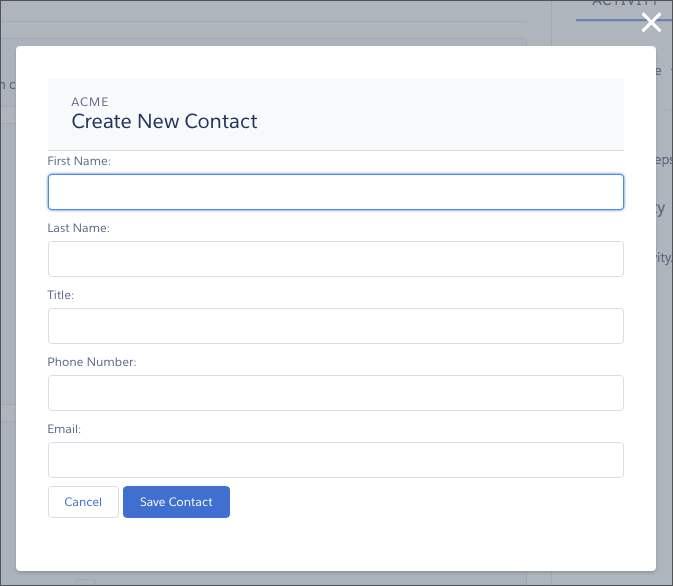
コンポーネント定義は、まず force:lightningQuickActionWithoutHeader と force:hasRecordId の両方のインターフェースで実装されます。最初のインターフェースは、コンポーネントをアクションとして使用できるようにし、標準コントロールが表示されないようにします。2 番目のインターフェースは、レコードのコンテキストでコンポーネントが呼び出されたときにインターフェースのレコード ID 属性と値の自動割り当て動作を追加します。
1<aura:component controller="QuickContactController"
2    implements="force:lightningQuickActionWithoutHeader,force:hasRecordId">
3
4    <aura:attribute name="account" type="Account" />
5    <aura:attribute name="newContact" type="Contact"
6        default="{ 'sobjectType': 'Contact' }" /> <!-- default to empty record -->
7
8    <aura:handler name="init" value="{!this}" action="{!c.doInit}" />
9
10    <!-- Display a header with details about the account -->
11    <div class="slds-page-header" role="banner">
12        <p class="slds-text-heading_label">{!v.account.Name}</p>
13        <h1 class="slds-page-header__title slds-m-right_small
14            slds-truncate slds-align-left">Create New Contact</h1>
15    </div>
16
17    <!-- Display the new contact form -->
18     <lightning:input aura:id="contactField" name="firstName" label="First Name"
19                      value="{!v.newContact.FirstName}" required="true"/>
20
21    <lightning:input aura:id="contactField" name="lastname" label="Last Name"
22                     value="{!v.newContact.LastName}" required="true"/>
23
24    <lightning:input aura:id="contactField" name="title" label="Title"
25                     value="{!v.newContact.Title}" />
26
27    <lightning:input aura:id="contactField" type="phone" name="phone" label="Phone Number"
28                     pattern="^(1?(-?\d{3})-?)?(\d{3})(-?\d{4})$"
29                     messageWhenPatternMismatch="The phone number must contain 7, 10, or 11 digits. Hyphens are optional."
30                     value="{!v.newContact.Phone}" required="true"/>
31
32    <lightning:input aura:id="contactField" type="email" name="email" label="Email"
33                     value="{!v.newContact.Email}" />
34
35    <lightning:button label="Cancel" onclick="{!c.handleCancel}" class="slds-m-top_medium" />
36    <lightning:button label="Save Contact" onclick="{!c.handleSaveContact}"
37               variant="brand" class="slds-m-top_medium"/>
38
39</aura:component>- account — init ハンドラで読み込まれた完全な取引先レコードを保持
- newContact — フォーム項目の値を取得するために使用される空の取引先責任者
コンポーネントのコントローラには、3 つのアクションハンドラの目的のすべてのコードがあります。
1({
2    doInit : function(component, event, helper) {
3
4        // Prepare the action to load account record
5        var action = component.get("c.getAccount");
6        action.setParams({"accountId": component.get("v.recordId")});
7
8        // Configure response handler
9        action.setCallback(this, function(response) {
10            var state = response.getState();
11            if(state === "SUCCESS") {
12                component.set("v.account", response.getReturnValue());
13            } else {
14                console.log('Problem getting account, response state: ' + state);
15            }
16        });
17        $A.enqueueAction(action);
18    },
19
20    handleSaveContact: function(component, event, helper) {
21        if(helper.validateContactForm(component)) {
22
23            // Prepare the action to create the new contact
24            var saveContactAction = component.get("c.saveContactWithAccount");
25            saveContactAction.setParams({
26                "contact": component.get("v.newContact"),
27                "accountId": component.get("v.recordId")
28            });
29
30            // Configure the response handler for the action
31            saveContactAction.setCallback(this, function(response) {
32                var state = response.getState();
33                if(state === "SUCCESS") {
34
35                    // Prepare a toast UI message
36                    var resultsToast = $A.get("e.force:showToast");
37                    resultsToast.setParams({
38                        "title": "Contact Saved",
39                        "message": "The new contact was created."
40                    });
41
42                    // Update the UI: close panel, show toast, refresh account page
43                    $A.get("e.force:closeQuickAction").fire();
44                    resultsToast.fire();
45                    $A.get("e.force:refreshView").fire();
46                }
47                else if (state === "ERROR") {
48                    console.log('Problem saving contact, response state: ' + state);
49                }
50                else {
51                    console.log('Unknown problem, response state: ' + state);
52                }
53            });
54
55            // Send the request to create the new contact
56            $A.enqueueAction(saveContactAction);
57        }
58
59    },
60
61	handleCancel: function(component, event, helper) {
62	    $A.get("e.force:closeQuickAction").fire();
63    }
64})
最初のアクションハンドラ doInit は init ハンドラです。このハンドラのジョブは、force:hasRecordId インターフェースで提供されるレコード ID を使用して、完全な取引先レコードを読み込むことです。このコンポーネントが別のオブジェクト (リード、商談、またはカスタムオブジェクト) のアクションで使用されないようにする手段は講じられていません。この場合、doInit ではレコードの読み込みに失敗しますが、フォームは表示されます。
- 新しい取引先責任者を保存するサーバアクションを準備をする。
- サーバがアクションを完了したときのためにレスポンスハンドラと呼ばれるコールバック関数を定義する。レスポンスハンドラについては、後ほど説明します。
- サーバアクションをキューに追加する。
- force:closeQuickAction イベントを起動してアクションパネルを閉じる。
- force:showToast イベントを起動して、取引先責任者が作成されたことを示す「トースト」メッセージを表示する。
- レコードページに自身を更新するように通知する force:refreshView イベントを起動して、レコードページを更新する。
handleCancel アクションハンドラは、force:closeQuickAction イベントを起動してアクションパネルを閉じます。
ここに記載されているコンポーネントヘルパーは、その用途を十分に説明できるだけの最小限のヘルパーです。本番品質のフォーム検証コードでは、さらに多くの作業が必要になります。
1({
2    validateContactForm: function(component) {
3        var validContact = true;
4
5
6        // Show error messages if required fields are blank
7        var allValid = component.find('contactField').reduce(function (validFields, inputCmp) {
8            inputCmp.showHelpMessageIfInvalid();
9            return validFields && inputCmp.get('v.validity').valid;
10        }, true);
11
12        if (allValid) {
13        // Verify we have an account to attach it to
14        var account = component.get("v.account");
15        if($A.util.isEmpty(account)) {
16            validContact = false;
17            console.log("Quick action context doesn't have a valid account.");
18        }
19
20        return(validContact);
21	}
22    }
23})
最後に、このコンポーネントのサーバ側コントローラとして使用される Apex クラスは、わかりやすいように意図的に簡略化されています。
1public with sharing class QuickContactController {
2
3    @AuraEnabled
4    public static Account getAccount(Id accountId) {
5        // Perform isAccessible() checks here
6        return [SELECT Name, BillingCity, BillingState FROM Account WHERE Id = :accountId];
7    }
8
9    @AuraEnabled
10    public static Contact saveContactWithAccount(Contact contact, Id accountId) {
11        // Perform isAccessible() and isUpdateable() checks here
12        contact.AccountId = accountId;
13        upsert contact;
14        return contact;
15    }
16
17}