


Apex 開発者ガイド
 j
jSalesforce サイトの URL の書き換え
たとえば、自分のブログサイトを持っているとします。URL を書き換えない場合、ブログのエントリの URL は次のようになります。https://myblog.my.salesforce-sites.com/posts?id=003D000000Q0PcN
URL を書き換えると、ユーザはレコード ID ではなく日付やタイトルでブログの投稿にアクセスできます。大晦日の投稿の URL は次のようになります。https://myblog.my.salesforce-sites.com/posts/2019/12/31/auld-lang-syne
また、サイトページ内に表示されるリンクの URL を書き換えることもできます。大晦日の投稿にバレンタインデーの投稿へのリンクが含まれる場合、リンク URL は次のように表示されます。https://myblog.my.salesforce-sites.com/posts/2019/02/14/last-minute-roses
サイトの URL を書き換えるには、元の URL をわかりやすい URL に対応付ける Apex クラスを作成して、Apex クラスをサイトに追加します。
Site.UrlRewriter インターフェースのメソッドについての詳細は、「UrlRewriter インターフェース」を参照してください。
Apex クラスの作成
1global class yourClass implements Site.UrlRewriter {
2    global PageReference mapRequestUrl(PageReference
3            yourFriendlyUrl)
4    global PageReference[] generateUrlFor(PageReference[]
5            yourSalesforceUrls);
6}- クラスおよびメソッドはグローバルである必要がある
- Apex クラスおよびメソッドはすべて global である必要があります。
- クラスに両方のメソッドを実装する必要がある
- Apex クラスには mapRequestUrl メソッドおよび generateUrlFor メソッドの両方を実装する必要があります。いずれのメソッドも使用しない場合は、そのメソッドが null を返すようにします。
- Visualforce サイトページでのみ機能する書き換え
- 受信 URL 要求は、サイトに関連付けられている Visualforce ページのみに対応付けできます。標準ページ、画像、その他のエンティティに対応付けることはできません。
- サイトページのリンクの URL を書き換えるには、$Page マージ変数を含む !URLFOR 関数を使用します。たとえば、次のコードでは、myPage という名前の Visualforce ページにリンクします。
1<apex:outputLink value="{!URLFOR($Page.myPage)}"></apex:outputLink> - 『Visualforce 開発者ガイド』の付録「関数」を参照してください。
- 符号化された URL
- Site.urlRewriter インターフェースを使用して取得する URL は符号化されています。符号化されていない URL の値にアクセスする必要がある場合は、EncodingUtil クラスの urlDecode メソッドを使用します。
- 文字の制限
- わかりやすい URL は、Salesforce の URL とは異なる必要があります。3 文字のエンティティのプレフィックスまたは 15 文字または 18 文字の ID を含む URL は書き換えられません。
- わかりやすい URL と書き換えられた後の URL のどちらでもピリオドは使用できません。ただし、URL の末尾には使用できない .well-known パスコンポーネントは例外です。
- 文字列の制限
- わかりやすい URL と書き換えられた後の URL パスのどちらでも、サイトのベース URL の後の最初のパスコンポーネントとして次の予約文字列を使用することはできません。サイトのベース URL の後の最初のパスコンポーネントとは、たとえば、https://MyDomainName.my.salesforce-sites.com/baseURL、https://MyDomainName.my.salesforce-sites.com/pathPrefix/baseURL、https://custom-domain/pathPrefix/baseURL、https://MyDomainName.my.salesforce-sites.com/pathPrefix/baseURL/another/path などの baseURL を指します。
- apexcomponent
- apexpages
- aura
- chatter
- chatteranswers
- chatterservice
- cometd
- ex
- faces
- flash
- flex
- home
- id
- ideas
- idp
- images
- img
- javascript
- js
- knowledge
- lightning
- login
- m
- mobile
- ncsphoto
- nui
- push
- resource
- saml
- sccommunities
- search
- secur
- services
- servlet
- setup
- sfc
- sfdc
- sfdc_ns
- sfsites
- site
- style
- vote
- WEB-INF
- widg
- 書き換えられた後の URL パスの最後に次の予約文字列を使用することはできません。
- /aura
- /auraFW
- /auraResource
- /AuraJLoggingRPCService
- /AuraJLVRPCService
- /AuraJRPCService
- /dbcthumbnail
- /HelpAndTrainingDoor
- /htmldbcthumbnail
- /l
- /m
- /mobile
- 相対パスのみ
- PageReference.getUrl() メソッドでは、ホスト名またはサイトのプレフィックス (ある場合) の直後に指定する URL の一部のみが返されます。たとえば、URL が https://mycompany.my.salesforce-sites.com/sales/MyPage?id=12345 であり、「sales」がサイトのプレフィックスである場合、/MyPage?id=12345 のみが返されます。
- ドメインとサイトのプレフィックスは書き換えできません。
- 一意のパスのみ
- サイトのプレフィックスと同じ名前を持つディレクトリには、URL を対応付けできません。たとえば、サイト URL が https://acme.my.salesforce-sites.com/help で、サイトプレフィックスが「help」である場合、help/page への URL をポイントすることはできません。結果として、返されるパスは https://acme.my.salesforce-sites.com/help/help/page ではなく、https://acme.my.salesforce-sites.com/help/page になります。
- 一括クエリ
- ページ作成でのパフォーマンスを向上させるには、generateUrlFor メソッドでタスクを一度に 1 つずつではなく、一括で実行します。
- 項目の一意性の適用
- URL を書き換えるために選択した項目が一意であることを確認します。クエリに SOQL の一意の項目またはインデックス付き項目を使用すると、パフォーマンスが向上する可能性があります。
サイトへの URL 書き換えの追加
- [設定] から、[クイック検索] ボックスに「サイト」と入力し、[サイト] を選択します。
- [新規] をクリックします。既存のサイトを変更する場合は [編集] をクリックします。
- [サイトの編集] ページで、[URL 書き換えクラス] の [Apex クラス] を選択します。
- [保存] をクリックします。
コード例
この例では、mycontact と myaccount という 2 つの Visualforce ページで構成される単純なサイトが存在します。このサンプルを試してみる前に、両方のページで「参照」権限が有効になっていることを確認します。各ページでそのオブジェクト種別の標準コントローラが使用されます。取引先責任者ページには親取引先ページへのリンクと取引先責任者の詳細が含まれます。
書き換えを実装する前は、「有効化前」の図に示されるように、アドレスバーとリンク URL はレコード ID (ランダムな 15 桁の文字列) を表示しました。書き換えを有効にした後は、「有効化後」の図に示されるように、アドレスバーとリンクがわかりやすく書き換えられた URL を表示します。
これらのページの URL の書き換えに使用する Apex クラスについては、詳しい説明と共に「URL を書き換える Apex クラスの例」に示しています。
サイトページの例
このセクションでは、この例で使用する取引先ページおよび取引先責任者ページの Visualforce を示します。
1<apex:page standardController="Account">
2    <apex:detail relatedList="false"/>
3</apex:page>1<apex:page standardController="contact">
2 <apex:pageBlock title="Parent Account">
3 <apex:outputLink value="{!URLFOR($Page.mycontact,null,
4 [id=contact.account.id])}">{!contact.account.name}
5 </apex:outputLink>
6 </apex:pageBlock>
7 <apex:detail relatedList="false"/>
8</apex:page>URL を書き換える Apex クラスの例
1global with sharing class myRewriter implements Site.UrlRewriter {
2
3    //Variables to represent the user-friendly URLs for
4    //account and contact pages
5    String ACCOUNT_PAGE = '/myaccount/';
6    String CONTACT_PAGE = '/mycontact/';
7    //Variables to represent my custom Visualforce pages
8    //that display account and contact information
9    String ACCOUNT_VISUALFORCE_PAGE = '/myaccount?id=';
10    String CONTACT_VISUALFORCE_PAGE = '/mycontact?id=';
11
12    global PageReference mapRequestUrl(PageReference
13            myFriendlyUrl){
14        String url = myFriendlyUrl.getUrl();
15
16        if(url.startsWith(CONTACT_PAGE)){
17            //Extract the name of the contact from the URL
18            //For example: /mycontact/Ryan returns Ryan
19            String name = url.substring(CONTACT_PAGE.length(),
20                    url.length());
21
22            //Select the ID of the contact that matches
23            //the name from the URL
24            Contact con = [SELECT Id FROM Contact WHERE Name =:
25                    name LIMIT 1];
26
27            //Construct a new page reference in the form
28            //of my Visualforce page
29            return new PageReference(CONTACT_VISUALFORCE_PAGE + con.id);
30        }
31        if(url.startsWith(ACCOUNT_PAGE)){
32            //Extract the name of the account
33            String name = url.substring(ACCOUNT_PAGE.length(),
34                    url.length());
35
36            //Query for the ID of an account with this name
37            Account acc = [SELECT Id FROM Account WHERE Name =:name LIMIT 1];
38
39           //Return a page in Visualforce format
40            return new PageReference(ACCOUNT_VISUALFORCE_PAGE + acc.id);
41        }
42        //If the URL isn't in the form of a contact or
43        //account page, continue with the request
44        return null;
45    }
46    global List<PageReference> generateUrlFor(List<PageReference>
47            mySalesforceUrls){
48        //A list of pages to return after all the links
49        //have been evaluated
50        List<PageReference> myFriendlyUrls = new List<PageReference>();
51
52        //a list of all the ids in the urls
53        List<id> accIds = new List<id>();
54
55        // loop through all the urls once, finding all the valid ids
56        for(PageReference mySalesforceUrl : mySalesforceUrls){
57        //Get the URL of the page
58        String url = mySalesforceUrl.getUrl();
59
60            //If this looks like an account page, transform it
61            if(url.startsWith(ACCOUNT_VISUALFORCE_PAGE)){
62                //Extract the ID from the query parameter
63                //and store in a list
64                //for querying later in bulk.
65                        String id= url.substring(ACCOUNT_VISUALFORCE_PAGE.length(),
66                        url.length());
67                        accIds.add(id);
68            }
69        }
70
71    // Get all the account names in bulk
72    List <account> accounts = [SELECT Name FROM Account WHERE Id IN :accIds];
73
74    // make the new urls
75    Integer counter = 0;
76
77    // it is important to go through all the urls again, so that the order
78    // of the urls in the list is maintained.
79    for(PageReference mySalesforceUrl : mySalesforceUrls) {
80
81       //Get the URL of the page
82       String url = mySalesforceUrl.getUrl();
83
84       if(url.startsWith(ACCOUNT_VISUALFORCE_PAGE)){
85         myFriendlyUrls.add(new PageReference(ACCOUNT_PAGE + accounts.get(counter).name));
86         counter++;
87       } else {
88         //If this doesn't start like an account page,
89         //don't do any transformations
90         myFriendlyUrls.add(mySalesforceUrl);
91       }
92    }
93
94    //Return the full list of pages
95    return myFriendlyUrls;
96  }
97
98}
書き換え前と書き換え後

- 取引先責任者ページの書き換え前の元の URL
- 取引先責任者ページから親取引先ページへのリンク
- 取引先ページへのリンクの書き換え前の元の URL (ブラウザのステータスバーに表示される)
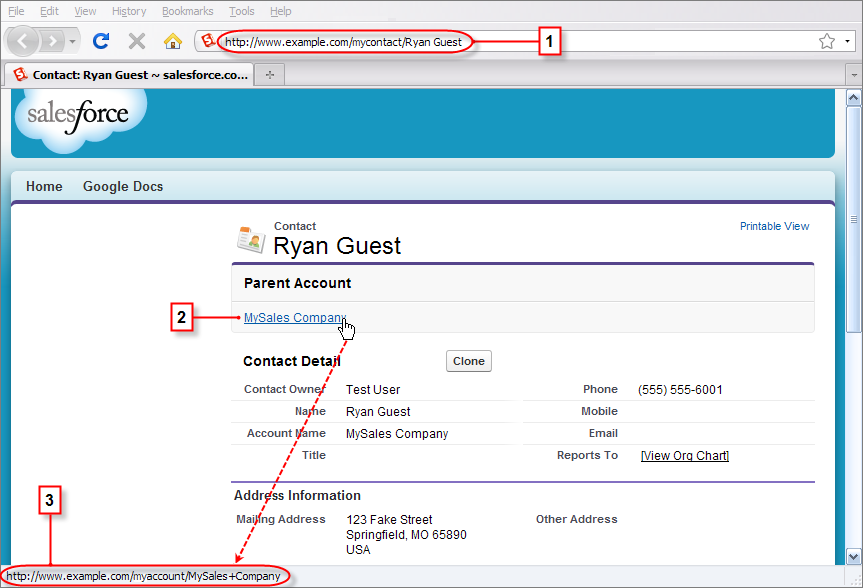
- 取引先責任者ページの書き換えられた URL
- 取引先責任者ページから親取引先ページへのリンク
- 取引先ページへのリンクの書き換え後の URL (ブラウザのステータスバーに表示される)