


Lightning Aura Components Developer Guide (Lightning Aura コンポーネント開発者ガイド)
 j
jAura コンポーネントを使用したフロー画面の動的更新
条件に基づいて項目を画面に表示するには、コンポーネントの構成部分をどのような場合に表示するのかを確認する aura:if を使用して、Aura コンポーネントを構築します。
例
このコンポーネント (c:flowDynamicScreen) は、カスタムスクリプトコンポーネントとラジオボタングループを表示します。コンポーネントは、フローから取引先責任者の既存の電話番号を取得し、その値を使用してスクリプトに入力します。
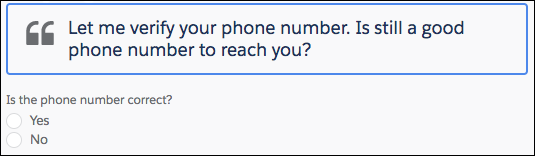
ユーザが [いいえ] ラジオボタンを選択すると、入力が表示され、ユーザはそこに新しい電話番号を入力できます。
![[いいえ] を選択すると、[電話] 項目が表示されます。](https://developer.salesforce.com/docs/resources/img/ja-jp/252.0?doc_id=images%2Fflow_dynamicform2.png&folder=lightning)
c:flowDynamicScreen コンポーネント
1<aura:component access="global" implements="lightning:availableForFlowScreens">
2   <aura:attribute name="oldPhone" type="String" />
3   <aura:attribute name="newPhone" type="String" />
4   <aura:attribute name="radioOptions" type="List" default="[
5      {'label': 'Yes', 'value': 'false'},
6      {'label': 'No', 'value': 'true'} ]"/>
7   <aura:attribute name="radioValue" type="Boolean" />
8
9   <!-- Displays script to guide the agent's call -->
10   <div class="script-container">
11      <div class="slds-card__header slds-grid slds-p-bottom_small slds-m-bottom_none">
12         <div class="slds-media slds-media_center slds-has-flexi-truncate" >
13            <div class="slds-media__figure slds-align-top">
14               <h2><lightning:icon iconName="utility:quotation_marks"
15                  title="Suggested script" /></h2>
16            </div>
17            <div class="slds-media__body">
18               <!-- Inserts the user’s current number, pulled from the flow, into the script -->
19               <ui:outputRichText class="script" value="{!'Let me verify your phone number.
20                  Is ' + v.oldPhone + ' still a good phone number to reach you?'}"/>
21            </div>
22         </div>
23      </div>
24   </div>
25   <!-- Displays a radio button group to enter the customer’s response -->
26   <div class="slds-p-top_medium slds-p-bottom_medium">
27      <lightning:radioGroup aura:id="rbg_correct" name="rbg_correct"
28         label="Is the phone number correct?"
29         options="{! v.radioOptions }" value="{! v.radioValue }" />
30      <!-- If the current number is wrong,
31         displays a field to enter the correct number -->
32      <aura:if isTrue="{!v.radioValue}">
33         <lightning:input type="tel" aura:id="phone_updated" label="Phone"
34            onblur="{!c.handleNewPhone}" class="slds-p-top_small"/>
35      </aura:if>
36   </div>
37</aura:component>
c:flowDynamicScreen スタイル
1.THIS.script-container {
2   border: t(borderWidthThick) solid t(colorBorderBrand);
3   border-radius: t(borderRadiusMedium);
4}
5
6.THIS .script {
7   font-size: 1.125rem; /*t(fontSizeTextLarge)*/
8   font-weight: t(fontWeightRegular);
9   line-height: t(lineHeightHeading);
10}
c:flowDynamicScreen コントローラ
ユーザが移動するか、[電話] の入力からフォーカスを外すと、コントローラは newPhone 属性を入力値に設定し、フローで新しい電話番号を参照できるようになります。
1({
2   handleNewPhone: function(cmp, event, helper) {
3      cmp.set("v.newPhone", cmp.find('phone_updated').get('v.value'));
4   }
5})
defaultTokens.tokens
c:flowDynamicScreen のスクリプトでは、Salesforce Lightning Design System のスタイルと同期された状態を保つためにトークンを使用します。
1<aura:tokens extends="force:base" >
2</aura:tokens>