Starting with B2C Commerce 26.6, use the Shopper Login and API Access Service (SLAS) to verify registered shopper identities by using a one-time password (OTP). This feature enables email verification during shopper registration, email updates, and other identity confirmation flows. Integrate OTP email verification with SLAS from any headless application. Currently, only registered user flows support SLAS OTP email verification.
OTPs provide a time-limited, single-use code delivered to a shopper’s email address. When /otp/request is called, SLAS fetches the shopper’s profile from B2C Commerce, checks the emailVerified status, and, if verification is valid, generates an OTP and delivers it by email. After the shopper submits the code, a call to /otp/verify causes SLAS to validate it and mark the shopper’s email as verified in B2C Commerce.
SLAS doesn’t support SMS delivery of OTP. To have the OTP sent by SMS you will need to use mode=callback and manage the SMS delivery from your callback. See Passwordless Login with One-Time Passwords Using Callback URI. OTP Email verification only supports mode=email.
For SLAS to have the required shopper information to send to the callback, the shopper must have logged in at least one time before attempting OTP email verification.
Note
Prerequisites
Before you integrate OTP-based email verification, make sure that you have:
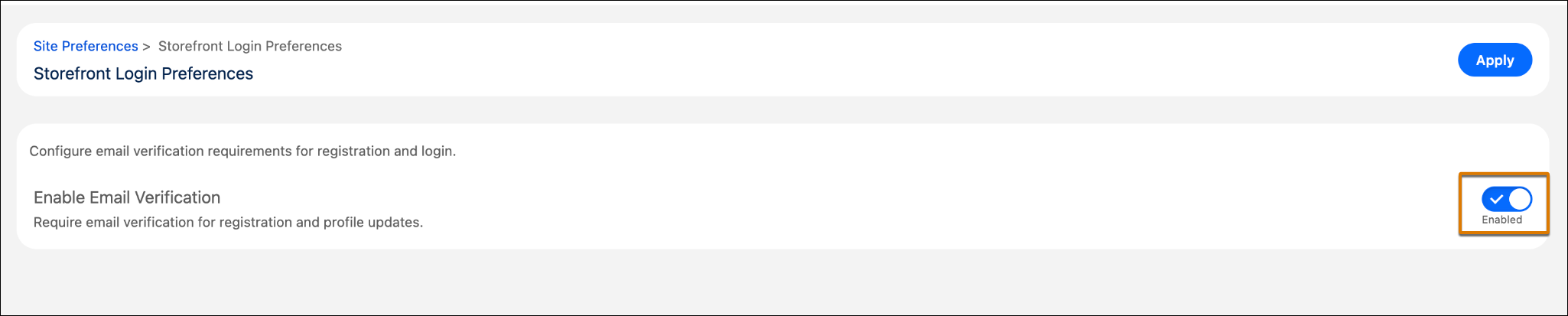
Email verification site preference enabled: The B2C Commerce Enable Email Verification preference must be turned on from Business Manager. When disabled, emailVerified is null on all profiles.
To enable email verification in Business Manager:
Click App Launcher, and then select Merchant Tools | site | Storefront Login Preferences.
Turn on Enable Email Verification.
Click Apply.
A SLAS private client configured for passwordless login: OTP email verification requires a SLAS private client. If you don’t have one, create it before proceeding. See Configure a SLAS Private Client. Configure the client with sfcc.pwdless_login in its allowed scopes (configured in SLAS Admin under Clients → Scopes). Requests from clients that lack this scope are rejected with a 403.
A client channel: The channel_id must be registered to the client. The channel_id in every OTP request must match a channel registered to the authenticating client. Configure in the SLAS Admin UI at https://{short-code}.api.commercecloud.salesforce.com/shopper/auth-admin/v1/ui/. Go to Clients and click Edit next to the channel you want to configure.
An OTP email template: Configure an OTP email template for the client channel. The template receives the shopper’s first name and the OTP code. See Configure Email Templates.
A valid shopper access token: Before you call the OTP email verification endpoints, obtain a SLAS shopper JSON Web Token (JWT) by using the standard authorization code or guest token flow. All OTP endpoints require a SLAS shopper bearer JWT in the authorization header. For more information, see Private SLAS Client Use Cases.
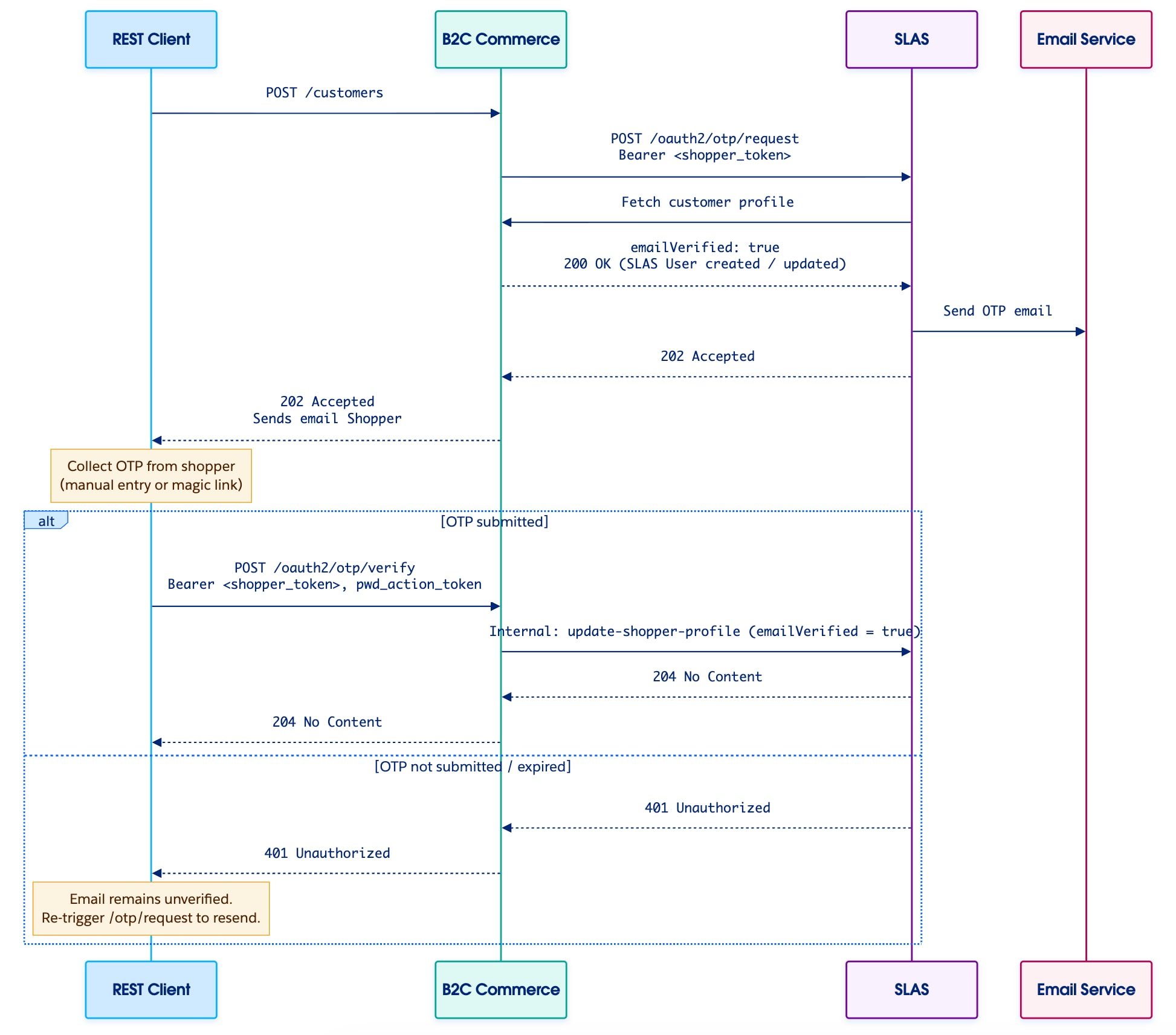
SLAS OTP Email Verification End-to-End Flow
This diagram shows the end-to-end sequence for email verification after shopper registration.
Request and Verification Flows
The SLAS OTP email verification process has two primary flows: OTP request and OTP verification.
OTP Request Flow
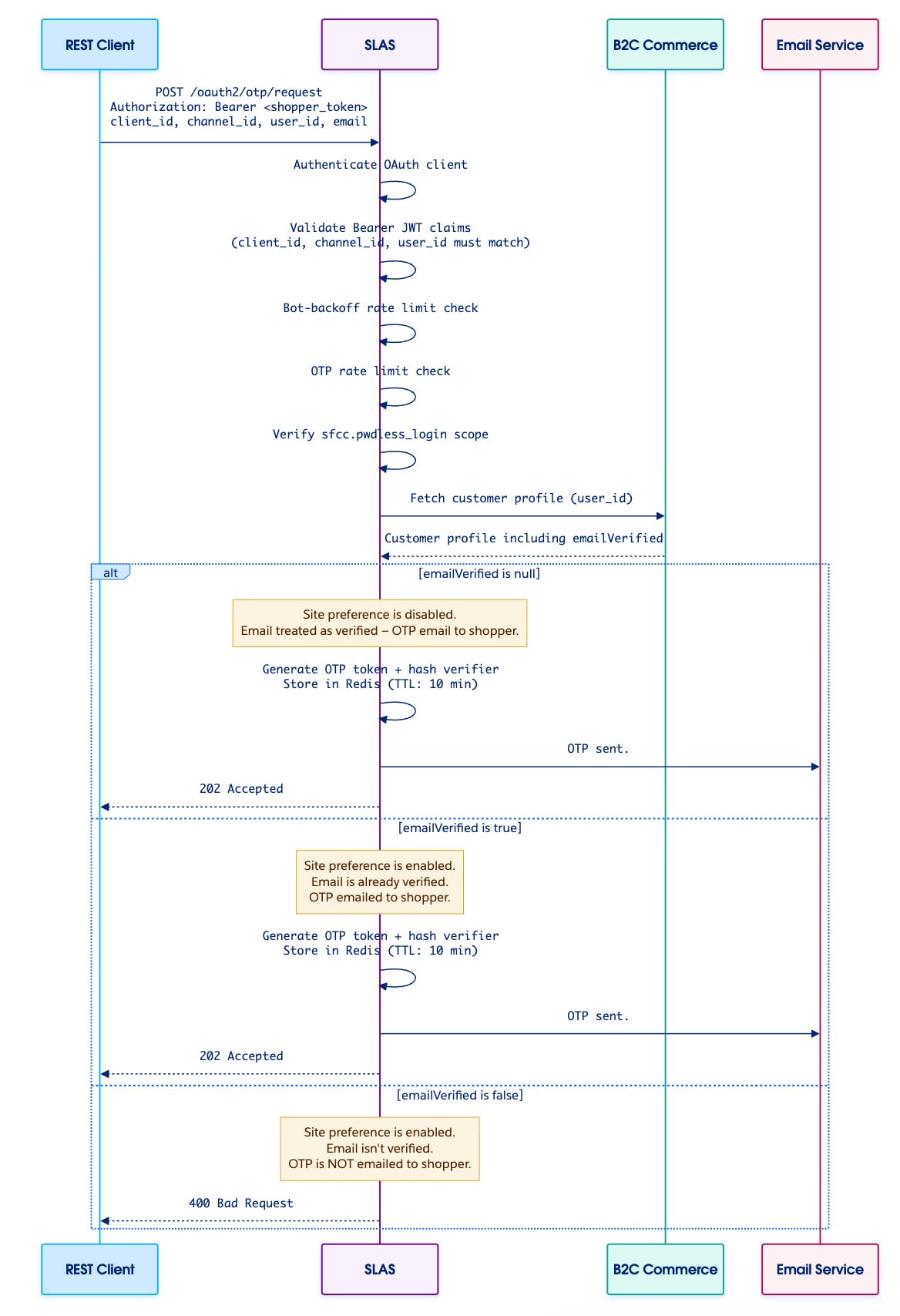
The OTP request flow initiates delivery of a one-time password to the shopper. SLAS handles the emailVerified check internally — the caller doesn’t need to inspect this field before calling the endpoint.
Call POST /organizations/{organizationId}/oauth2/otp/request, passing the shopper’s user_id, channel_id, client_id, email, and a valid shopper bearer token in the authorization header.
SLAS authenticates the OAuth client and validates the bearer JWT, confirming that client_id, channel_id, and user_id all match the token’s subject claims. A mismatch results in HTTP 400.
SLAS verifies the client has the sfcc.pwdless_login permission scope.
SLAS applies a bot-backoff and per-user rate limiting to prevent OTP flooding.
SLAS fetches the shopper’s customer profile from B2C Commerce and reads the emailVerified field:
null — The email verification site preference is disabled. SLAS treats the email as verified, proceeds to generate and send the OTP, and returns 202.
true — The email is already verified. SLAS proceeds to generate and send the OTP and returns 202.
false — The email is explicitly unverified. SLAS doesn’t send the OTP and returns 400.
SLAS generates an OTP token and computes a hash verifier. The entry expires after 10 minutes.
SLAS sends the OTP to the shopper’s email address by using an email service with the configured email template.
SLAS automatically extracts the usid (unique shopper ID) from the bearer token’s subject claims. You don’t need to include it in the request body.
Note
OTP Verification Flow
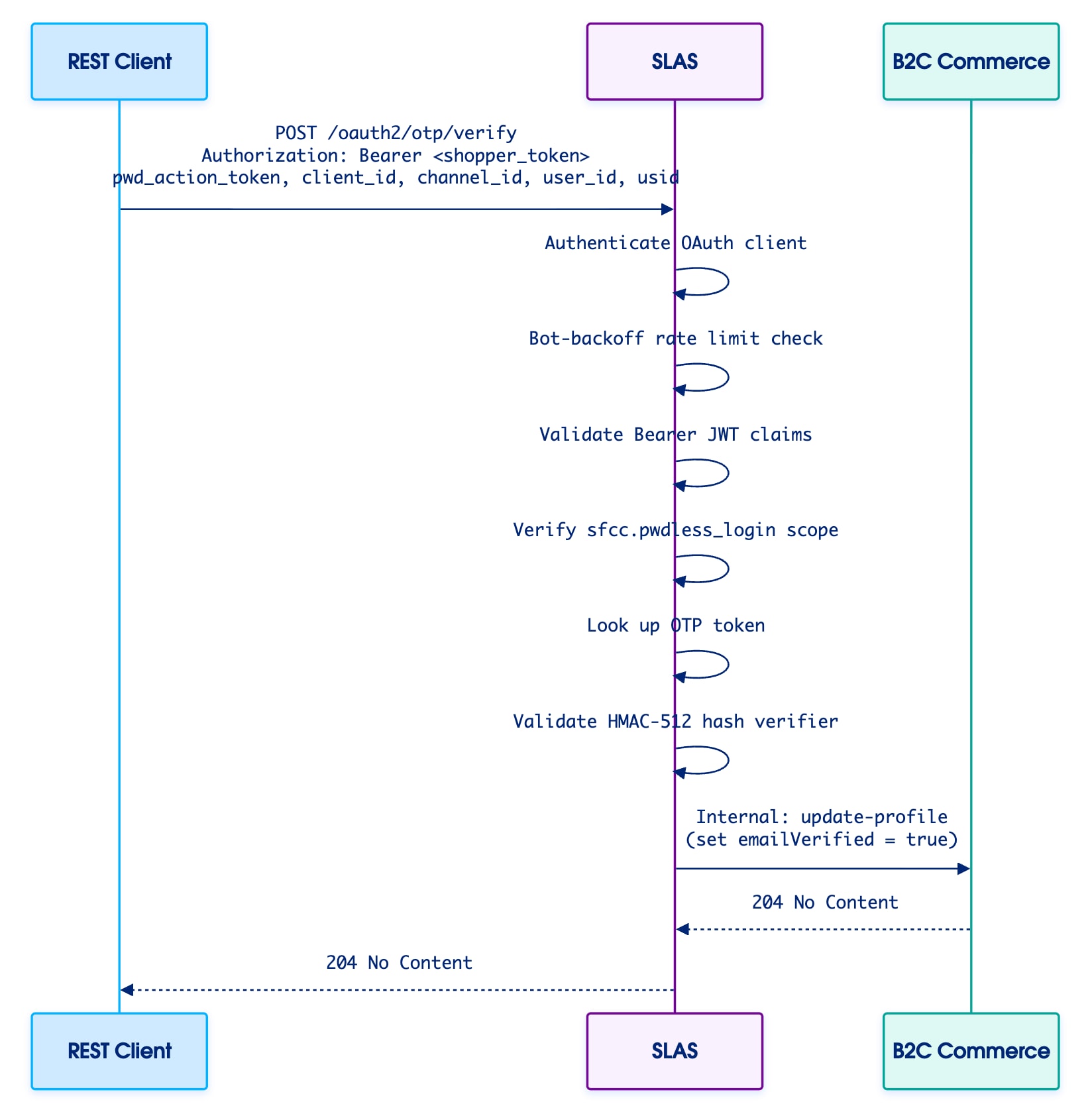
The OTP verification flow confirms that the shopper received and submitted the correct code.
Call POST /organizations/{organizationId}/oauth2/otp/verify, passing the pwd_action_token (the code the shopper received), client_id, channel_id, user_id, usid, and the shopper bearer token.
SLAS authenticates the OAuth client and validates the bearer JWT, confirming that the client_id, channel_id, and user_id match the token claims.
SLAS applies a bot-backoff rate limiting to guard against brute-force guessing.
SLAS verifies the client has the sfcc.pwdless_login permission scope.
SLAS looks up the OTP entry by reconstructing the key from the supplied fields. The entry is atomically consumed (deleted) on first successful lookup — the token cannot be reused.
SLAS validates the hash verifier. A mismatch results in HTTP 400.
SLAS makes an internal call to the B2C Commerce update-profile endpoint to set emailVerified to true. This call is best-effort: a failure does not block the 204 response from being returned.
SLAS responds with HTTP 204 No Content.
If the hash verifier fails or any parameters are invalid, SLAS responds with HTTP 400 Bad Request.
If the authorization header, shopper JWT fails validation, or token validation fails**,** SLAS responds with HTTP 401 Unauthorized.
If the scope validation fails, SLAS responds with HTTP 403 Forbidden.
Sample API Calls
Obtain a Shopper Access Token
Before calling the OTP endpoints, obtain a SLAS shopper bearer JWT. The shopper must authenticate before making any OTP requests.
Use the access_token from the shopper authentication response as the bearer token in the OTP calls below.
Response: 202 Accepted
No response body is returned. If emailVerified is true or null on the shopper profile, the OTP is sent to the shopper’s email. If emailVerified is false, no email is sent.
Response: 204 No Content
No response body is returned. The OTP is valid and the shopper’s emailVerified status is updated to true in B2C Commerce.
Request Field Reference
POST /otp/request
Field
Required
Constraints
Notes
client_id
Yes
Exactly 36 chars, base64url characters only
Must match a client registered for the tenant
channel_id
Yes
Max 100 chars
Must be a channel registered to the client
user_id
Yes
Max 128 chars
The shopper’s login ID or email address. If user_id is an email then user_id will be used to send the email, if not the email query parameter will be used.
mode
Yes
—
Must be set to email
email
No
—
The email address to deliver the OTP to. This email address will be used if the user_id isn’t a valid email address.
locale
No
—
Defaults to en-us; controls the email template locale
POST /otp/verify
Field
Required
Constraints
Notes
pwd_action_token
Yes
Passwordless token format
The OTP code received by the shopper
client_id
Yes
Exactly 36 chars, base64url characters only
Must match the client_id used in /otp/request
channel_id
Yes
Max 100 chars, base64url characters only
Must match the channel_id used in /otp/request
user_id
Yes
Max 128 chars
Must match the user_id used in /otp/request
Security
Authorization
Both endpoints require a SLAS shopper bearer JWT in the authorization header. All values in the request body must exactly match the corresponding claims in the token. Any mismatch results in HTTP 400. SLAS also checks that the shopper session hasn’t been revoked before proceeding.
Hash Verifier
After a successful OTP lookup, SLAS validates a hash verifier to confirm the token wasn’t tampered with. The verifier is computed during /otp/request and re-validated during /otp/verify using a key. A mismatch results in HTTP 400.
Bot Backoff
Both endpoints enforce per-tenant bot-backoff rate limiting to prevent automated flooding and brute-force OTP guessing. When the threshold is exceeded, SLAS returns HTTP 429.
OTP Rate Limiting
SLAS checks per-user OTP request rate limits before generating a new code. This prevents resource exhaustion from repeated delivery attempts for the same user.
OTP Token Expiration
OTP tokens are stored in Redis with a configurable time to live (TTL). The default TTL is 600 seconds (10 minutes). Tokens not consumed within this window expire automatically. Attempting to verify an expired token results in HTTP 403. Requesting a new OTP token invalidates any pending, unverified tokens for that user.
Error Responses
HTTP Status
Scenario
400 Bad Request
Invalid or missing request parameters; emailVerified is false; JWT claims mismatch between request body and token
Client doesn’t have the sfcc.pwdless_login permission scope
429 Too Many Requests
Bot-backoff threshold exceeded for the tenant
To prevent information leakage, SLAS returns a generic 400 for all OTP verification failures, regardless of the specific reason (invalid/missing parameters, hash mismatch, and emailValidate is false). SLAS returns a generic 401 for client authenticate failure, expired token, failed hash verifier, and expired Shopper JWT. Don’t attempt to differentiate failure reasons based on the error response message.


 j
j