DevOps Center Testing is now generally available, natively on the platform within DevOps Center. For today’s enterprises, speed means nothing without stability. Yet, the release cycle still hits a familiar bottleneck at the very end: manual or disconnected testing. When a test fails late in the cycle, code gets sent all the way back to the developer, resulting in broken feedback loops and delayed releases. By embedding automated testing directly into the Headless 360 platform, your team can now catch regressions and enforce compliance long before code ever gets near production. In this post, we’ll look at the cost of late-stage testing, how automated quality gates work, the native test providers you can use, and how to scale this with API tools.
What is DevOps Center Testing?
Testing in DevOps Center brings together Salesforce tools like Code Analyzer, Apex unit tests, and flow tests (with other Salesforce tools and partner tools from ACCELQ, Copado, Panaya, Provar, Quality Clouds, and Tricentis coming soon). You can run everything from static code analysis to full regression tests within a single workflow.
DevOps Center Testing is the single source of truth for test definitions and test results, where you can define your test strategy across multiple tools, run tests automatically, and enforce quality gates to keep only high-quality changes moving forward.
This means that your teams are empowered to find issues earlier in the development process and fix them well before any bugs make their way to production, where they are expensive to fix. You’ll be able to comprehensively test Apex and flow actions thanks to Code Analyzer v5 and integration with Apex unit tests and flow tests.
The cost of the late-stage testing bottleneck
“Shifting left” is the practice of moving testing, quality checks, and compliance validation as early in the development lifecycle as possible. Catching a bug in a developer sandbox takes minutes to fix. Catching that same bug in production can cost days of downtime and thousands of dollars in remediation.
Achieving a true shift-left workflow on Salesforce historically required complex CI/CD orchestration, external script maintenance, and heavy third-party syncing tools. DevOps Center eliminates this operational overhead by bringing automated quality frameworks natively on the platform where your metadata and code already live.
Quality gates: automated pipeline governance
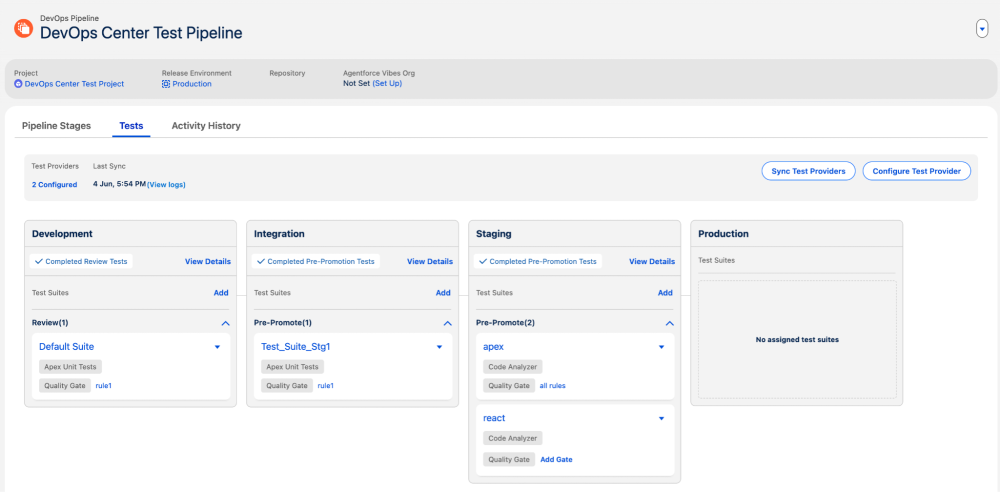
Running tests automatically is only half the battle; the real magic happens when you use those tests to enforce governance. A quality gate is an automated checkpoint in a CI/CD pipeline that evaluates code against predefined criteria, blocking substandard software from advancing or deploying until it meets the required thresholds. Automated quality gates are now directly part of the pipeline workflow in DevOps Center. Instead of relying on manual checklists or human oversight to approve a pipeline promotion, you can define strict criteria for specific pipeline stages, such as on pull request creation or pre-promotion.
Imagine a developer attempting to promote a work item. Behind the scenes, DevOps Center automatically triggers the assigned Apex, Flow, and Code Analyzer test suites. If an Apex test fails, code coverage drops below your organization’s threshold, or Code Analyzer flags a critical security vulnerability, the pipeline automatically halts. The promotion is blocked, and the developer receives immediate, line-level feedback right inside their work item. The bug is isolated and fixed instantly, keeping the main release branch completely clean.
Test providers in native platform automation
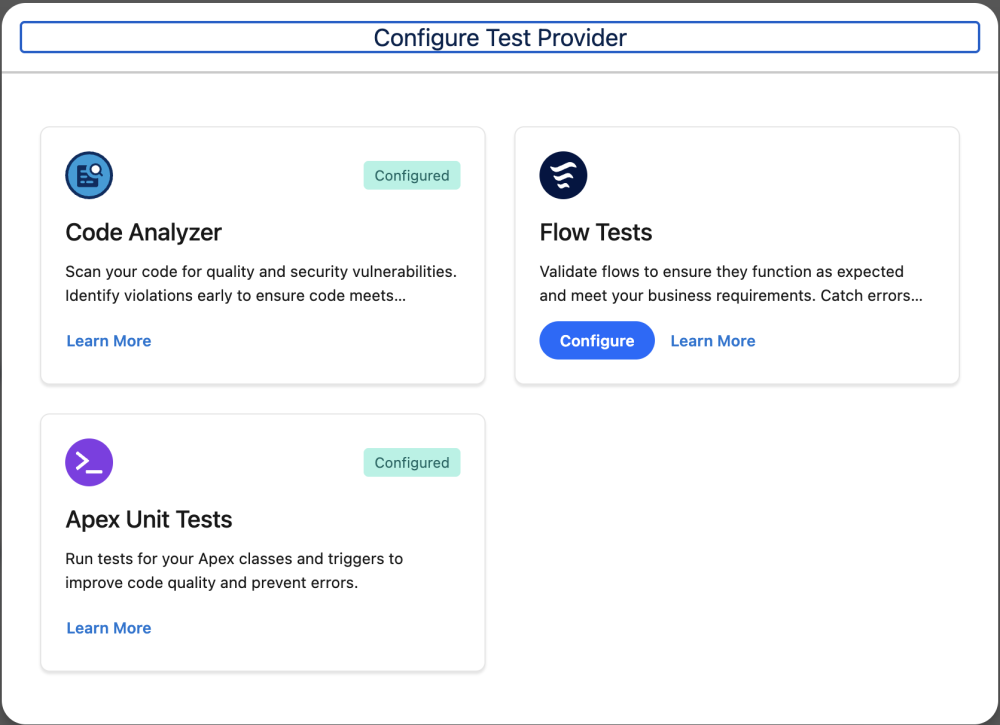
DevOps Center Testing unifies execution and reporting for your most critical internal test providers right out of the box. From a single centralized hub, you can easily orchestrate a comprehensive testing matrix across programmatic and declarative elements.
- Apex tests: Automatically execute unit tests and track code coverage percentages to ensure backend programmatic logic is thoroughly vetted early.
- Flow tests: Natively execute declarative flow test cases to verify that your automated business logic behaves precisely as intended before promotion.
- Salesforce Code Analyzer: Catch security vulnerabilities, detect anti-patterns, and evaluate technical debt before code review even begins by running multi-engine static code analysis including PMD, ESLint, and Flow Scanner.
Agentic era: skills for DevOps Center Testing
While manual and programmatic gate configuration offers incredible safety, managing a matrix of dozens of test suites, mapping coverage gaps, and diagnosing complex failures can become a full-time task. To simplify this complexity, we have also released Skills for Testing within Agentforce Vibes.
Four new Agentforce skills bring AI-assisted test management directly into your DevOps Center workflow, from configuring providers and quality gates to running suites, analyzing failures, and tracking fixes.
These skills combine to act as an autonomous copilot for your release operations, allowing DevOps Center Testing managers to control the lifecycle through natural language interaction:
dx-devops-test-pipeline-configure
What it does: Configures test providers, syncs new suites into a pipeline, and assigns quality gates with pass-rate, severity, and essential-test rules to test suites on a pipeline stage. Instead of manually mapping criteria across complex tables, managers can instruct the agent to align the gate logic automatically.dx-devops-test-suite-assignments-configure
What it does: Recommends and manages DevOps Center test suite assignments for pipeline stages. Use this skill to recommend suites for a commit, assign or map suites to stages, or add/remove tests in a suite.dx-devops-test-suite-run
What it does: Triggers test suite execution on a specific pipeline stage, polls for results, and can automatically re-run a quality gate check after a developer resolves their code coverage gaps. This keeps the deployment train moving efficiently with automated validation loopbacks.dx-devops-test-failures-analyze
What it does: Analyzes DevOps Center test failures and Code Analyzer violations in plain language, failure category, offending file/class/method/line, rule violated, fix direction, and prioritized improvement suggestions (test-code vs production-code), then optionally creates a tracked fix WorkItem on explicit request.
How to get started
You can bring automated quality to your release management workflow in a few quick steps:
- Locate the Tests tab: The automated testing feature is available within the DevOps Center application. Admins can open their DevOps Center pipeline to find the new native Tests management interface.
- Add test providers: Configure one or more of the available test providers: Apex, Flow, and Code Analyzer.
- Configure your quality gates: Define your testing thresholds. Decide which pipeline stages require mandatory Apex test passes, flow validations, or Code Analyzer scans.
- Automate and scale: Review the developer reference documentation to connect your CLI scripts, repository webhooks, or Agentforce toolsets to the Headless 360 API.
By automating your testing lifecycle natively within DevOps Center and pairing it with Agentforce, you eliminate release anxiety, secure your digital supply chain, and empower your teams to ship high-quality features faster and smarter than ever before.
Conclusion
DevOps Center Testing now enforces Apex, Flow, and Code Analyzer checks at each pipeline stage, and you can trigger the same gates from your existing CI tools via the CLI or REST API.
Resources
- Testing User Guide
- Release Notes
- Object References
- Code Analyzer
- DevOps Center Trailblazer Group
- DX Inspector Documentation
- Salesforce CLI Reference
- Next Generation DevOps Center documentation
About the Author
Srikrishna Padmannagari is a Senior Product Manager at Salesforce, where he builds tools that simplify ALM for the global developer community. He leads product for Salesforce DX Inspector, Testing, Code Analyzer focusing on making the Salesforce DX ecosystem more efficient, reliable, and developer-friendly. Follow Srikrishna on LinkedIn.