Modern software development is increasingly decoupled from specific IDEs. Thanks to agentic technology and headless development, developers can now complete tasks using any IDE or even a CLI. This shift provides greater freedom of choice, as AI agents allow development workflows to function independently of traditional monolithic environments.
In this post, we’ll present the key components of headless development and explore how Salesforce enables this approach at scale. We’ll also introduce a Claude Code plugin that streamlines the practice before sharing what’s on the roadmap.
![Screenshot of the Salesforce development plugin for Claude Code]](https://d259t2jj6zp7qm.cloudfront.net/images/20260810083227/image5-e1786375962200.png?w=1000)
The components of headless development
Headless development relies on a few main components: agent skills, MCP servers, and agent plugins.
Agent skills
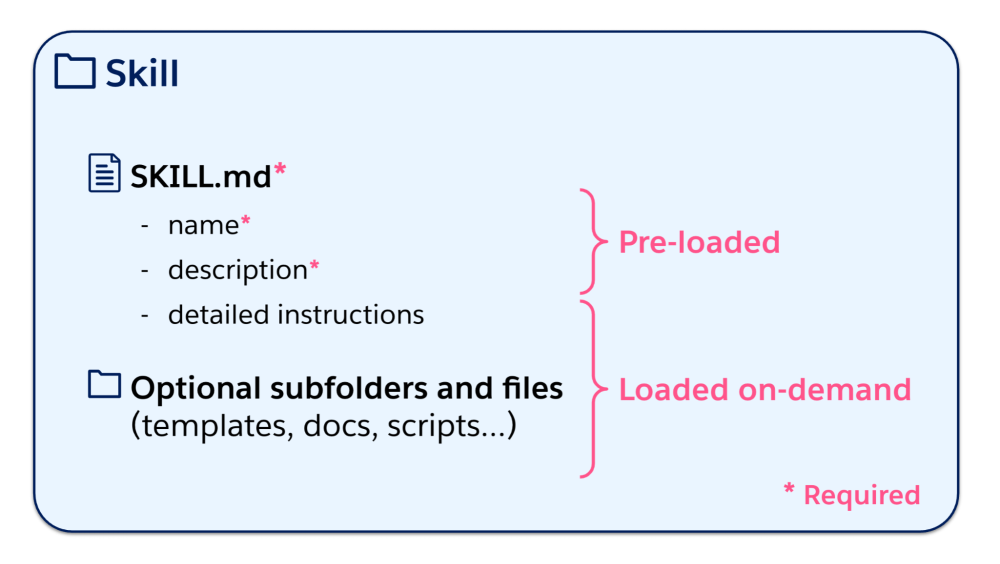
Agent skills are reusable, validated instructions that teach AI agents how to perform specific tasks. A skill is a folder that contains a SKILL.md markdown file. The file has a header with a set of standard attributes (name and description at a minimum) followed by free-text instructions. Skills can also include subfolders and files such as templates or scripts.
Thanks to a detailed specification, skills are interoperable across agents. Skills work with a lazy-loading mechanism: only skill names and descriptions are initially loaded in the agent context. When running a prompt, the agent determines which skills it needs to activate, and then loads them in context.
MCP servers
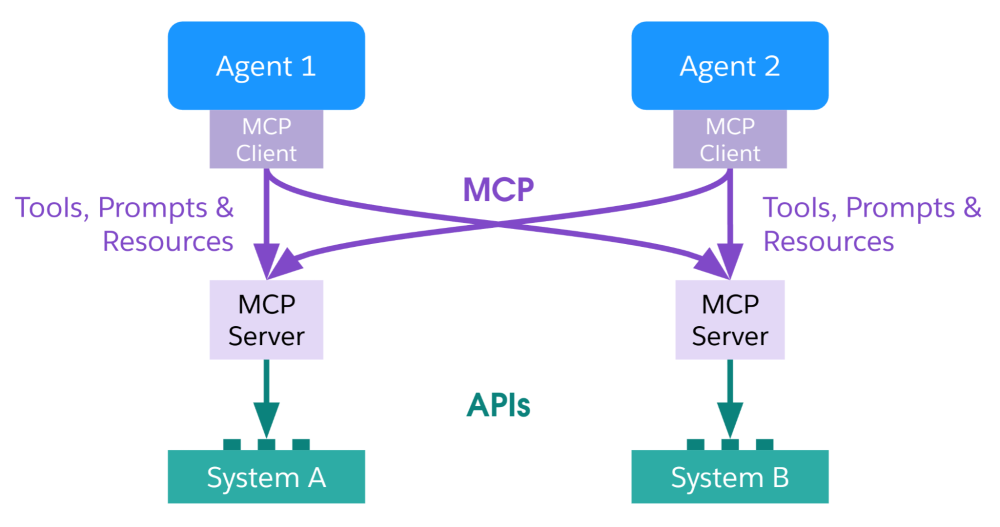
The Model Context Protocol (MCP) is an open-source standard that provides a standardized way to connect AI applications to external systems. MCP helps by decoupling AI agents from API clients for those external systems. Agents embed a standard MCP client that can connect to any MCP server. Service providers ship MCP servers that interact with their systems’ APIs and expose MCP tools, prompts, and resources to agents. Thanks to this standard, connecting agents to external systems becomes plug and play just like using USB-C.
Agent plugins
Setting up a headless development environment requires that you retrieve skills and configure MCP servers. This can be time-consuming during initial setup and a bother to keep up to date. Agent plugins are precisely designed to address these pain points.
Plugins package skills, MCP servers, and other utilities into a single installable unit for a specific AI platform. This simplifies setup and eases maintenance over time as there’s generally an update mechanism for plugins. A key limitation of plugins at the time of writing is that they remain AI vendor-specific, unlike skills and MCP servers, which are standard.
How Salesforce is scaling headless development
Salesforce skills are evolving
Salesforce ships a collection of over a hundred skills for development across its clouds and products in the open-source Salesforce skills library (sf-skills) GitHub repository.
Each skill focuses on a narrow capability such as generating Apex classes, running Data 360 queries, designing mobile apps, generating OmniScript, and more. Each skill includes context about the platform, best practices, and error handling.
The Salesforce skills library comes pre-installed in Agentforce Vibes. You can install some or all of its skills in the agentic environment of your choice (for example, OpenCode, Claude Code, Codex, or Cursor) by running this interactive command (requires Node.js):
1npx skills add forcedotcom/sf-skillsWith Salesforce driving headless development across products, the number of available skills has skyrocketed since the launch of the skills library. And, with multiple teams contributing, it became clear that strict governance is needed to manage skills at scale to ensure discoverability and distribution.
Improved discoverability
Developers and agents can’t predict skill names (should a skill be named “generate-X”, “build-X”, or “create-X”?). The problem becomes ever more visible as coverage for multiple products and features is added to the mix. Without a structured and defined taxonomy, skills fall out of step with how Salesforce officially names and groups features. This leads to developer frustration and agents that can’t execute tasks effectively or consistently.
To prevent this, skills have been renamed in accordance with a well-defined taxonomy. For example, the dx-devops-test-failures-analyze skill belongs to the following classification path: DX > DevOps > Test > Failures Analyze.
To prevent context dilution and structural drift as multiple teams and individuals contribute to the library over time, an automated, gated verification pipeline ensures skills are checked for taxonomy alignment, accuracy, and expected outcomes before they are cleared for distribution.
Robust distribution
In initial releases of the skills library, skills were not individually versioned (only the library was versioned) and dependencies weren’t expressed in a standardized manner. As skill instructions and dependencies were updated, these changes could occasionally introduce undocumented behavior changes in dev workflows.
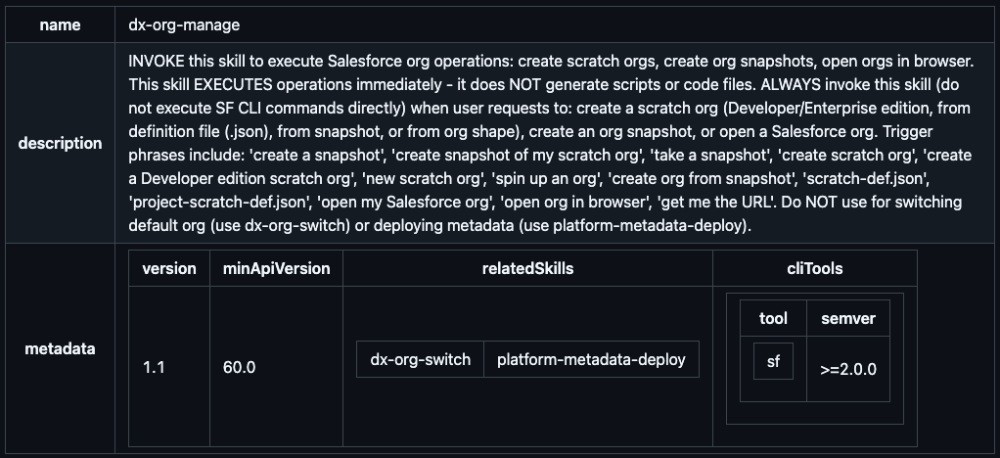
To provide more visibility and control over skills, we’ve used skill metadata to define individual skill versions and dependencies. For example, below is the header of the dx-org-manage skill. Note the metadata section that includes the skill version, minimum required Salesforce API version, related skills, and dependencies.
Introducing the Salesforce development plugin for Claude Code
The Salesforce development plugin is our first official plugin, built for Claude Code, Anthropic’s AI-powered command-line development tool. This plugin transforms Claude from a general-purpose coding assistant into a Salesforce development expert.
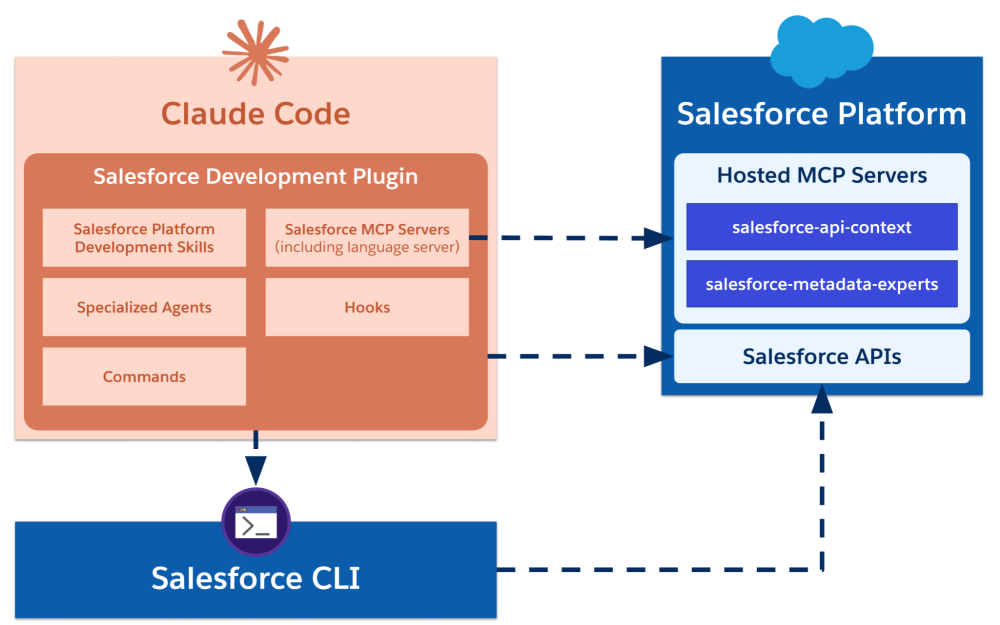
Here are the details of what’s included in the Salesforce development plugin for Claude Code: a collection of Salesforce development skills, MCP servers, specialized agents, hooks, and commands.
Salesforce development skills
The plugin bundles a subset of about 40 skills from the Salesforce skills library. This collection of skills covers core Salesforce development. Skills for other clouds and features (including Data 360, Commerce, and mobile development) are not included in this plugin. We plan to collect feedback on this initial plugin before shipping dedicated plugins for these domains.
Specialized agents
The plugin includes specialized Claude agents that automatically activate based on context:
- salesforce-dev: The primary development agent that auto-detects Salesforce projects and routes requests through skills → Salesforce CLI → Salesforce APIs in that priority order.
- architecture-review: A read-only agent that grades your project against the Well-Architected pillars (Trusted, Easy, Adaptable) and provides a governance checklist.
- Agentforce Development Lifecycle (ADLC) agents: A set of specialized agents for authoring, engineering, and testing Agentforce agents.
Salesforce MCP servers
The plugin exposes three MCP servers that provide Claude with deep platform integration without requiring that you configure them manually one by one:
- salesforce-api-context: Offers API and metadata guidance.
- salesforce-metadata-experts: Provides expert knowledge about Salesforce metadata types.
- salesforce-lsp: Hosts local Apex and SOQL language servers, exposing semantic capabilities (diagnostics, completions, and code actions) as MCP tools. This means that Claude can perform real-time Apex syntax validation, suggest code fixes, and provide intelligent completions just like the Salesforce Extensions for VS Code, but from the terminal.
Hooks
The plugin ships with custom Claude Code hooks. A hook is a shell command that automatically runs in response to specific events, like before/after tool calls or when certain actions occur. They let you extend Claude Code’s behavior without changing the core tool.
Here are some examples of hooks that ship with the plugin:
- Automated context discovery: When Claude Code starts or changes directories, a hook runs to detect whether the folder is a Salesforce DX project and, if so, loads information such as the default org.
- Agent Script syntax validation: When a
.agentfile is edited, a hook runs an Agent Script syntax validation command. - Deployment validation: When a metadata deployment command runs, a hook validates the deployment result and analyzes potential errors.
Commands
The plugin ships with a set of convenient commands that let you run operations from the Claude Code interface such as:
- A
/setupcommand for validating the state of the plugin and the org. - A
/discoverycommand for exploring available skills. - A set of utility commands that act as shortcuts for common CLI commands such as getting the status of the default org (
/org), logging into an org (/login), or logging out of an org (/logout). These are convenient as you can’t directly run Salesforce CLI commands from within the Claude Code interface and calling the related MCP tools for simple tasks like these is overkill.
Getting started with the Salesforce development plugin
Setting up the plugin is straightforward:
- Install the prerequisites:
- Claude Code
- Node.js LTS (v22 or v24 at time of writing)
- Salesforce CLI
- Python 3.8 or above. This is only required for some internal hooks related to org detection and deployment safety. The Python requirement may go away in future versions. Check the official setup instructions for the latest information.
- Open any Salesforce DX project and authenticate to an org with the Salesforce CLI:
1sf org login web --alias my-org --set-default - In Claude Code, install the plugin from the Claude Plugin Marketplace:
1/plugin install salesforce-development@claude-plugins-official - Validate your environment in Claude Code (optional but recommended):
1/salesforce-development:setup
That’s it. Claude will automatically detect your org context from your project and activate the salesforce-dev agent. You can now use natural language prompts like:
- “Create an Apex service class to handle Account territory assignments”
- “Generate a
Project__ccustom object with fields for Status, Due Date, and Priority” - “Deploy the project to my org”
- “Write a test class for
AccountTerritoryServiceand run it”
What’s next
We’re expanding development plugins across the AI agent ecosystem. Upcoming work (subject to change) includes:
- Claude Cowork plugin: Bringing skills to Anthropic’s collaborative agentic workspace
- Open-source plugin architecture: Community-contributed plugins for domain-specific use cases (Agentforce Service, Agentforce Sales, Agentforce Commerce)
- Coding Agent Platform Governance (CAP-G): Integration with governance tools for session tracking, policy enforcement, and compliance reporting
Expanding development plugins is the first step in shipping plugins for broader use cases. We are considering options and frameworks to ship plugins for knowledge workers. For instance, you could see an Agentforce 360 for Automotive plugin with a set of business skills, custom, hosted MCP servers preconfigured with access to business processes, and more.
Conclusion
This concludes our tour of how Salesforce is scaling headless development from expanding skills and MCP servers to the adoption of plugins. You learned about governance applied to skills, the launch of our first Salesforce development plugin for Claude Code, and our plans for additional plugins.
Try the Salesforce development plugin today and remember that Salesforce skills and plugins are open-source initiatives. You can participate by exploring the skills and plugins repository and sharing your feedback on GitHub.
Resources
- Plugin homepage
- Salesforce skills library repository
- Claude Code documentation
- Salesforce Hosted MCP Servers
- Plugin development guide
About the author
Philippe Ozil is a Principal Developer Advocate at Salesforce, where he focuses on the Salesforce Platform. He writes technical content and speaks frequently at conferences. He is a full-stack developer and enjoys working with APIs, DevOps, robotics, and VR projects. Follow him on X, LinkedIn, and Bluesky, and check out his GitHub projects.