Retrieval Augmented Generation (RAG) is the architecture behind most enterprise Artificial Intelligence (AI) agents’ answers. It retrieves relevant documents and feeds them to a large language model (LLM) to generate a response.
If AI agents are returning confident but wrong answers from enterprise documents, the problem probably isn’t your LLM. It’s your RAG pipeline, and you can fix it without writing code.
We validated the approach described in this post on four public, reproducible benchmarks. Three configuration changes in Data 360 improved accuracy from 62.5% to 92.5% on knowledge-base question answering. On complex enterprise PDFs with tables, charts, and formulas, the same pipeline achieved 86.8% accuracy end to end.
In this post, we’ll cover where your pipeline is breaking, three configuration steps to fix it, how to validate improvements, and what’s coming next.
The four stages where RAG pipelines fail
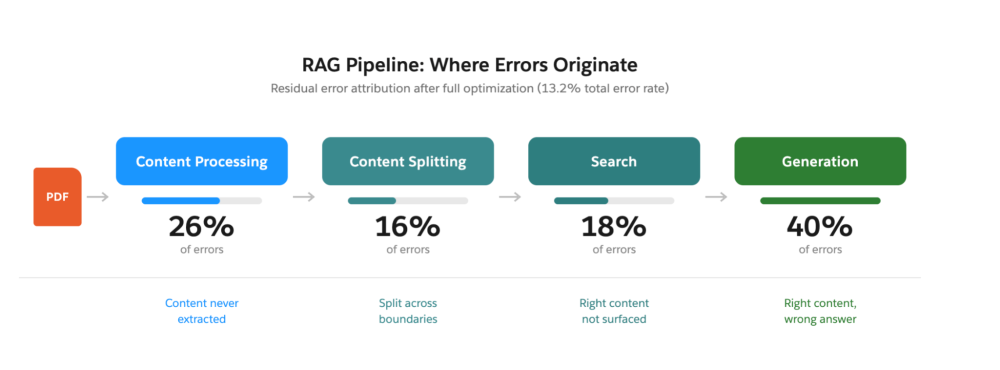
RAG failures compound silently across four stages. Before tuning anything, identify your bottleneck:
- Content processing: Charts, diagrams, and tables lose structure during extraction. A pricing matrix becomes garbled text; a wiring diagram disappears entirely.
- Content splitting: A 15-step procedure gets split at an arbitrary token boundary. Your agent returns steps 1–7 and misses the safety warning on step 12.
- Search: The right content exists but the wrong content surfaces. Your user asks about “firmware reset” but the document says “factory restore procedure.”
- Generation: The retrieved context is correct but the LLM produces a wrong or incomplete answer anyway.
Fixing one stage doesn’t help if another is the actual bottleneck. On our benchmarks, the remaining errors after full optimization break down as follows:
- 40% generation
- 26% content processing
- 18% search
- 16% content splitting
Your distribution will vary by document type.
Here’s what fixing these stages looks like in practice across different industries and for your business:
- Insurance and financial services: Multipage policy tables become queryable with correct cell-level extraction. Finance-domain accuracy improved by over 27.9 percentage points, the largest increase of any domain tested.
- Manufacturing and field service: Schematics, wiring diagrams, and safety documentation become searchable by meaning, not just filename. Technical/product manual-domain accuracy: from 77% to 88.7%.
- Customer support and service: Optimized configuration delivers 92.5% accuracy on knowledge-base question answering. Your agents get complete procedures, not fragments that leave customers waiting.
- Enterprise-wide search: 82.1% accuracy with confluence documents. Your agents find information regardless of where it lives.
Optimize your RAG pipeline
Enable intelligent parsing for rich documents
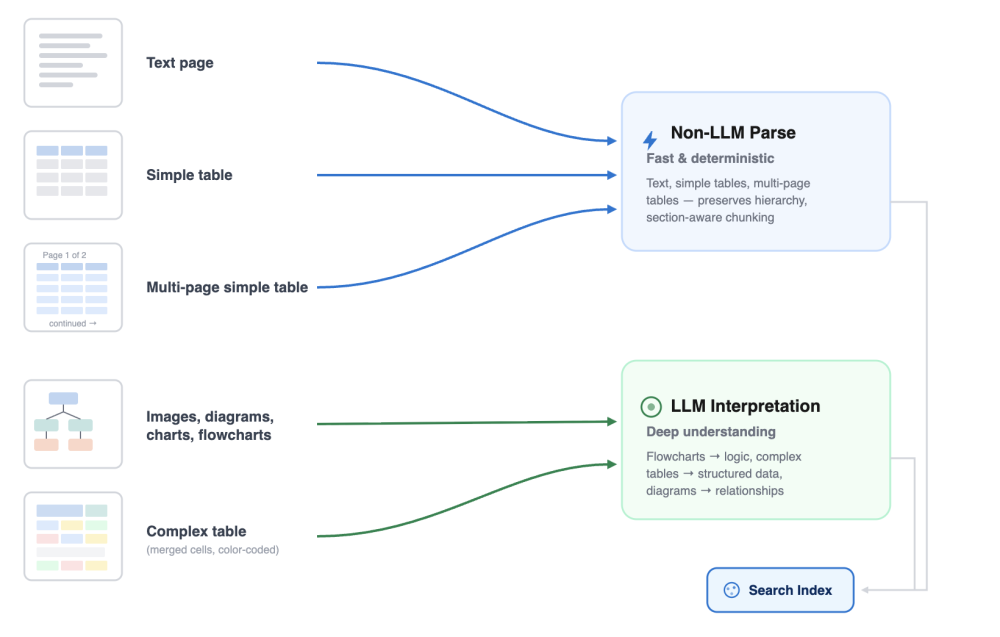
The first thing you can do to increase accuracy is to enable intelligent parsing (expected November 2026) for rich documents. Intelligent parsing analyzes each page and routes it to the right extraction method. Text-heavy pages get fast, structure-preserving parsing. Pages with charts, diagrams, or schematics get vision-model interpretation that converts visual content into searchable text.
This matters because standard parsing skips images entirely and breaks tables across rows. Intelligent parsing keeps tables intact, preserves section hierarchy during chunking, and makes visual content retrievable.
To enable it, select Intelligent Parsing as the document processing method in your Data 360 intelligent context. No additional setup is required; page-level routing happens automatically.
The following table shows the measured impact of intelligent parsing on OHR-Bench (Office-domain Hybrid Retrieval Benchmark) v2 (International Conference on Computer Vision [ICCV] 2025, enterprise PDF questions):
| Content type | Before (Data 360 RAG Pipeline) | After ( Data 360 RAG Pipeline) |
| Charts and diagrams | 57.9% | 76.3% |
| Reading order (multicolumn, multipage) | 11.9% | 67.1% |
| Tables | Fragmented | Intact with cell-level accuracy |
| End-to-end accuracy | 65% | 84.4% |
Turn on enriched indexing
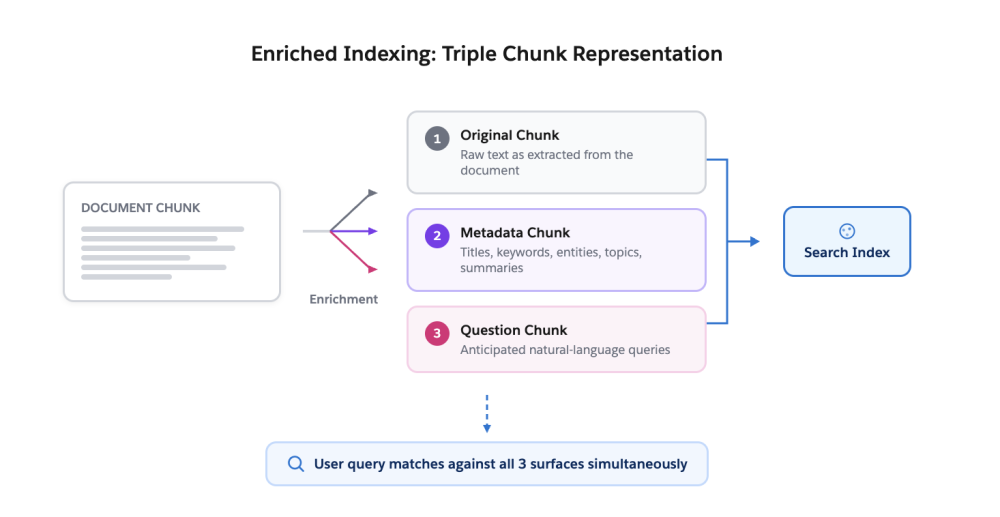
Another way to improve accuracy is to enable enriched indexing. For every chunk in your index, enriched indexing generates two additional representations automatically:
- Rich metadata: titles, keywords, entities, summaries, and topic labels extracted from the content
- Question chunks: the natural-language questions this content is likely to answer, phrased the way your users actually search
At retrieval time, a query matches against all three surfaces simultaneously: raw content, metadata, and anticipated questions.
This matters because your users search with different vocabulary than your documents use. A service agent asks “How do I reset the configuration after a firmware update?” but the document says “Restore factory settings post-upgrade.” Enriched indexing bridges that gap without manual tagging.
To enable it, toggle Enriched Indexing on in Search Index Setup. The enrichment runs during indexing; no changes are needed at query time.
The measured impact of enriched indexing was +2.4 percentage points on top of intelligent parsing by itself (84.4% to 86.8% on OHR-Bench v2). No manual content curation is required.

Tune chunk size, search depth, and generation prompts
This is likely where you will see the largest single improvement. On WixQA (arXiv 2025, real help articles with expert-written questions), configuration tuning alone delivered a 30 percentage-point improvement, with no code changes and no custom models.
The three levers are:
| Setting | Default | Optimized | What it controls |
| Chunk size | 512 tokens | 2048 tokens | Whether procedures and tables stay intact |
| Search/Retrieval depth (top-k, the number of top-ranked chunks returned) | 10 chunks | 30 chunks | How much relevant content surfaces |
| Generation prompt | Generic | Domain-tuned | Whether the LLM produces full answers or fragments |
Adjust these configurations in your search index and RAG pipeline settings. If your documents contain multistep procedures or tables, start with the chunk size, increasing it to 512 or higher.
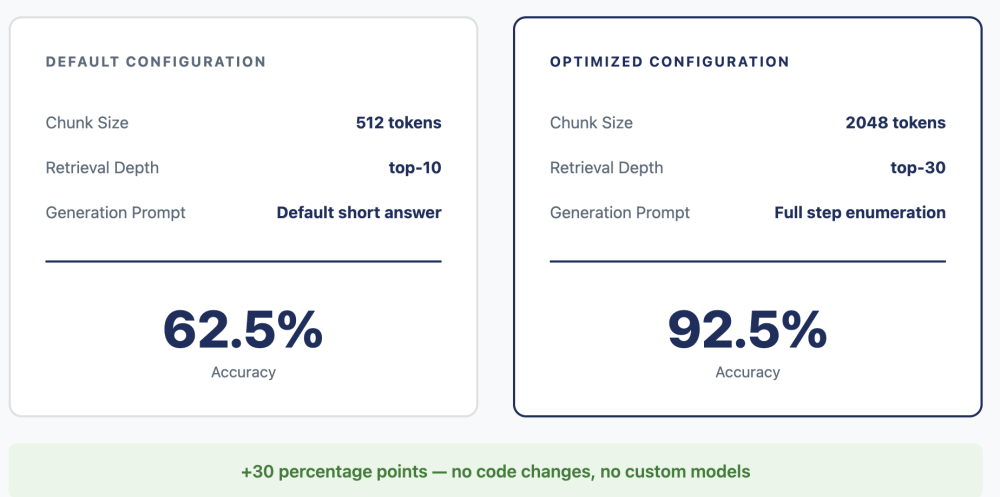
The measured impact of this tuning was 62.5% to 92.5% accuracy on the same benchmark, same platform, and same data, with configuration changes only.
What’s next: Knowledge Graph
Some questions can’t be answered from a single page or even a single document. “What safety certifications apply to this component given recent regulatory changes?” requires connecting information across multiple sources.
Knowledge Graph (Generally Available November 2026) builds entity-relationship connections across your entire document corpus. Instead of retrieving isolated content, the system traverses relationships. It follows a policy clause to its definitions. It connects a financial line item to its footnoted methodology. It links a product specification to safety constraints in a separate document.
This is our path to 90%+ accuracy on multipage reasoning (the same level we’ve achieved on single-document benchmarks).
Your action plan
| If your problem is… | Do this… | Expected improvement |
| Charts/diagrams invisible to search | Enable Intelligent Parsing | +17 percentage points (pp) |
| Users can’t find content with different wording | Enable Enriched Indexing | +2.4 pp end-to-end |
| Procedures and tables fragmented | Enable Intelligent Parsing & increase chunk size | Contributes to + 17 pp config improvement |
| Agents hallucinating instead of saying I don’t know | Tune the generation prompt & generation model | +5 pp improvement |
| Chunking/retrieval for text based knowledge articles | Fully optimize the configuration (Tune chunk size, search depth, and generation prompts) | 62.5% → 92.5% on knowledge-base question answering |
Validating your improvements
You don’t need to trust our benchmark numbers; you can measure the pipeline against your dataset:
- Build your own evaluation dataset of 20-50 questions paired with correct answers from your documents. You can evaluate the answers to each of these questions in Intelligent Context now. In the next version of Intelligent Context (expected November 2026), you will be able to get an aggregate accuracy assessment on your dataset out of the box.
- Through our benchmarking exercise, we mapped every failure pattern to the specific pipeline configuration that fixes it. We’re now packaging that into auto-tuning, which is expected to launch in November 2026. It runs accuracy assessments against a set of golden question-answer pairs, diagnoses where answers fail, and automatically applies the right configuration, with no manual experimentation and no RAG expertise required. In early testing, auto-tuning found the optimal configuration in three iterations, replacing months of manual work.
Conclusion
Enterprise RAG accuracy is a configuration problem, not a model problem. Three changes (Intelligent Parsing, Enriched Indexing, and tuned pipeline settings) improved accuracy from 62.5% to 92.5% on public benchmarks without custom code or model training.
For practitioners who want hands-on control, start with the Action Plan table above to identify your highest-impact fix. Then, use the validation steps to measure your own pipeline. For everyone else, we’re introducing auto-tuning and automated accuracy assessments built from the same diagnostic logic our benchmarking uncovered so that any practitioner can reach optimal accuracy without needing to understand the details of the RAG system.
If you have questions or want to share your results, join the conversation on the Trailblazer Community.
Ready to get started? Set up a Data 360 search index today and run your first evaluation.
Resources
- Data 360 Documentation – Platform setup and configuration guides
- Benchmarks:
- OHR-Bench v2 (ICCV 2025) – Complex enterprise PDF benchmark
- MMLongBench-Doc (NeurIPS 2024) – Long-document reasoning benchmark
- WixQA (arXiv 2505.08643) – Knowledge-base QA benchmark
- Enterprise RAG Bench – Multisource enterprise retrieval benchmark
- Data 360 on Trailhead – Learning paths for Data 360 developers
- Salesforce AI Blog – Related posts on enterprise AI architecture
About the Authors
Barnali Patnaik is a Senior Product Manager at Salesforce, focused on enterprise search accuracy and RAG pipeline optimization in Data 360. She leads benchmarking and evaluation strategy for the Data 360 retrieval stack. LinkedIn
Aanchal Varma is a Senior Member of Technical Staff (SMTS) in Data Science at Salesforce, specializing in retrieval evaluation and accuracy measurement for enterprise search systems in Data 360. LinkedIn
Kartik Muktinutalapati, Senior Director of Product Management at Salesforce, leads the Data 360 product vision and strategy for unstructured data processing and retrieval to give AI agents access to enterprise knowledge.
![[Agentforce ハンズオン] Coral Cloud Resorts サンプルアプリケーションのご紹介](https://d259t2jj6zp7qm.cloudfront.net/images/20240918152858/Sample-App-Blog.png?w=1905)