You ask a coding agent to fix a bug on your menu page. It searches your project, finds nothing that matches, and starts writing a new component. Your org already has one. Most projects hold only part of an org, and this one lives in the part you haven’t retrieved.
Coding agents can already explore your org with the Salesforce CLI, but that means listing metadata one type at a time, across hundreds of types and thousands of components. The Metadata Grounding MCP Server (Beta) searches a pre-indexed catalog of your org’s metadata instead, so the agent can find what already exists before it builds something new.
In this post, you’ll learn how Metadata Grounding works, how to connect it, and how to use it in two examples from a food delivery org called Pronto.
Why coding agents need your org’s metadata
The Headless Toolkit is how Salesforce brings your org to any agent, app, and experience. Three pieces matter when you build with a coding agent:
- Skills teach the agent how to build on Salesforce. They carry the patterns, the APIs, and the guardrails.
- The Headless 360 MCP Server lets the agent act. It can configure, provision, and change things in your org.
- Metadata Grounding lets the agent see what already exists. It answers the question the other two can’t: what is currently in this org?
Without that third piece, an agent can write correct Apex against the wrong object. With it, the agent checks the org first.
If you’ve read our announcement of the Headless 360 MCP Server Beta, you’ve seen how the Discover tool finds the right Salesforce action to run. Metadata Grounding answers a different question. It finds the things that already exist in your org, such as an object, a field, or a component, so the agent knows what to point that action at.
Here’s how the options an agent has today compare:
| Where the agent looks | Finds metadata that isn’t in your project? | Search by intent? | Cost to the agent |
|---|---|---|---|
| Your local DX project | No, only what you retrieved | No, text match only | Low, but blind to the rest of the org |
| Metadata API or SOQL | Yes | No, you need the type and name first | Low per call, but the agent must already know what to ask for |
| Retrieve everything, then search | Yes | No | High. Thousands of files burn context, tokens, and time |
| Metadata Grounding (Beta) | Yes | Yes, across 70+ types | Low. The agent pulls only what it asks for |
How Metadata Grounding works
Metadata Grounding exposes three read-only tools:
describe_metadata |
Lists the metadata types in your org and the schema for each, so the agent knows what it can search |
search_metadata |
Finds metadata by what it does, using natural language, with optional filters for type and subtype |
query_metadata |
Returns the full record for a result, including its type-specific properties |
As of this writing, it covers more than 70 metadata types, including objects, fields, Lightning web components, Apex classes, flows, and permission sets. Behind it is Salesforce Catalog, where your org’s metadata is stored and indexed.
The pattern the tools are built for is describe, search, then query. Let the agent learn what exists, narrow to the right type, and read the record before it writes any code.
Note:
- Metadata Grounding runs as the authenticated user and returns only the metadata that the user is permitted to access. It’s read-only, so it can find and explain, but never change your org.
- Metadata Grounding currently covers core Salesforce metadata. If you need to ground your agents on Data 360 metadata, use the Data 360 MCP Server.
What’s behind the tools
Metadata Grounding reads from Salesforce Catalog, which Data 360 powers. Four pieces matter:
- Extraction. Metadata extractors read your standard and custom metadata from the org. When you turn Salesforce Catalog on, Data 360 runs an initial full sync. How long that takes depends on the size of your org.
- Storage. Data 360 stores the metadata in a metadata data lake object and maps it into a Catalog data model.
- Search index. A hybrid index combines a vector index, which matches on meaning, with a keyword index, which matches on exact terms. That’s why a plain-English query can find
MenuBrowserControllerwithout the agent knowing its name. - Access. The Metadata Grounding MCP Server queries that index and returns only what the authenticated user may see.
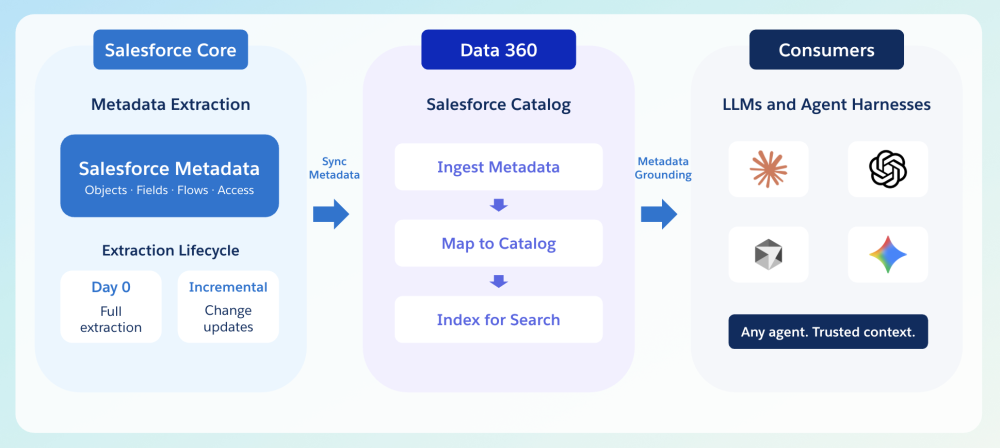
Salesforce Catalog stays current in two ways. For supported metadata types, it picks up changes without waiting for the scheduled refresh. A full refresh also runs every 24 hours to cover all types, including those that incremental sync doesn’t support yet.
Metadata Grounding MCP Server in action
Most work in an org starts with a question about what’s already there. Where’s the code behind this bug? Do we already have this logic?
The two use cases below answer those questions in that order. Each one ran in Pronto, our sample food delivery org, so the queries and results are real. Both ran in Claude Code with Metadata Grounding connected and a project rule in place that tells the agent to check the org first. You’ll find the rule at the end of this section. Your results depend on your org’s metadata and how well it’s described.
Find the metadata component behind a bug
Here’s the ticket I used in an org installed with Pronto sample app:
“On the menu page, clicking a category doesn’t do anything. I click Breakfast and it still shows me the whole menu. It works when the page first loads, then breaks the moment you touch it. The All Categories button does nothing at all.”
The developer isn’t familiar with this feature, and the org has hundreds of components. There’s no field name to search for, only a symptom. The project folder is empty, so there’s nothing local to grep. I gave the ticket to Claude Code with Metadata Grounding connected and added: “Find whatever is behind that. I don’t know what it’s called. Search by type: look through Apex classes first, then Lightning web components.”
The agent starts with describe_metadata to see what’s available. Then it searches Apex classes by plain English, not by name:
1{
2  "query": "code that loads a restaurant menu and its categories and items",
3  "metadataType": "ApexClass",
4  "limit": 8
5}
Among the results is MenuBrowserController, whose name and purpose match the symptom. A second search, limited to Lightning web components, finds the component that goes with it:
1{
2  "query": "menu",
3  "metadataType": "LightningComponentBundle",
4  "limit": 8
5}
In my org that returns c__menuBrowser as the first match. A query_metadata call on it shows the targets it’s exposed on, including record pages, app pages, and Experience Cloud pages.
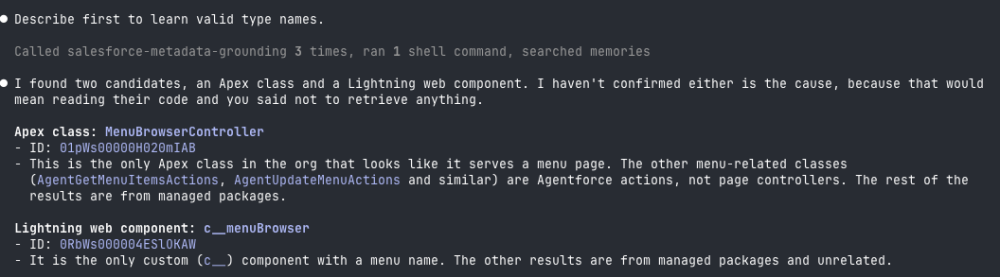
Metadata Grounding tells the agent what exists and where it lives. It doesn’t return source code. To read the code, the agent switches tools and retrieves only the items it needs into the empty project, such as the controller and the component. The org stays on the server, and only what the fix touches comes down.
Two things to notice. The match came from a business symptom, not a name the developer already knew. And the type filter did real work. The same query without metadataType returns standard fields from across the platform, which is noise.
Note: The Lightning web component record currently has no description, so the ranking relies on the component name and its properties. The richer the descriptions in your org, the better the search gets. More on that in the roadmap “What’s next” section below.
Extend what exists instead of rebuilding it
A developer asks the agent to add a customer review summary to a storefront page for the Pronto app. The project rule tells the agent to check the org first, so before writing anything it searches Apex classes:
1{
2  "query": "summarize customer reviews for a restaurant",
3  "metadataType": "ApexClass",
4  "limit": 8
5}
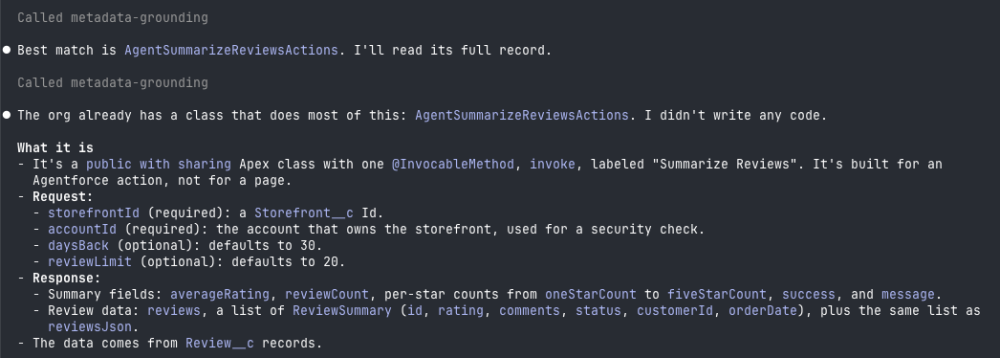
The first result is AgentSummarizeReviewsActions, which already exists in the org. A query_metadata call on it returns the full class, including an invocable method labeled “Summarize Reviews” that retrieves recent reviews for a storefront and returns summary statistics. The agent can see the inputs it requires: an account ID and a storefront ID, as well as optional limits for how many days back to look and how many reviews to return.
So the agent builds on the existing class instead of writing a new query. The developer keeps working code, and the team doesn’t end up with two classes that do the same job.
You can make this behavior the default. Add an instruction like this to your project rules or agent instructions:
Before you write code that references an object, field, component, or Apex class, search my org with Metadata Grounding. Query the record you plan to use and confirm it exists. If something similar already exists, extend it instead of creating a new one.
You can also install skills instead of writing the rule yourself. The platform-metadata-grounding-get skill teaches your agent how to use Metadata Grounding. The platform-metadata-discovery-get skill helps it choose between Metadata Grounding, SOQL, and the Salesforce CLI. Both are in the public sf-skills repo.
Choose where to connect
Metadata Grounding is available on two servers, both of which are in Beta.
The Metadata Grounding MCP Server (Beta) is the best way to get started today. It’s read-only, and it works with any MCP-compatible client such as Claude Code, Cursor, or ChatGPT. If you want discovery and reuse and nothing else, start here.
The Metadata Grounding MCP Server will be available out of the box in Agentforce Vibes and included in the Salesforce Development Plugin for Claude Code.
The Headless 360 MCP Server (Beta) is where Metadata Grounding is headed. It’s the one-stop MCP for the Headless Toolkit, exposing the same Metadata Grounding capabilities, along with the tools an agent uses to act on your org. One connection and one place to manage access, with grounding next to action.
The shape differs a little. The standalone server gives your agent three tools directly. Inside the Headless 360 MCP Server, the agent reaches the same capability through the four tools it already uses:
- Discover finds the grounding workflow,
- Describe shows its steps, and
- Dispatch / Dispatch Read Only runs the search and query.
If you build prompts or tests around the three tool names exposed in the standalone MCP server, they won’t carry over unchanged.
Note: We’re working to bring the Headless 360 MCP Server to full parity with the standalone server. We’ll publish guidance on any change before it affects you, and we’ll update this post. The Headless 360 MCP Server will be renamed to the Salesforce MCP Server when it reaches general availability.
Before you begin
- Your org needs an edition that Data 360 supports, with Data 360 provisioned and API Enabled. Salesforce Catalog is opt-in through Data Cloud Setup Feature Manager.
- Data 360 isn’t supported in scratch orgs. Salesforce Catalog isn’t available in Developer Edition orgs that use namespaces.
- An admin sets up the connection and activates the server. All Platform Hosted MCP Servers require admin activation.
- The server returns only the metadata that the authorized user is permitted to access.
Note: The Metadata Grounding MCP Server is a beta service that is subject to the Beta Services Terms. Use of this beta service is at the Customer’s sole discretion.
Tip: Try Metadata Grounding in a sandbox or developer org first, then move to production once your team is comfortable with how the agent uses it.
Connect the Metadata Grounding MCP Server
- Follow the Platform Hosted MCP Server setup guide to create an External Client App and log in to your org.
- In Setup, find the Salesforce Hosted MCP Servers section, locate Metadata Grounding Beta, and click Activate.
- Add the server to your MCP client and authorize.
- Ask a first question to confirm it works, such as “Which objects track reservations?”
What to know before you rely on it
- Search finds candidates; query confirms them. Have your agent read the full record before it writes code against it.
- Results can lag a change. Something you deployed a moment ago can take time to appear. See the “What’s behind the tools” section for how refresh works.
- The set of types is broad but not complete. Use describe_metadata to see exactly which types your org exposes, and don’t treat a search as an exhaustive inventory.
- It’s read-only. To change your org, pair it with the Headless 360 MCP Server or your existing deployment tools.
- It returns metadata, not source code. The agent can find the Apex class or component and see its properties. To read or edit the code, it retrieves that one item with the Salesforce CLI or the Metadata API.
- Billing. Metadata Grounding usage, including the underlying Data 360 consumption, is metered in production orgs and unmetered in pre-production orgs such as sandboxes and Developer Edition. See Billing Considerations for Salesforce Catalog for details.
What’s next
We’re working on two additions that build on this foundation. AI-Generated Metadata Descriptions will make metadata more meaningful to agents, so searches like the menu example get sharper even when a component has no description today. The Metadata Graph will let an agent use dependency analysis to see what could break before it acts. Want to try them early? Sign up for early access.
Conclusion
Coding agents are only as good as their view of your org. Skills tell them how to build, and the Headless 360 MCP Server lets them act. Metadata Grounding lets them see, so they extend what you have rather than rebuild it.
A good place to start: activate the Metadata Grounding MCP Server in a sandbox that has Salesforce Catalog enabled, add the project rule above, and give your agent a ticket for a feature you suspect already exists somewhere in the org. We welcome your feedback to help shape what ships next.
Watch the Salesforce Developers website for documentation, release notes, and hands-on content.
Resources
- Discover Org Metadata with the Metadata Grounding MCP Server (Beta)
- Metadata Grounding MCP Server (Beta) Dev Documentation
- Platform Hosted MCP Server Setup Guide
- Metadata Grounding Skill (sf-skills)
- Metadata Discovery Skill (sf-skills)
- Ground Users and Agents in Your Metadata with Salesforce Catalog (Generally Available)
- Salesforce Catalog Documentation
- Announcing the Headless 360 MCP Server Beta
About the author
Gonzalo Gambino is a Senior Director of Product Management at Salesforce and the product domain lead for Platform Metadata and Schema. Gonzalo’s domain covers the schema and metadata foundation for the platform, including Metadata Grounding.