Agents are helping us move faster and expand what’s possible in our work. This kind of empowerment is what Salesforce is built for, and it’s why Headless 360 is bringing the full breadth of the platform’s capabilities to those agents.
Today, we’re taking the next big step on that journey. The Salesforce Headless 360 MCP Server is now available in Beta starting in early July. It builds on the hosted MCP servers that we made generally available in April, and it’s one surface that brings Salesforce to your MCP clients.
In this blog post, we’ll walk you through what’s new and how to get started with the Headless 360 MCP Server (Beta).
Use only four tools, not four thousand
When we were designing the Headless 360 Server, we needed to come up with a way to bring the thousands of features that Salesforce has built to MCP clients. If we exposed each feature as a distinct MCP tool, a model would have to reason over thousands of tool descriptions and pick the right one. The risk there is that the model would burn a huge amount of context, tokens, and time before it could take action. It’s also a scale problem that gets harder as we add more features and more APIs in the future.
So, the Headless 360 Server takes a different shape. It presents an agent with four tools, not thousands. Behind these tools we’ve put a continuously growing library of skills. The agent’s surface stays small and stable, and the action surface scales independently.
Explore the new tools: Discover, Describe, Dispatch, and Dispatch Read Only
The four tools in our Headless 360 Server map to how an agent moves through a request.
- Discover: Takes the agent’s interpretation of what you asked for and runs a semantic search across a vector index of every API and skill we’ve generated. It returns a ranked set of candidates, so agents spend less time and call fewer MCP tools trying to find what they need.
- Describe: Pulls back the technical contract for a skill with APIs, parameters, dependencies, and the ordered steps. This tool helps an agent verify that the Discover tool is serving helpful results and details the steps an agent needs to take.
- Dispatch: Invokes the chosen skill. It routes to the right endpoint and enforces the user access guards before anything runs.
- Dispatch Read Only: Runs read-only dispatch actions
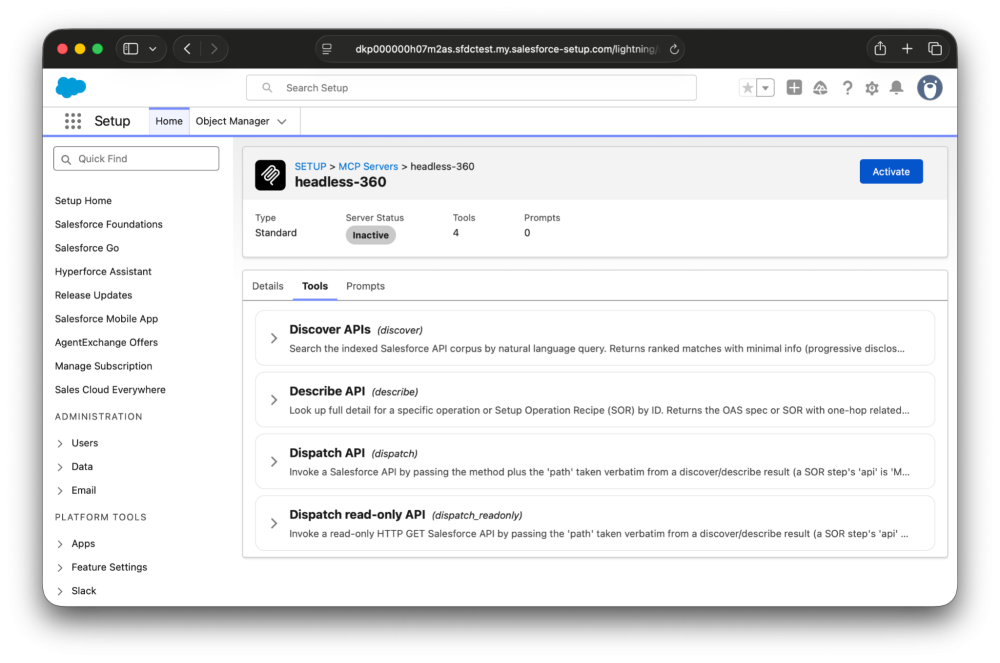
You could ask your agent to “Plan an integration that sends events to AWS when Account records change.” Your agent can propose and build an integration, saving you the time you’d otherwise spend clicking through three Setup screens to configure Change Data Capture, a named credential, and the event relay.
In this example, an MCP client will start by using the Discover tool to find the relevant skills for Change Data Capture, Named Credentials, and Event Relay.
Once it’s found them, it’ll use the Describe tool to inspect the API calls it needs to make and the order in which they need to happen. In order to create an event relay, the agent needs to start by creating a named credential.
Finally, once the agent knows what API calls need to be made, it executes those calls with the Dispatch tool. Of course, this same pattern extends beyond the work developers and admins do to the work that business users take on across Salesforce’s products.
Guardrails for MCP clients
Agents are powerful, and it’s worth talking about the guardrails that are in place today to make sure your MCP clients keep out of trouble. This matters for business users on the Headless 360 MCP Server, and it matters more for admins and developers. Every Salesforce Hosted MCP transaction runs as the authenticated user, scoped through an external client app with the mcp_api scope. CRUD, FLS, sharing rules, profile permissions, and permission sets all apply. If you can’t do it in Salesforce, your agent can’t do it through the MCP server. The audit trail attributes actions to you.
On top of the gating Salesforce that enforces, most MCP clients also allow you to set tool-level restrictions. If you want to verify the actions that your agent will take on your behalf, you can set your tool-level permissions to have the agent ask for your approval each time it runs a tool. This matters most for admins and developers, who carry wide-ranging permissions in their orgs and should be careful about the changes they and their agents take. As always, follow the best practice of making configuration changes in sandboxes and developer orgs before you take them to production.
Up-skilling agents with thousands of new skills
We’re launching this Beta with roughly 100 skills that will sit behind our MCP server. We’re also creating thousands of new skills that sit behind the Headless 360 MCP Server.
At launch, the majority of these skills will be focused on Setup operations for admins, extending the kind of capabilities in Agentforce for Setup to headless MCP clients. During the Beta, the Headless 360 MCP Server will grow to encompass cloud-specific skills that represent the breadth of what business users can do with Salesforce, too.
A few of the high-traffic tasks that your agent can handle in July include:
- Managing users: Create, deactivate, freeze and unfreeze, reset or set passwords, assign permission sets and permission set licenses, this includes the full surface that a builder reaches for on the User detail page
- Managing Apex triggers: Read, write, and deploy Apex triggers
- Building event-driven integrations: Define platform events, manage Change Data Capture, and manage event relays
- Creating named credentials: Designate auth mechanisms, endpoints, and certificate handling
Unsurprisingly, there’s a lot of AI being used to generate the skills that back our Headless 360 MCP Server. As part of this project, we created an internal tool called the Headless 360 Factory that scans Salesforce Setup, identifies features that are missing API access, and then generates APIs and skills that agents can use via our MCP server. Feature teams across Salesforce are reviewing these skills now and bringing their own to make sure that all of Salesforce is represented in one MCP server.
Join the Beta
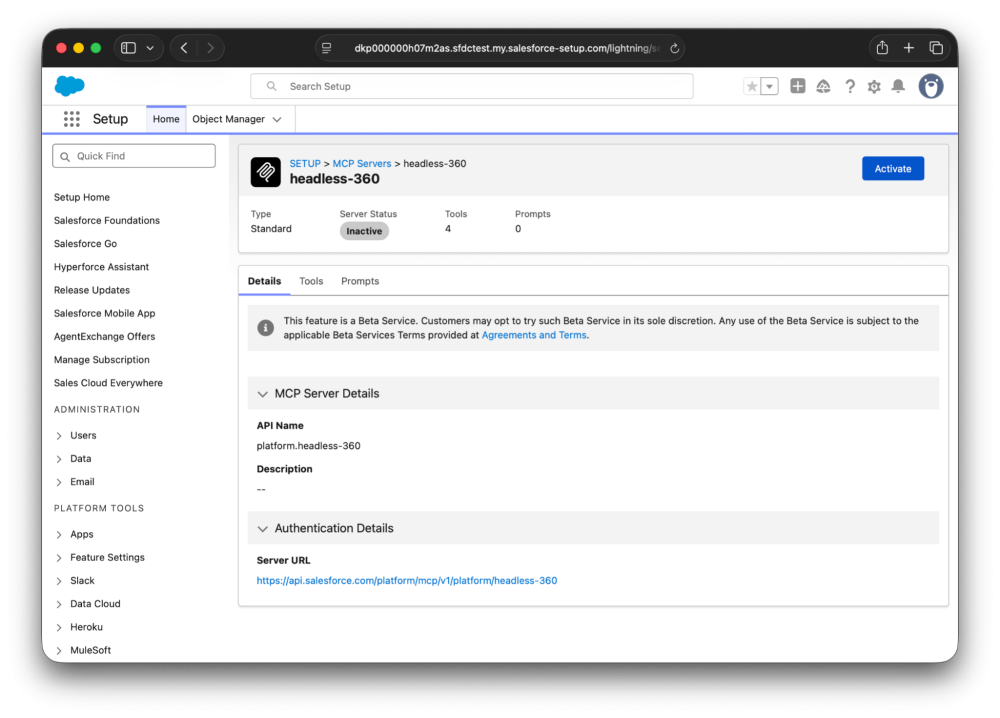
To join the Beta, go to Salesforce Setup, find the Salesforce Hosted MCP Servers section, look for Headless 360 in the list, and click Activate. We also want your feedback on this server. Post questions, issues, and comments in our github repo for Salesforce Hosted MCP Servers.
Resources
- Salesforce Hosted MCP Servers Developer Guide
- Salesforce Hosted MCP Servers GA Announcement
- Salesforce Hosted MCP Servers Github Repo
About the author
Tyson Read is a Senior Director of Product Management at Salesforce. He works on MCP and event-driven integrations.