


Get Started with the App Template Framework
Tableau Next Template Builder
Create a Tableau Next workspace with insights and data assets, generate a template with the template builder to package your workspace as an app, and then deploy your app template across Salesforce orgs.
For more information on using the Tableau Next template builder, see Build App Templates from Your Tableau Next Workspace (Beta).
Tools
These are recommended developer tools for working with apps and templates.
Salesforce CLI - Orchestrator Plugin
The Salesforce CLI plugin for working with orchestrated apps, templates, assets, and services.
To install, run
sf plugins install @salesforce/plugin-orchestrator@latest
For reference, see Salesforce Orchestrator Commands.
Visual Studio Code
While orchestrator commands can be run from the command line, you can also run them from the VS Code command palette.
ATF Connect Rest API
Directly access the app-framework Rest APIs to create and manage templates, apps, assets, chains, tasks, variables, and rules.
For reference, see App Framework Connect REST API
For information on how to set up authentication for using the APIs, see Authentication in the Tableau Next REST API developer guide.
Prerequisites
To work with the App Template Framework, you must have these prerequisites
Org Requirements
Your org must have Data 360, Semantic Layer, and Tableau Next enabled.
Licenses and Permission Sets
Links to current licenses and user permission sets are provided. For app template framework development work, it’s recommended that your user has user permission sets with admin-level permissions for each feature set.
Data 360
Tableau Semantics
Tableau Next
Architecture
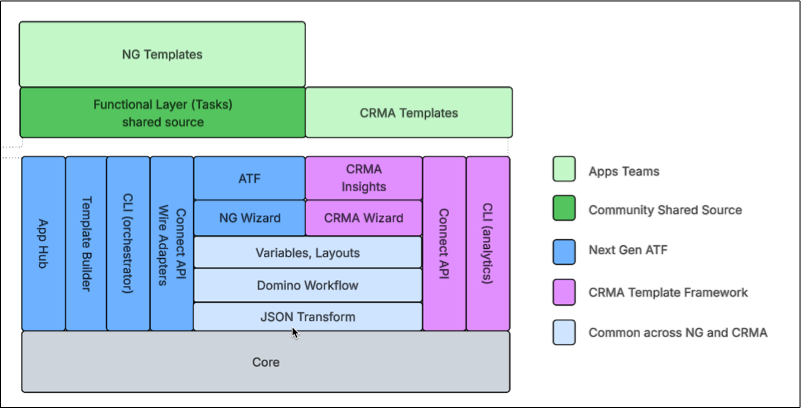
 j
j