


Simple case Operator
Use case in a foreach statement to assign different field values in different situations. case supports two syntax forms: searched case and simple case. This section explains simple case.
Syntax
1case
2  primary_expr
3  when test_expr then result_expr
4  [when test_expr2 then result_expr2 ]
5  [else default_expr ]
6end
case…end opens and closes the case operator.
primary_expr is any expression that takes a single input value and returns a single output value. May contain values, identifiers, and scalar functions (including date and math functions). The expression can return a number, string, or date.
when…then defines a conditional statement. A case expression can contain one or more conditional statements.
test_expr is any expression that takes a single input value and returns a single output value. May contain values, identifiers, and scalar functions (including date and math functions). The expression must return the same data type as primary_expr.
result_expr is any expression that takes a single input value and returns a single output value. May contain values, identifiers, and scalar functions (including date and math functions). The expression must return the same data type as primary_expr.
else default_expr (optional) is any expression that takes a single input value and returns a single output value. May contain values, identifiers, and scalar functions (including date and math functions). The expression can return a number, string, or date.
Usage
Statements are evaluated in the order that they are given. If test_expr returns true, the corresponding result_expr is returned. You can specify any number of when/then statements.
You can use else to specify a default expression. For example, if no industry is specified then use the string “No Industry Specified”. If you don’t specify a default statement then null is returned.
You can use case expressions in foreach statements. You cannot use case in order, group, or filter statements.
Example
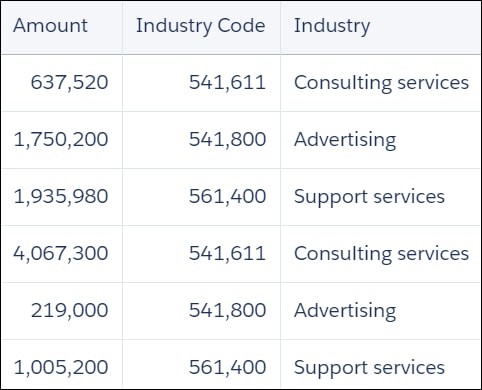
Suppose that you want to create a dimension that displays the meaning of industry codes. Use case to parse the Industry_Code field and specify the corresponding string.
1q = foreach q generate Amount as 'Amount', 'Industry_Code' as 'Industry_Code', (case 'Industry_Code'
2      when 541611 then "Consulting services"
3      when 541800 then "Advertising"
4      when 561400 then "Support services"
5      else "Unspecified"
6end) as 'Industry';
The resulting data displays the meaning of industry codes:
Handling Null Values
In general, null values can’t be compared. When _ primary_expr_ or test_expr evaluates to null, the default_expr is returned. If no default expression is specified, null is returned.
See Also
 j
j