Share CRM Analytics Assets Between Apps
Use the Template Dependencies feature to reuse CRM Analytics dashboards, datasets, and lenses across apps.
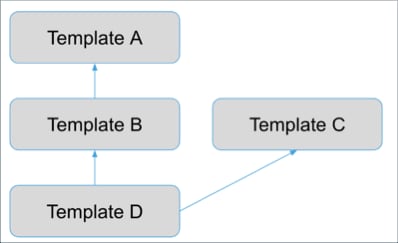
Create dependencies between app templates with Template Dependencies. Create the dependency from one app template (the dependent app template, Template D in the image) to assets in another (the supporting app template, Template A in the image) that reside in the same org. Apps created from the dependent template can include dashboards, datasets, and lenses from the supporting template. A template (Template B) can be both a dependent template and a supporting template at the same time.
Template dependencies can’t be used with templates packaged for automatic install. The creation of auto-install requests can’t guarantee dependent templates are installed in the correct order.
While a template declares dependencies on other templates, it is really the apps that get created from the templates that have dependencies on each other. If Template B declares a dependency on Template A, it means that to create an app from Template B, you must first create one or more apps from Template A. The dependent and supporting apps must both reside in the same org.
You can only create dependencies on apps created from templates. That’s because the dependency refers to the template. There is template-to-template dependency in creating token references and app-to-app dependency when app assets are created from the dependent template.


 j
j