Newer Version Available

This content describes an older version of this product. View Latest

Customizing the Articles Tool

The Articles tool lets support agents browse Salesforce Knowledge articles, see whether articles are attached to a case, and share relevant articles with customers. With the support:caseArticles component, you can:
  • Customize the appearance and dimensions of the Articles tool.
  • Define how the tool’s search function works, including which article types and keywords are used by default and whether advanced search is available.
  • Specify whether agents can attach articles to emails.

support:caseArticles Attributes

Attribute Name Attribute Type Description Required? API Version Access
articleTypes String Article types to be used to filter the search. Multiple article types can be defined, separated by commas. 25.0
attachToEmailEnabled Boolean A Boolean value that specifies whether articles can be attached to emails. 25.0
bodyHeight String The height of the body in pixels (px) or 'auto' to automatically adjust to the height of the currently displayed list of articles. 25.0
caseId id Case ID of the record for which to display the case articles. Yes 25.0
categories String Data categories to be used to filter the search. The format of this value should be: 'CatgeoryGroup1:Category1' where CategoryGroup1 and Category1 are the names of a Category Group and a Category respectively. Multiple category filters can be specified separated by commas but only one per category group. 25.0
defaultKeywords String The keywords to be used when the defaultSearchType attribute is 'keyword'. If no keywords are specified, the Case subject is used as a default. 25.0
defaultSearchType String Specifies the default query of the article search form when it is first displayed. The value can be 'keyword', 'mostViewed', or 'lastPublished'. 25.0
id String An identifier that allows the component to be referenced by other components on the page. 25.0 Global
language String The language used for filtering the search if multilingual Salesforce Knowledge is enabled. 25.0
logSearch Boolean A Boolean value that specifies whether keyword searches should be logged. 25.0
mode String Specifies whether the component displays articles currently attached to the case, an article search form, or both. The value can be 'attached', 'search', 'attachedAndSearch', or 'searchAndAttached'. 25.0
onSearchComplete String The JavaScript invoked after an article search has completed. 25.0
rendered Boolean A Boolean value that specifies whether the component is rendered on the page. If not specified, this value defaults to true. 25.0 Global
reRender Object The ID of one or more components that are redrawn when the result of the action method returns to the client. This value can be a single ID, a comma-separated list of IDs, or a merge field expression for a list or collection of IDs. 25.0
searchButtonName String The display name of the search button. 25.0
searchFieldWidth String The width of the keyword search field in pixels (px). 25.0
searchFunctionName String The name of a function that can be called from JavaScript to search for articles if the widget is currently in search mode. 25.0
showAdvancedSearch Boolean A Boolean value that specifies whether the advanced search link should be displayed. 25.0
title String The title displayed in the component's header. 25.0
titlebarStyle String The style of the title bar can be 'expanded', 'collapsed', 'fixed', or 'none'. 25.0
width String The width of the component in pixels (px) or percentage (%). 25.0

Use Case

Cirrus Computers wanted to customize the Case Feed articles tool so agents could more easily find articles to help resolve customers’ issues.

Cirrus used the support:caseArticles component to create an articles tool that:
  1. Appears in the right sidebar of the page and is open by default on all case pages.
  2. Uses search-as-you-type functionality to show suggested articles quickly.
  3. Lets agents attach articles to messages they write with the Email action.
  4. Displays the most recently published articles when no articles are attached to a case.
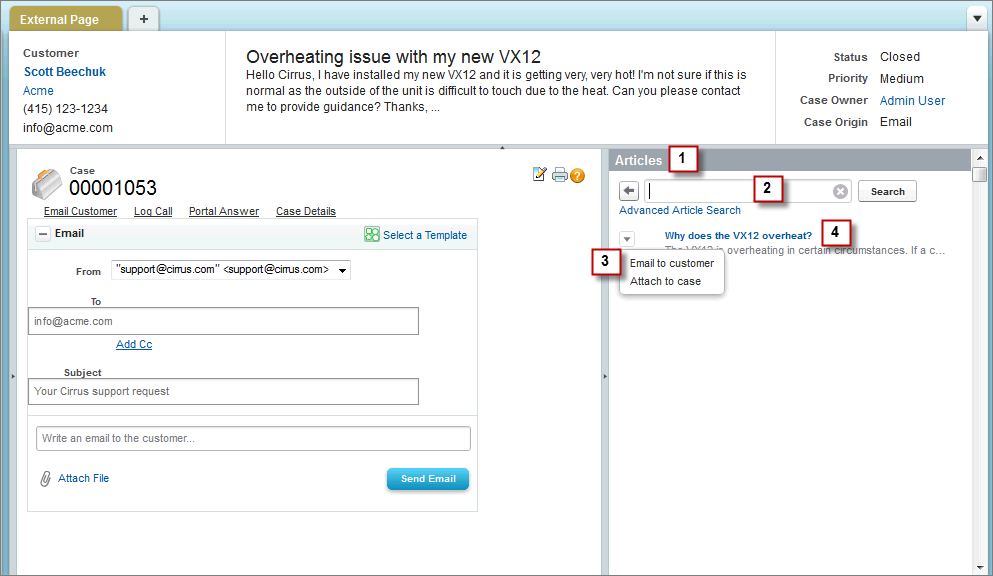
Case Feed articles tool example

Code Sample
