


Customizing Case Feed with Visualforce
 j
j
No Results
Search Tips:
- Please consider misspellings
- Try different search keywords
Newer Version Available
Customizing the Articles Tool
The Articles tool lets support agents browse Salesforce Knowledge articles,
see whether articles are attached to a case, and share relevant articles
with customers. With the support:caseArticles component, you
can:
- Customize the appearance and dimensions of the Articles tool.
- Define how the tool’s search function works, including which article types and keywords are used by default and whether advanced search is available.
- Specify whether agents can attach articles to emails.
support:caseArticles Attributes
Use Case
Cirrus Computers wanted to customize the Case Feed articles tool so agents could more easily find articles to help resolve customers’ issues.
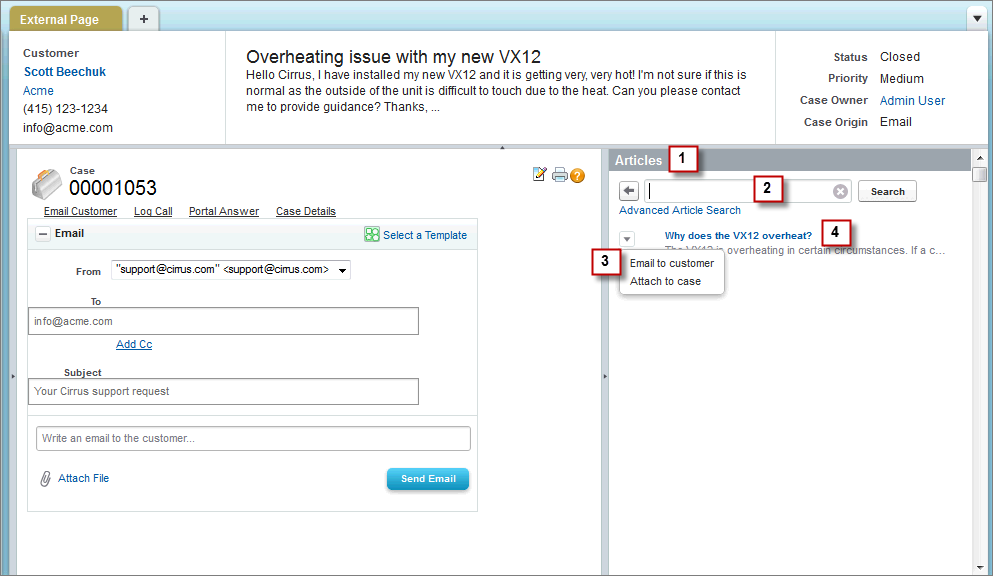
Cirrus used the support:caseArticles component to create an articles tool that:
- Appears in the right sidebar of the page and is open by default on all case pages.
- Uses search-as-you-type functionality to show suggested articles quickly.
- Lets agents attach articles to messages they write with the Email action.
- Displays the most recently published articles when no articles are attached to a case.
Code Sample
1swfobject.registerObject("clippy.codeblock-0", "9");<apex:page standardController="Case">
2    <div style="margin-left:-10px;margin-right:-10px;">
3        <div style="background-color: #99A3AC;color:#FFFFFF;font-size:1.1em;font-weight: bold;padding:3px 6px 3px 6px;">Articles</div>
4        <support:caseArticles caseId="{!case.id}"
5            bodyHeight="auto"
6            titlebarStyle="none"
7            searchButtonName="Search"
8            searchFieldWidth="200px"
9            defaultSearchType="lastPublished"
10        />
11    </div>
12</apex:page>