


Visualforce Developer’s Guide
 j
j
No Results
Search Tips:
- Please consider misspellings
- Try different search keywords
Newer Version Available
Providing Chart Data via a Controller Method
The most straightforward way to provide data to a chart
is using a Visualforce expression that references a controller method. Simply reference
the controller in the <apex:chart> data attribute.
On the server side, write a controller method that returns a List of objects, which can be your own Apex wrapper objects as in A Simple Charting Example, sObjects, or AggregateResult objects. The method is evaluated server-side, and the results serialized to JSON. On the client, these results are used directly by <apex:chart>, with no further opportunity for processing.
To illustrate this technique with sObjects, here is a simple controller that returns a list of Opportunities, and a bar chart for their amounts:
1swfobject.registerObject("clippy.codeblock-0", "9");public class OppsController {
2
3    // Get a set of Opportunities
4    public ApexPages.StandardSetController setCon {
5        get {
6            if(setCon == null) {
7                setCon = new ApexPages.StandardSetController(Database.getQueryLocator(
8                      [SELECT name, type, amount, closedate FROM Opportunity]));
9                setCon.setPageSize(5);
10            }
11            return setCon;
12        }
13        set;
14    }
15
16    public List<Opportunity> getOpportunities() {
17         return (List<Opportunity>) setCon.getRecords();
18    }
19}
201swfobject.registerObject("clippy.codeblock-1", "9");<apex:page controller="OppsController">
2 <apex:chart data="{!Opportunities}" width="600" height="400">
3 <apex:axis type="Category" position="left" fields="Name" title="Opportunities"/>
4 <apex:axis type="Numeric" position="bottom" fields="Amount" title="Amount"/>
5 <apex:barSeries orientation="horizontal" axis="bottom"
6 xField="Name" yField="Amount"/>
7 </apex:chart>
8 <apex:dataTable value="{!Opportunities}" var="opp">
9 <apex:column headerValue="Opportunity" value="{!opp.name}"/>
10 <apex:column headerValue="Amount" value="{!opp.amount}"/>
11 </apex:dataTable>
12</apex:page>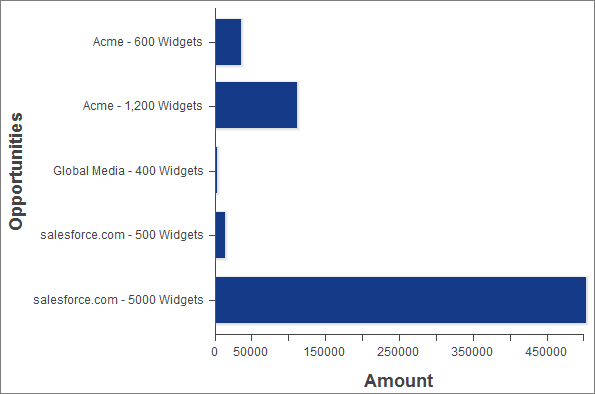
There are two important things to notice about this example:
- The Visualforce chart components access the data attributes from a List of Opportunity sObjects the same way as from the simple Data object used in A Simple Charting Example.
- The object field names used as data attributes are case-sensitive in JavaScript while field names in Apex and Visualforce are case-insensitive. Be careful to use the precise field name in the fields, xField, and yField attributes of axes and data series components, or your chart will silently fail.