


Force.com Platform Fundamentals
 j
j
No Results
Search Tips:
- Please consider misspellings
- Try different search keywords
Newer Version Available
Introducing Workflow
Workflow is a Force.com platform business-logic engine that allows us to define rules to automate certain actions, such as sending email alerts, assigning tasks, or updating field values. Any time that changes to a record meet the conditions in a workflow rule, the platform automatically performs the actions associated with the rule.
For example, let's say Ben Stuart, a software development manager, has decided to extend an offer to Ethan Tran, a bright young candidate who's interested in the Software Engineer position. At Universal Containers, it's a recruiter's job to extend offers, but in this case, Mario Ruiz, the recruiter responsible for the Software Engineer position, doesn't know whether or not Ben has made a decision unless Ben emails or calls him directly.
Instead of relying on Ben to remember to tell Mario, we can set up a simple workflow that triggers the assignment of the appropriate task whenever the status on a job application record is set to Extend an Offer or Rejected. As soon as Ben changes the status of the candidate's job application, workflow creates the appropriate task and sends Mario a notification email, as shown in the following diagram.
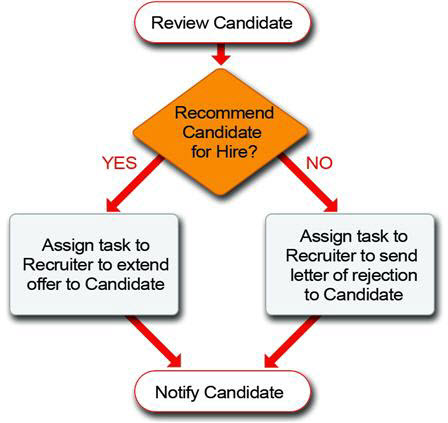
Pretty powerful, isn't it? In general, if we can come up with a standard rule that specifies when a particular event should happen, we can make it happen automatically with workflow. Workflow is one of the secret ingredients that's going to transform our Recruiting app from a glorified database into a fully functional tool that everyone finds useful.
Now that we've got a general idea of what workflow's all about, let's take a closer look at the individual components that make up workflow: rules and actions.