


Force.com Platform Fundamentals
 j
jNewer Version Available
Introducing Process Builder
- Criteria that determine when to execute action groups and
- Immediate and scheduled actions to execute when those criteria are met.
Example
Instead of relying on Ben to remember to tell Mario, let’s automate it! We can set up a simple process that automatically assigns a task to the recruiter when a manager decides to extend an offer or reject a job application.
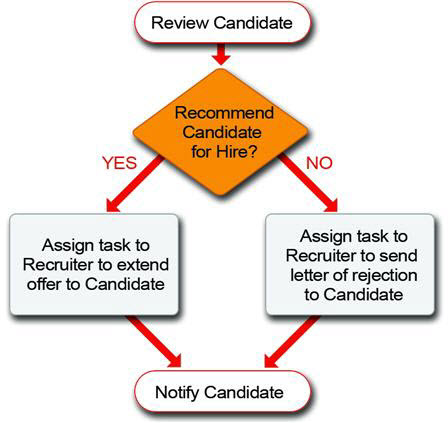
Pretty powerful, isn't it? In general, if we can come up with a condition that specifies when a particular event should happen, we can make it happen automatically with the Process Builder. Processes are one of the secret ingredients that will transform our Recruiting app from a glorified database into a fully functional tool that everyone finds useful.
Now that we've got a general idea of what processes are all about, let's take a closer look at what it takes to create a process.