


Force.com Apex Code Developer's Guide
 j
jNewer Version Available
Define an Action Link and Post with a Feed Element
This example creates one action link in an action link group, associates the action link
group with a feed item, and posts the feed item. 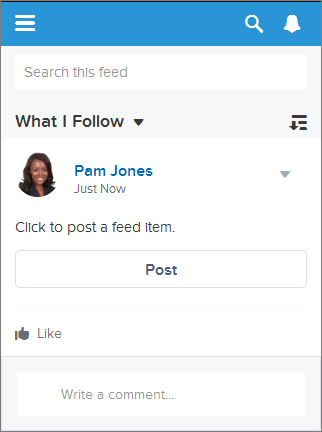
When a user clicks the action link, the action link requests the Chatter REST API resource /chatter/feed-elements, which posts a feed item to the user’s
feed. After the user clicks the action link and it executes successfully, its status changes
to successful and the feed item UI is updated: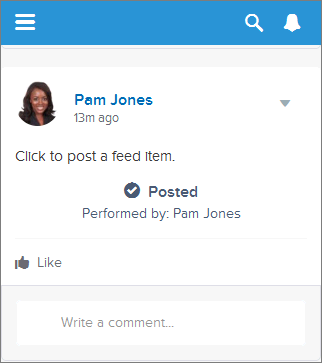 Refresh the user’s feed to see the new
post:
Refresh the user’s feed to see the new
post: This is a simple example, but it shows you how to
use action links to make a call to a Salesforce resource.
This is a simple example, but it shows you how to
use action links to make a call to a Salesforce resource.
Think of an action link as a button on a feed item. Like a button, an action link definition includes a label (labelKey). An action link group definition also includes other properties like a URL (actionUrl), an HTTP method (method), and an optional request body (requestBody) and HTTP headers (headers).
When a user clicks this action link, an HTTP POST request is made to a Chatter REST API resource, which posts a feed item to Chatter. The requestBody property holds the request body for the actionUrl resource, including the text of the new feed item. In this example, the new feed item includes only text, but it could include other capabilities such as a file attachment, a poll, or even action links.
Just like radio buttons, action links must be nested in a group. Action links within a group share the properties of the group and are mutually exclusive (you can click on only one action link within a group). Even if you define only one action link, it must be part of an action link group.
This example calls ConnectApi.ActionLinks.createActionLinkGroupDefinition(communityId, actionLinkGroup) to create an action link group definition.
It saves the action link group ID from that call and associates it with a feed element in a call to ConnectApi.ChatterFeeds.postFeedElement(communityId, feedElement, feedElementFileUpload).
To use this code, substitute an OAuth value for your own Salesforce organization. Also, verify that the expirationDate is in the future. Look for the To Do comments in the code.
1swfobject.registerObject("clippy.codeblock-0", "9");
2
3
4
5
6
7
8
9
10
11
12
13
14
15
16
17ConnectApi.ActionLinkGroupDefinitionInput actionLinkGroupDefinitionInput = new ConnectApi.ActionLinkGroupDefinitionInput();
18ConnectApi.ActionLinkDefinitionInput actionLinkDefinitionInput = new ConnectApi.ActionLinkDefinitionInput();
19ConnectApi.RequestHeaderInput requestHeaderInput1 = new ConnectApi.RequestHeaderInput();
20ConnectApi.RequestHeaderInput requestHeaderInput2 = new ConnectApi.RequestHeaderInput();
21
22// Create the action link group definition.
23actionLinkGroupDefinitionInput.actionLinks = New List<ConnectApi.ActionLinkDefinitionInput>();
24actionLinkGroupDefinitionInput.executionsAllowed = ConnectApi.ActionLinkExecutionsAllowed.OncePerUser;
25actionLinkGroupDefinitionInput.category = ConnectApi.PlatformActionGroupCategory.Primary;
26// To Do: Verify that the date is in the future.
27// Action link groups are removed from feed elements on the expiration date.
28datetime myDate = datetime.newInstance(2016, 3, 1);
29actionLinkGroupDefinitionInput.expirationDate = myDate;
30
31// Create the action link definition.
32actionLinkDefinitionInput.actionType = ConnectApi.ActionLinkType.Api;
33actionLinkDefinitionInput.actionUrl = '/services/data/v33.0/chatter/feed-elements';
34actionLinkDefinitionInput.headers = new List<ConnectApi.RequestHeaderInput>();
35actionLinkDefinitionInput.labelKey = 'Post';
36actionLinkDefinitionInput.method = ConnectApi.HttpRequestMethod.HttpPost;
37actionLinkDefinitionInput.requestBody = '{\"subjectId\": \"me\",\"feedElementType\": \"FeedItem\",\"body\": {\"messageSegments\": [{\"type\": \"Text\",\"text\": \"This is a test post created via an API action link.\"}]}}';
38actionLinkDefinitionInput.requiresConfirmation = true;
39
40// To Do: Substitute an OAuth value for your Salesforce org.
41requestHeaderInput1.name = 'Authorization';
42requestHeaderInput1.value = 'OAuth 00DD00000007WNP!ARsAQCwoeV0zzAV847FTl4zF.85w.EwsPbUgXR4SAjsp';
43actionLinkDefinitionInput.headers.add(requestHeaderInput1);
44
45requestHeaderInput2.name = 'Content-Type';
46requestHeaderInput2.value = 'application/json';
47actionLinkDefinitionInput.headers.add(requestHeaderInput2);
48
49// Add the action link definition to the action link group definition.
50actionLinkGroupDefinitionInput.actionLinks.add(actionLinkDefinitionInput);
51
52// Instantiate the action link group definition.
53ConnectApi.ActionLinkGroupDefinition actionLinkGroupDefinition = ConnectApi.ActionLinks.createActionLinkGroupDefinition(Network.getNetworkId(), actionLinkGroupDefinitionInput);
54
55ConnectApi.FeedItemInput feedItemInput = new ConnectApi.FeedItemInput();
56ConnectApi.FeedElementCapabilitiesInput feedElementCapabilitiesInput = new ConnectApi.FeedElementCapabilitiesInput();
57ConnectApi.AssociatedActionsCapabilityInput associatedActionsCapabilityInput = new ConnectApi.AssociatedActionsCapabilityInput();
58ConnectApi.MessageBodyInput messageBodyInput = new ConnectApi.MessageBodyInput();
59ConnectApi.TextSegmentInput textSegmentInput = new ConnectApi.TextSegmentInput();
60
61// Set the properties of the feedItemInput object.
62feedItemInput.body = messageBodyInput;
63feedItemInput.capabilities = feedElementCapabilitiesInput;
64feedItemInput.subjectId = 'me';
65
66// Create the text for the post.
67messageBodyInput.messageSegments = new List<ConnectApi.MessageSegmentInput>();
68textSegmentInput.text = 'Click to post a feed item.';
69messageBodyInput.messageSegments.add(textSegmentInput);
70
71
72// The feedElementCapabilitiesInput object holds the capabilities of the feed item.
73// Define an associated actions capability to hold the action link group.
74// The action link group ID is returned from the call to create the action link group definition.
75feedElementCapabilitiesInput.associatedActions = associatedActionsCapabilityInput;
76associatedActionsCapabilityInput.actionLinkGroupIds = new List<String>();
77associatedActionsCapabilityInput.actionLinkGroupIds.add(actionLinkGroupDefinition.id);
78
79// Post the feed item.
80ConnectApi.FeedElement feedElement = ConnectApi.ChatterFeeds.postFeedElement(Network.getNetworkId(), feedItemInput, null);