


Force.com Platform Fundamentals
 j
jTry It Out: Add Predefined Field Values
A few fields still need to be filled out: Status, Open Date, and Hire By. These fields represent important details, but we don’t need our users to fill them out every time they use the action. We know that every new position record should have a Status of New Position, an Open Date of the current date, and a Hire By of 90 days after the Open Date. Let’s take care of those with predefined field values now from the detail page for the New Standard Position global action.
- In the Predefined Field Values related list, click New.
- For the Field Name drop-down list, select Status.
- For the specific value, select New Position.
- Click Save.
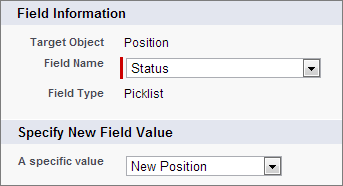
Now every position created using this global action will automatically have a Status of New Position. Users who are creating a position by using the action don’t have to worry about selecting that field. They can focus on the variable information. Use the same steps to create predefined field values for Open Date and Hire By using this table.
| Field Name | New Field Value |
|---|---|
| Open Date | TODAY() |
| Hire By | TODAY() + 90 |
That’s it! Now let’s create a few more global actions. We currently have one for creating new standard positions, but what about IT positions? And our recruiters would also appreciate being able to easily create new candidate and job application records. Let’s get busy!