


Lightning Components Developer’s Guide
 j
jNewer Version Available
Component Composition
Let's see how we can fit components together. We will first create a few simple components: docsample:helloHTML and docsample:helloAttributes. Then, we’ll create a wrapper component, docsample:nestedComponents, that contains the simple components.
Here is the source for helloHTML.cmp.
1swfobject.registerObject("clippy.codeblock-0", "9");
2
3
4
5
6
7
8
9
10
11
12
13
14
15
16
17<!--docsample:helloHTML-->
18<aura:component>
19  <div class="white">
20    Hello, HTML!
21  </div>
22
23  <h2>Check out the style in this list.</h2>
24
25  <ul>
26    <li class="red">I'm red.</li>
27    <li class="blue">I'm blue.</li>
28    <li class="green">I'm green.</li>
29  </ul>
30</aura:component>
31
CSS source
1swfobject.registerObject("clippy.codeblock-1", "9");
2
3
4
5
6
7
8
9
10
11
12
13
14
15
16
17.THIS {
18    background-color: grey;
19}
20
21.THIS.white {
22    background-color: white;
23}
24
25.THIS .red {
26    background-color: red;
27}
28
29.THIS .blue {
30    background-color: blue;
31}
32
33.THIS .green {
34    background-color: green;
35}
36
Output

Here is the source for helloAttributes.cmp.
1swfobject.registerObject("clippy.codeblock-2", "9");
2
3
4
5
6
7
8
9
10
11
12
13
14
15
16
17<!--docsample:helloAttributes-->
18<aura:component>
19    <aura:attribute name="whom" type="String" default="world"/>
20    Hello {!v.whom}!
21</aura:component>
22
nestedComponents.cmp uses composition to include other components in its markup.
1swfobject.registerObject("clippy.codeblock-3", "9");
2
3
4
5
6
7
8
9
10
11
12
13
14
15
16
17<!--docsample:nestedComponents-->
18<aura:component>
19    Observe!  Components within components!
20
21    <docsample:helloHTML/>
22
23    <docsample:helloAttributes whom="component composition"/>
24</aura:component>
25
Output

Including an existing component is similar to including an HTML tag. Reference the component by its "descriptor", which is of the form namespace:component. nestedComponents.cmp references the helloHTML.cmp component, which lives in the docsample namespace. Hence, its descriptor is docsample:helloHTML.
Note how nestedComponents.cmp also references docsample:helloAttributes. Just like adding attributes to an HTML tag, you can set attribute values in a component as part of the component tag. nestedComponents.cmp sets the whom attribute of helloAttributes.cmp to "component composition".
Attribute Passing
You can also pass attributes to nested components. nestedComponents2.cmp is similar to nestedComponents.cmp, except that it includes an extra passthrough attribute. This value is passed through as the attribute value for docsample:helloAttributes.
1swfobject.registerObject("clippy.codeblock-4", "9");
2
3
4
5
6
7
8
9
10
11
12
13
14
15
16
17<!--docsample:nestedComponents2-->
18<aura:component>
19    <aura:attribute name="passthrough" type="String" default="passed attribute"/>
20    Observe!  Components within components!
21
22    <docsample:helloHTML/>
23
24    <docsample:helloAttributes whom="{!v.passthrough}"/>
25</aura:component>
26
Output
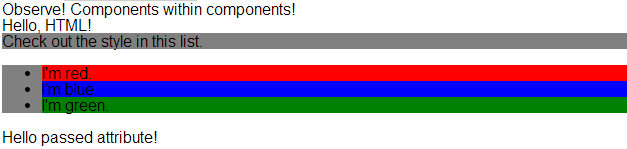
helloAttributes is now using the passed through attribute value.
Definitions versus Instances
In object-oriented programming, there’s a difference between a class and an instance of that class. Components have a similar concept. When you create a .cmp resource, you are providing the definition (class) of that component. When you put a component tag in a .cmp , you are creating a reference to (instance of) that component.
It shouldn't be surprising that we can add multiple instances of the same component with different attributes. nestedComponents3.cmp adds another instance of docsample:helloAttributes with a different attribute value. The two instances of the docsample:helloAttributes component have different values for their whom attribute .
1swfobject.registerObject("clippy.codeblock-5", "9");
2
3
4
5
6
7
8
9
10
11
12
13
14
15
16
17<!--docsample:nestedComponents3-->
18<aura:component>
19    <aura:attribute name="passthrough" type="String" default="passed attribute"/>
20    Observe!  Components within components!
21
22    <docsample:helloHTML/>
23
24    <docsample:helloAttributes whom="{!v.passthrough}"/>
25
26    <docsample:helloAttributes whom="separate instance"/>
27</aura:component>
28
Output
