


Visualforce Developer’s Guide
 j
jNewer Version Available
Editing Records with List Controllers
You can edit a set of records using list controllers, too. For
example, if you create a page with the following markup: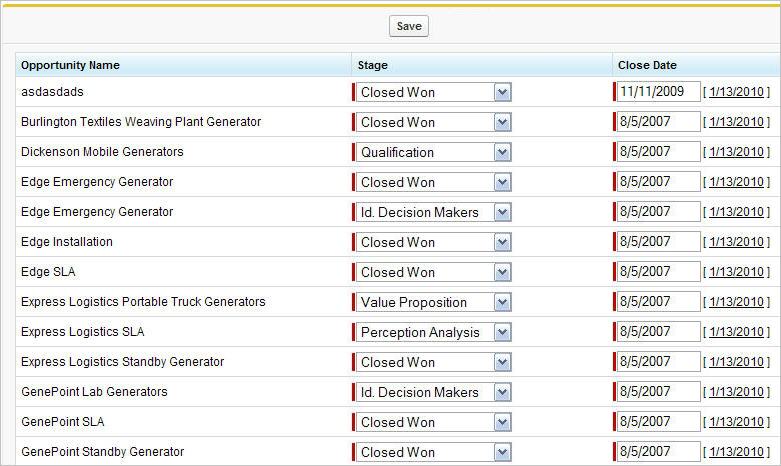 For more information, see Mass-Updating Records with a Custom List
Controller.
For more information, see Mass-Updating Records with a Custom List
Controller.
1swfobject.registerObject("clippy.codeblock-0", "9");
2
3
4
5
6
7
8
9
10
11
12
13
14
15
16
17<apex:page standardController="Opportunity" recordSetVar="opportunities" tabStyle="Opportunity" sidebar="false">
18    <apex:form >
19        <apex:pageBlock >
20            <apex:pageMessages />
21            <apex:pageBlockButtons >
22                <apex:commandButton value="Save" action="{!save}"/>
23            </apex:pageBlockButtons>
24            <apex:pageBlockTable value="{!opportunities}" var="opp">
25                <apex:column value="{!opp.name}"/>
26                <apex:column headerValue="Stage">
27                    <apex:inputField value="{!opp.stageName}"/>
28                </apex:column>
29                <apex:column headerValue="Close Date">
30                    <apex:inputField value="{!opp.closeDate}"/>
31                </apex:column>
32            </apex:pageBlockTable>
33        </apex:pageBlock>
34    </apex:form>
35</apex:page>