


Force.com SOQL and SOSL Reference
 j
jNewer Version Available
SOSL Limits
SOSL applies specific limits to objects or situations in search results. As a result,
users don’t always find all possible matching results, because the record that they’re looking for
falls outside the maximum number of records that are searched. This outline and illustration can
help you understand how the search engine processes SOSL searches.
Your organization’s Salesforce data is indexed and retrieved in a way that returns the most relevant results to users.
However, it’s possible for users not to find all the matching results that they can access because the record that they’re looking for falls outside the maximum number of records searched.
The search engine processes SOSL
searches in this order (the numbers in this list correspond to the numbers in the image below).
- The search engine looks for matches to the search term across a maximum number of records.
-
SOSL then applies specific limits to
objects or situations.
In general, SOSL has the same limits that SOQL imposes and has an overall limit of 2,000 results returned, beginning with API version 28.0. Earlier versions return a maximum of 200 results.
This results set can vary by user issuing the search, and can change over time.- Records that users accessed recently are more likely to be included in their search results.
- The index can change throughout the day as users delete and create records.
- Administrators (users with the “View All Data” permission) see the full set of results returned, as specified in the RETURNING clause.
- Individual users see only those records that they have access to.
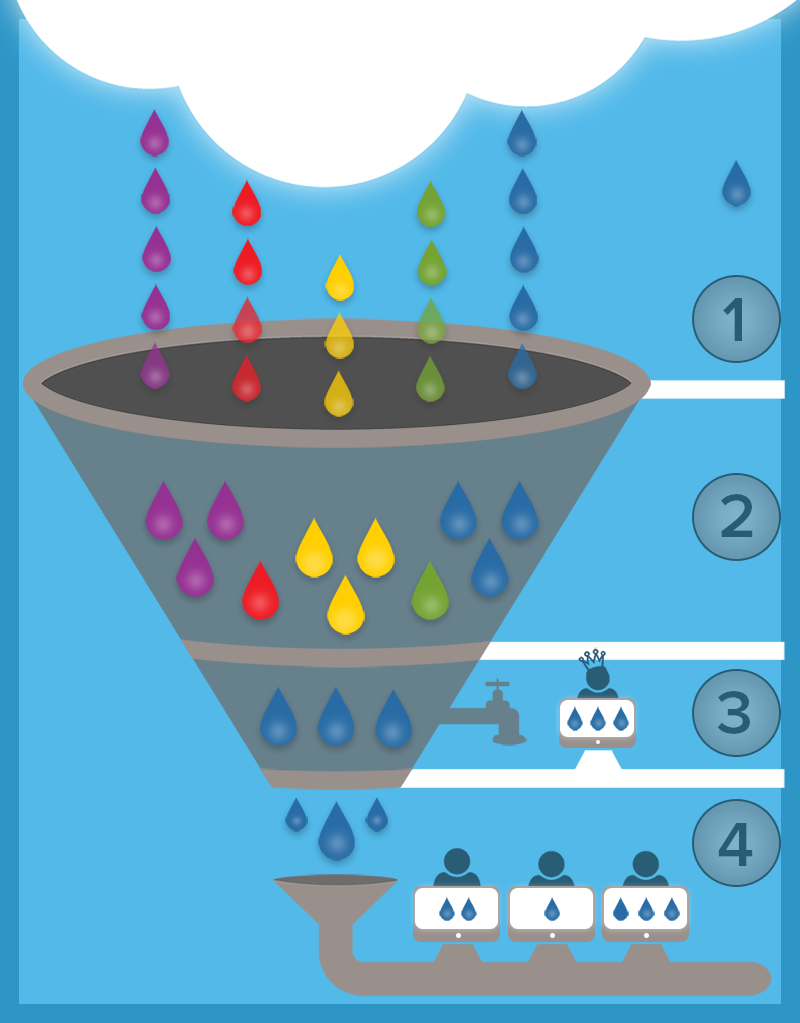
Example
For example, let’s say that each raindrop in the image above represents a record, each
color represents an object, and the blue raindrop that’s falling outside the funnel represents
the account record, “Acme, Inc.” In this example, the maximum number of matching records that are
returned is 21 (represented by the number of raindrops falling into the funnel). When users
search for “Acme, Inc.,” the search engine looks for matches until it reaches the limit of 21
matching records overall, which includes only the first 5 account records. Because “Acme, Inc.”
is not included in the set of records that’s searched, it will not be included in the returned
results, even if the user who’s searching has access to it.
SOSL Limits for External Objects
- Only text, text area, and long text area fields on external objects can be searched. If an external object has no searchable fields, searches on that object return no records.
- External objects don’t support the following.
- INCLUDES operator
- LIKE operator
- EXCLUDES operator
- toLabel() function
- External objects also don’t support Salesforce Knowledge-specific clauses,
including the following.
- UPDATE TRACKING clause
- UPDATE VIEWSTAT clause
- WITH DATA CATEGORY clause
- External
objects must be specified explicitly in a RETURNING clause to be returned in search results. For
example:
1FIND {MyProspect} RETURNING MyExternalObject, MyOtherExternalObject
The following limits apply only to the OData
2.0 adapter for Lightning Connect.
- The OData 2.0 adapter for Lightning Connect doesn’t support logical operators in a FIND clause. The entire search query string is received by the external system as a case-sensitive single phrase, with all non-alphanumeric characters removed. For example, FIND {MyProspect OR “John Smith”} searches for the exact phrase “MyProspect OR John Smith”.
-
Also, by default, the search query string is used as the substringof value in the $filter system query option. In the following example, the search query string is Acme.
1http://services.example.org/my.svc/Shippers?
2$select=CompanyName,Phone,ShipperID&$inlinecount=allpages&
3$filter=substringof('Acme',CompanyName)+eq+true+
4or+substringof('Acme',Phone)+eq+true&$top=26
We recommend that you implement a free-text-search custom query option on the OData producer. Specify the name of that query string parameter in the Custom Query Option for Salesforce Search field on the external data source. In the following example, the custom query parameter is named doSearch and the search query string is Acme.1http://services.example.org/my.svc/Shippers? 2$select=CompanyName,Phone,ShipperID& 3$inlinecount=allpages&doSearch=Acme&$top=26
The following limits apply only to custom
adapters for Lightning Connect.
- The convertCurrency() function isn’t supported in SOSL queries of external objects.
- WITH clauses aren’t supported in SOSL queries of external objects.