


SOQL and SOSL Reference
 j
jNewer Version Available
SOSL Limits on Search Results
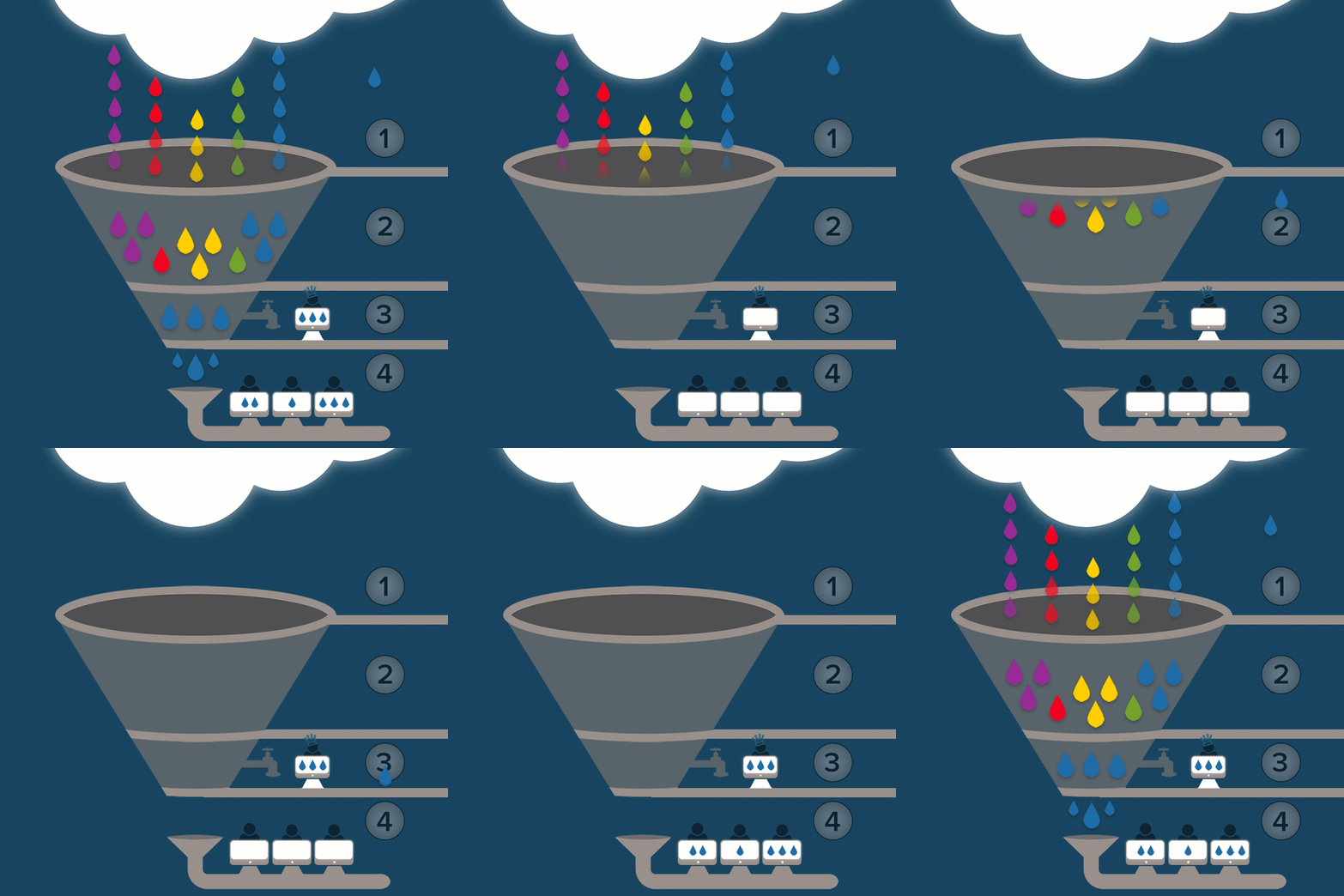
This image illustrates how the search engine processes SOSL searches and limits results. Each color represents an object, and each raindrop represents some records. The numbers correspond to this flow:
- The search engine looks for matches to the search term across a maximum of 2,000 records (this limit starts with API version 28.0)
- SOSL applies different limits for a given object or situation. If the search is for a single object, the full record limit is applied. If the search is global across multiple objects, each object has individual limits that total 2,000 records.
- Admins (users with the View All Data permission) see the full set of results returned.
- For all other users, SOSL applies user permission filters. Individual users see only those records that they have access to. Results sets and order vary by the user issuing the search and can change throughout the day as records are added or removed from the index.
Example
Joe Smith, a sales executive at Acme, Inc., wants to find the account record for Industrial Computing. He types Industrial into the search bar. Because so many records match the search term Industrial, a limit is imposed on the results. Unfortunately for Joe, the record he wanted is outside the limit. This concept is illustrated in the image as the single raindrop outside of the filter. Because Joe used a global search, limits are applied to each object type to make up the 2,000 record limit. The illustration shows five blue raindrops going into the filter, but only three make it to the next stage. If Joe limited his search to just one object, the limit would apply to only that object, increasing the chance that the record he wanted would be returned. Joe retries his search by typing Industrial Computing San Francisco. With a more specific search term, the search engine is able to return better matches, even with the same limits applied. In this scenario, the record Joe’s looking for is one of the blue raindrops that makes it from the top of the filter all the way through to Joe’s search results page.
For other SOSL limits, see SOQL and SOSL Limits in the Salesforce Developer Limits and Allocations Quick Reference.