


Force.com IDE Developer Guide
 j
jForce.com IDE Release Notes
Because the Force.com IDE
has an off-cycle release cadence, changes are not typically documented in the Salesforce Release Notes. Read Force.com IDE Release Notes for API versions 31.0 and later
here.
Winter ’16 (Force.com IDE v35.0)
Winter ’16 (Force.com IDE v35.0)
contains the following updates.
- Enabled auto-completion for System types
- In Spring ’15 (Force.com IDE v33.0), we removed inline auto-complete tips for Apex built-in objects to allow packaging of a new compiler that features outline view. We’ve been working on bringing auto-completion back. In Winter ’16 (Force.com IDE v35.0), we’re reintroducing auto-completion for the System namespace.
- Provided run configurations for Apex tests, with configurable logging levels
- To execute Apex unit tests, select . To create a test run configuration, then select New launch
configuration (
 ). To execute the selected test run configuration, click
Run.
). To execute the selected test run configuration, click
Run. 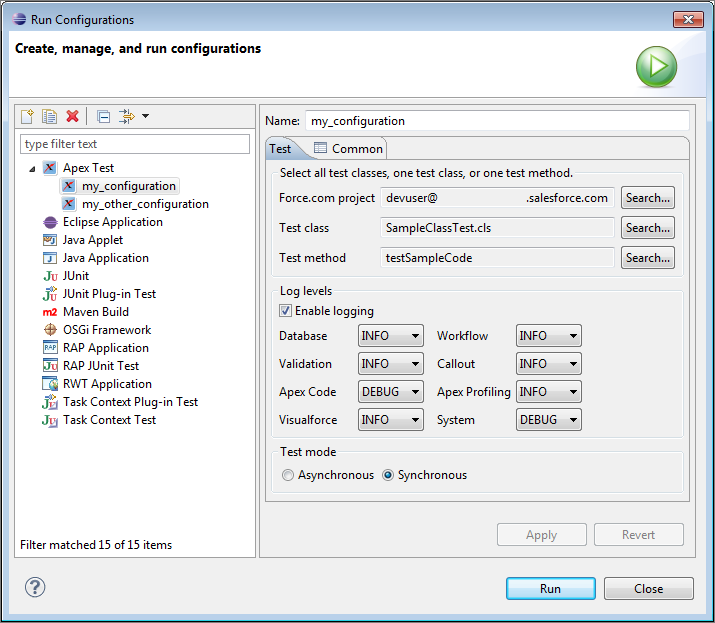
- Made the interactive Apex Debugger generally available
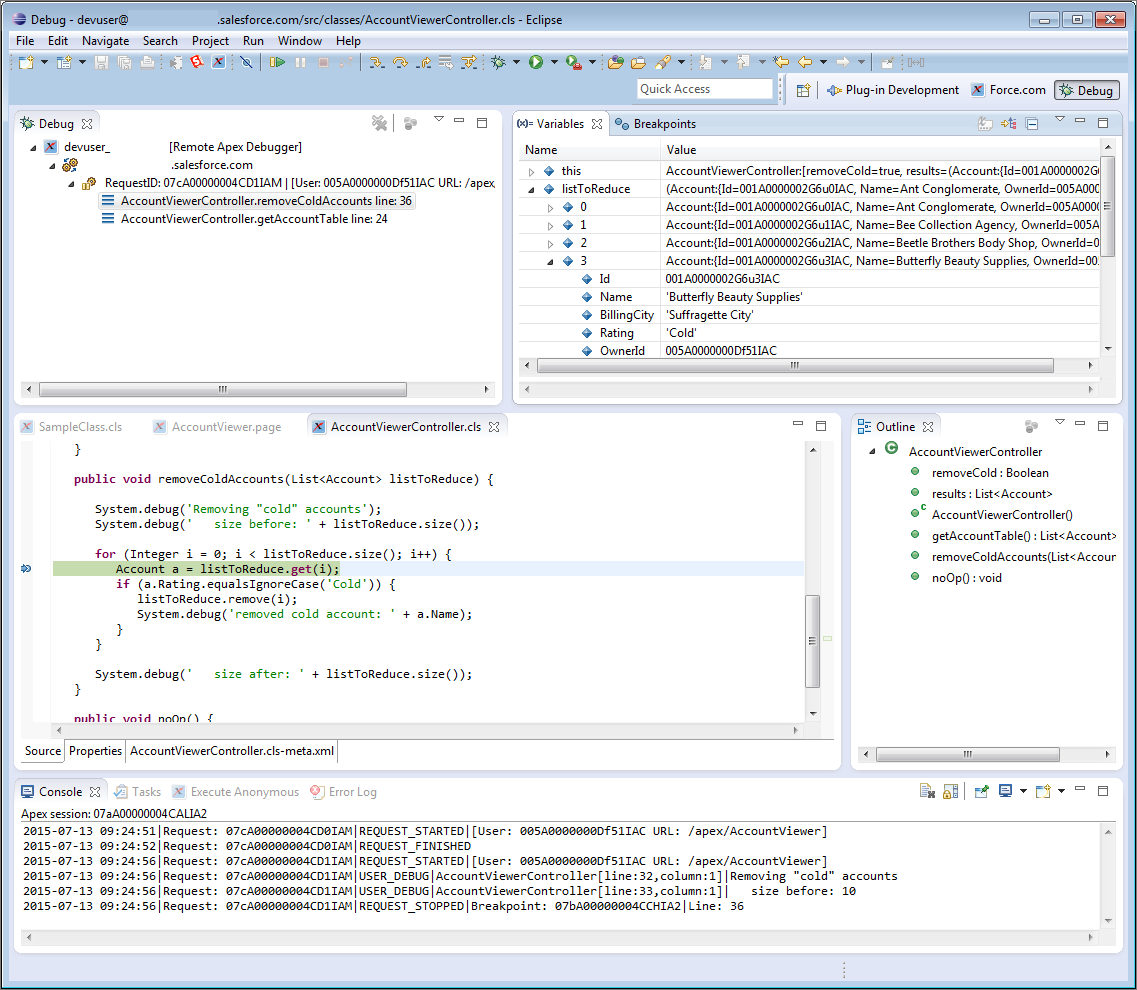
- The Apex Debugger extends the Force.com IDE plug-in for Eclipse and behaves similarly to debuggers available for other languages. Use it in sandbox orgs to root out the bugs in your Apex code. After you’ve set a breakpoint and started a debugging session, you can debug actions in your org that cause the line of code to execute.
-
Use the Apex Debugger to complete the following actions.
- Set breakpoints in Apex classes and triggers.
- View variables, including sObject types, collections, and Apex System types.
- View the call stack, including triggers activated by Apex Data Manipulation Language (DML), method-to-method calls, and variables.
- Interact with global classes, exceptions, and triggers from your installed managed packages. When you inspect objects that have managed types that aren’t visible to you, only global variables are displayed in the variable inspection pane.
- Complete standard debugging actions, including step into, over, and out, and run to breakpoint.
- Output your results to the Console window.
Spring ’15 (Force.com IDE v33.0)
Spring ’15 (Force.com IDE v33.0)
contains the following updates.
- Introduced a wizard for generating Apex classes from a WSDL
- Previously, you could only generate classes from a WSDL in the Salesforce user interface. The WSDL-based classes enable you to make callouts to external services.
- Open-source code for the WSDL to Apex wizard is available in the WSDL2Apex GitHub repository. Developers in the GitHub community can add enhancements or customizations to WSDL2Apex. The Force.com IDE plug-in is a snapshot of the WSDL2Apex and idecore GitHub repositories at the time of the latest official plug-in release.
-
The Spring ’15 (Force.com IDE v33.0) version of the WSDL to Apex tool includes this user-visible contribution from the open-source community.
- Update ApexTypeMapper.java—#6
- Added integer and boolean as reserved keywords. These words now pick up the _x suffix when used as variable names.
- Incorporated pull requests from the open-source community
- For complete lists of pull requests, see https://github.com/forcedotcom/idecore/pulls and https://github.com/forcedotcom/WSDL2Apex/pulls. User-visible impacts of community-submitted changes that were incorporated in Spring ’15 (Force.com IDE v33.0) include:
-
- Respect spacesForTabs preference for auto-indent—#39
- Previously, a hard-coded tab character in ApexAutoIndentStrategy.java led to Apex files that contained a mixture of spaces and tabs when the spacesForTabs preference was enabled. This change makes the Force.com IDE respect Eclipse’s preference.
- Speed up unit test postprocessing—#52
- This change made a significant improvement in debug-log processing speeds when running unit tests.
- Changes to monitor only SF files in `/src/` folder—#57
- Popup menus now work only in the src folder and on projects.
- The Force.com submenu is now easier to see, thanks to the addition of an icon.
- Changes for Apex Test Runner: Code coverage results should be alphabetized—#61
- Code coverage results are now alphabetized in the Apex Test Runner pane.
- Fix display of child and parent records in schema browser—#64
- A red “icon missing” image has been removed in the Schema Explorer. This icon was displayed erroneously.
- Need to have a different text for debug only—#65
- The Execute Anonymous view now displays System.debug statements in a more noticeable text style.
Spring ’15 (Force.com IDE v33.0)
Spring ’15 (Force.com IDE v33.0)
contains the following updates.
- New wizard for generating Apex classes from a WSDL
- Previously, you could only generate classes from a WSDL in the Salesforce user interface. The WSDL-based classes enable you to make callouts to external services.
- Open-source code for the WSDL to Apex wizard is available in the WSDL2Apex GitHub repository. Developers in the GitHub community can add enhancements or customizations to WSDL2Apex. The Force.com IDE plug-in is a snapshot of the WSDL2Apex and idecore GitHub repositories at the time of the latest official plug-in release.
-
The Spring ’15 (Force.com IDE v33.0) version of the WSDL to Apex tool includes this user-visible contribution from the open-source community.
- Update ApexTypeMapper.java—#6
- Added integer and boolean as reserved keywords. These words now pick up the _x suffix when used as variable names.
- Incorporated pull requests from the open-source community
- For complete lists of pull requests, see https://github.com/forcedotcom/idecore/pulls and https://github.com/forcedotcom/WSDL2Apex/pulls. User-visible impacts of community-submitted changes that were incorporated in Spring ’15 (Force.com IDE v33.0) include:
-
- Respect spacesForTabs preference for auto-indent—#39
- Previously, a hard-coded tab character in ApexAutoIndentStrategy.java led to Apex files that contained a mixture of spaces and tabs when the spacesForTabs preference was enabled. This change makes the Force.com IDE respect Eclipse’s preference.
- Speed up unit test postprocessing—#52
- This change made a significant improvement in debug-log processing speeds when running unit tests.
- Changes to monitor only SF files in `/src/` folder—#57
- Popup menus now work only in the src folder and on projects.
- The Force.com submenu is now easier to see, thanks to the addition of an icon.
- Changes for Apex Test Runner: Code coverage results should be alphabetized—#61
- Code coverage results are now alphabetized in the Apex Test Runner pane.
- Fix display of child and parent records in schema browser—#64
- A red “icon missing” image has been removed in the Schema Explorer. This icon was displayed erroneously.
- Need to have a different text for debug only—#65
- The Execute Anonymous view now displays System.debug statements in a more noticeable text style.
Summer ’14 (Force.com IDE v31.0)
Summer ’14 (Force.com IDE v31.0)
contains the following updates.
- Made the Force.com IDE source code available on GitHub.
- Added new metadata support. See the Salesforce.com Summer '14 Release Notes for a complete list of metadata enhancements.
- Facilitated editing of metadata using the new Properties tab—a form-based GUI.
- Discontinued support for Java 6. We now require Java 7.
- Set offline mode as the default for new projects to shorten save times.
- Enabled syntax checking and outline view using a new parser, which can be toggled through .
- Set the Tooling API as the default mechanism used for Apex classes and triggers and for Visualforce pages and components.
- Removed inline auto-complete tips for Apex built-in objects to allow packaging of a new compiler that features outline view. Auto-complete tips are still available in Spring ’14 (Force.com IDE v30.0) and earlier versions.