


Lightning Components Developer's Guide
 j
jNewer Version Available
Component Versioning
Component versioning lets you declare dependencies against specific
revisions of an installed managed package.
By assigning a version to your component, you have granular control over how the
component functions when new versions of a managed package are released. For example, imagine
that a <packageNamespace>:button is
pinned to version 2.0 of the package. Upon installing version 3.0, the button retains its version
2.0 functionality.
Versions are assigned declaratively in the Developer Console. When you’re working on a component, click Bundle Version Settings in the right panel to define the version. You can only version a component if you’ve installed a package, and the valid versions for the component are the available versions of that package. Versions are in the format <major>.<minor>. So if you assign a component version 1.4, its behavior depends on the first major release and fourth minor release of the associated package.
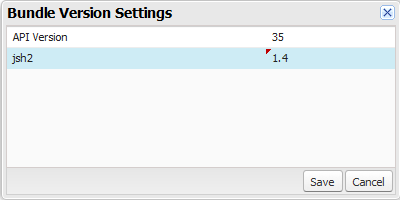
When working with Lightning Components, you can version:
- Apex controllers
- JavaScript controllers
- JavaScript helpers
- JavaScript renderers
- Bundle markups
- Applications (.app)
- Components (.cmp)
- Interfaces (.intf)
- Events (.evt)
- Styles (.css)
- Documentation (.doc)
- Design (.design)
- SVG (.svg)
Once you’ve assigned versions to components, or if you’re developing components for a package,
you can retrieve the version in several contexts.
| Resource | Return Type | Expression |
|---|---|---|
| Apex | Version | System.requestVersion() |
| JavaScript | String | cmp.getVersion() |
| Lightning Component Markup | String | {!Version} |
You can use the retrieved version to add logic to your code or markup to assign different
functionality to different versions. Here’s an example of using versioning in an <aura:if>
statement.
1<aura:component>
2 <aura:if isTrue="{!Version > 1.0}">
3  <c:newVersionFunctionality/>
4 </aura:if>
5 <c:oldVersionFunctionality/>
6 ...
7</aura:component>