Aura Component Versioning for Managed Packages
Aura component versioning enables you to declare dependencies against specific revisions of an installed managed package.
By assigning a version to your component, you have granular control over how the component functions when new versions of a managed package are released. For example, imagine that a <packageNamespace>:button is pinned to version 2.0 of a package. Upon installing version 3.0, the button retains its version 2.0 functionality.
The package developer is responsible for inserting versioning logic into the markup when updating a component. If the component wasn’t changed in the update or if the markup doesn’t account for version, the component behaves in the context of the most recent version.
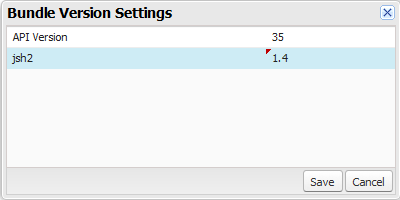
Versions are assigned declaratively in the Developer Console. When you’re working on a component, click Bundle Version Settings in the right panel to define the version. You can only version a component if you’ve installed a package, and the valid versions for the component are the available versions of that package. Versions are in the format <major>.<minor>. So if you assign a component version 1.4, its behavior depends on the first major release and fourth minor release of the associated package.
When working with components, you can version:
-
Apex controllers
-
JavaScript controllers
-
JavaScript helpers
-
JavaScript renderers
-
Bundle markup
- Applications (
.app)
- Components (
.cmp)
- Interfaces (
.intf)
- Events (
.evt)
You can’t version any other types of resources in bundles. Unsupported types include:
- Styles (
.css)
- Documentation (
.doc)
- Design (
.design)
- SVG (
.svg)
Once you’ve assigned versions to components, or if you’re developing components for a package, you can retrieve the version in several contexts.
| Resource | Return Type | Expression |
|---|
| Apex | Version | System.requestVersion() |
| JavaScript | String | cmp.getVersion() |
| Aura component markup | String | {!Version} |
You can use the retrieved version to add logic to your code or markup to assign different functionality to different versions. Here’s an example of using versioning in an <aura:if> statement.
1<aura:component>
2 <aura:if isTrue="{!Version > 1.0}">
3  <c:newVersionFunctionality/>
4 </aura:if>
5 <c:oldVersionFunctionality/>
6 ...
7</aura:component>
See Also


 j
j