


Lightning Components Developer's Guide
 j
jNewer Version Available
Create a Component for Salesforce1 and Lightning Experience
Create a component that loads contacts data and interacts with Salesforce1 and Lightning Experience. Some of the events that are
used in this tutorial are not supported for standalone apps.
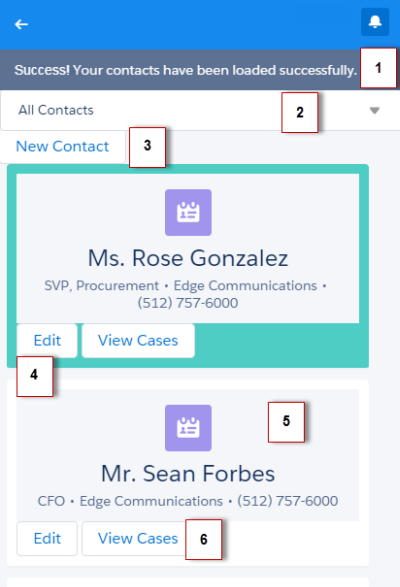
The component has these features.
- Displays a toast message (1) when all contacts are loaded successfully
- Use a nested component that displays all contacts or displays all primary contacts that are colored green when the input select value (2) is changed
- Opens the create record page to create a new contact when the New Contact button (3) is clicked
- Opens the edit record page to update the selected contact when the Edit button (4) is clicked
- Navigates to the record when the contact (5) is clicked
- Navigates to related cases when the View Cases button (6) is clicked
| Resource | Description |
|---|---|
| Contacts Bundle | |
| contacts.cmp | The component that loads contact data |
| contactsController.js | The client-side controller actions that loads contact data, handles input select change event, and opens the create record page |
| contactsHelper.js | The helper function that retrieves contact data and display toast messages based on the loading status |
| contactList Bundle | |
| contactList.cmp | The contact list component |
| contactListController.js | The client-side controller actions that opens the edit record page, and navigates to a contact record, related cases, and map of contact address |
| contactList.css | The styles for the component |
| Apex Controller | |
| ContactController.apxc | The Apex controller that queries the contact records |