


Lightning Components Developer’s Guide
 j
jNewer Version Available
Create a Component for Salesforce1
Create a component that loads contacts data and interacts with Salesforce1.
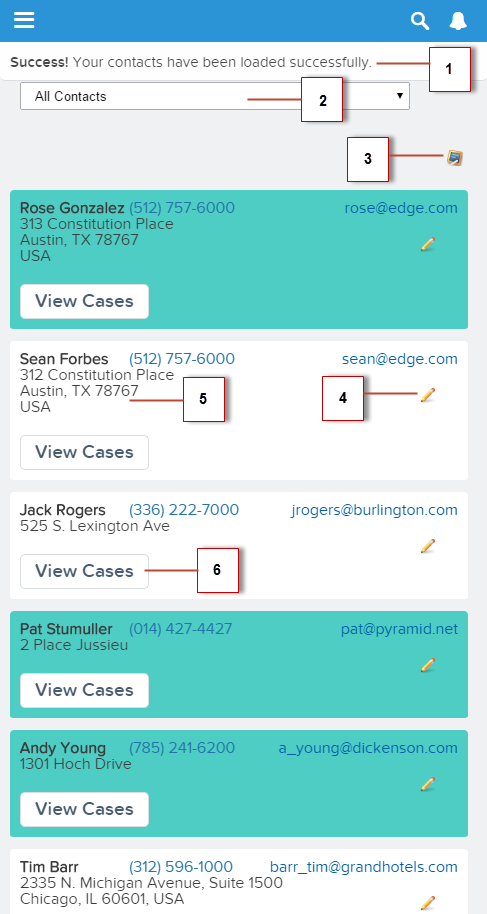
The component has these features.
- Displays a toast message (1) when all contacts are loaded successfully
- Use a nested component that displays all contacts or displays all primary contacts that are colored green when the input select value (2) is changed
- Opens the create record page to create a new contact when the Create New (3) icon is clicked
- Opens the edit record page to update the selected contact when the Edit Contact (4) icon is clicked
- Navigates to the record when the contact name (5) is clicked
- Navigates to a map when the mailing address (5) is clicked
- Navigates to related cases when the View Cases button (6) is clicked
| Resource | Description |
|---|---|
| Contacts Bundle | |
| contacts.cmp | The component that loads contact data |
| contactsController.js | The client-side controller actions that loads contact data, handles input select change event, and opens the create record page |
| contactsHelper.js | The helper function that retrieves contact data and display toast messages based on the loading status |
| contacts.css | The styles for the component |
| contactList Bundle | |
| contactList.cmp | The contact list component |
| contactListController.js | The client-side controller actions that opens the edit record page, and navigates to a contact record, related cases, and map of contact address |
| contactList.css | The styles for the component |
| Apex Controller | |
| ContactController.apxc | The Apex controller that queries the contact records |