


Lightning Components Developer Guide
 j
jNewer Version Available
Step 1: Create A Static Mockup
Create a static mockup in a.app file,
which is the entry point for your app. It can contain other components
and HTML markup.
The following flowchart summarizes the data flow in the app. The app retrieves data from the records through a combination of client-side controller and helper functions, and an Apex controller, which you’ll create later in this quick start.
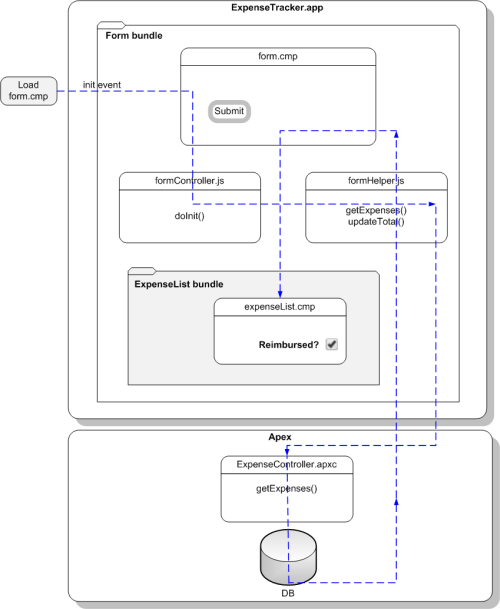
This tutorial uses the Lightning Design System CSS framework, which provides a look and feel that’s consistent with Lightning Experience.
- Go to https://www.lightningdesignsystem.com/resources/downloads and download Version 0.9.0 of the Design System Unmanaged Package. At the prompt, install the unmanaged package in your organization. Your installation is successful when you see the SLDS090 package on the Installed Packages page.
-
Open the Developer Console.
- In Salesforce Classic, click .
-
In Lightning Experience, click the quick access menu (
 ), and then Developer Console.
- Create a new Lightning app. In the Developer Console, click .
- Enter expenseTracker for the Name field in the New Lightning Bundle popup window. This creates a new app, expenseTracker.app.
-
In the source code editor, enter this code.An application is a top-level component and the main entry point to your components. It can include components and HTML markup, such as <div> and <header> tags. The CSS classes are provided by the Lightning Design System CSS framework.
1<aura:application> 2 <!-- Define the Design System static resource (version 0.9.0) --> 3 <ltng:require styles="/resource/slds090/assets/styles/salesforce-lightning-design-system.min.css"/> 4 5 <div class="slds"> 6 <div class="slds-page-header"> 7 <div class="slds-grid"> 8 <div class="slds-col slds-has-flexi-truncate"> 9 <p class="slds-text-heading--label">Expenses</p> 10 <div class="slds-grid"> 11 <div class="slds-grid slds-type-focus slds-no-space"> 12 <h1 class="slds-text-heading--medium slds-truncate" title="My Expenses">My Expenses</h1> 13 </div> 14 </div> 15 </div> 16 </div> 17 </div> 18 </div> 19</aura:application> -
Save your changes and click Preview in the sidebar to preview your app.
Alternatively, navigate to https://<myDomain>.lightning.force.com/<namespace>/expenseTracker.app,
where <myDomain> is the name of your custom Salesforce
domain. If
you’re not using a namespace, your app is available at
/c/expenseTracker.app.
You should see the header My Expenses.