


Salesforce Security Guide
 j
jTransaction Security Policies
| Available in: both Salesforce Classic and Lightning Experience |
| Available in: Enterprise, Performance, Unlimited, and Developer
Editions. Requires purchasing Salesforce Shield or Salesforce Shield Event Monitoring add-on subscriptions. |
Policies evaluate activity using events you specify. For each policy, you define real-time actions, such as notify, block, force two-factor authentication, or choose a session to end.
For example, suppose that you activate the Concurrent Sessions Limiting policy to limit the number of concurrent sessions per user. In addition, you change the policy to notify you via email when the policy is triggered. You also update the policy’s Apex implementation to limit users to three sessions instead of the default five sessions. (That’s easier than it sounds.) Later, someone with three login sessions tries to create a fourth. The policy prevents that and requires the user to end one of the existing sessions before proceeding with the new session. At the same time, you are notified that the policy was triggered.
The Transaction Security architecture uses the Security Policy Engine to analyze events and determine the necessary actions.
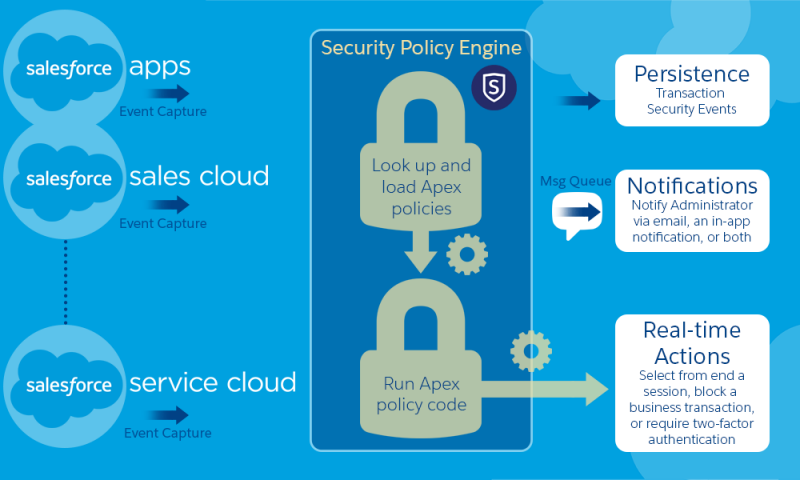
- Policies to apply to the organization, made up of events. Available event types are:
- Data Export for Account, Contact, Lead, and Opportunity objects
- Entity for authentication providers and sessions, client browsers, and login IP
- Logins
- Resource Access for connected apps and reports and dashboards
- Available policy notifications—You can be notified via email, by an in-app notification, or both.
- Actions to take if the policy is triggered:
- Block the operation
- Require a higher level of assurance using two-factor authentication
- End a current session
You can also take no action and only receive a notification. The actions available depend on the event type selected.