


Lightning Components Developer Guide
 j
jNewer Version Available
Configure Components for Record-Specific Actions
- It adds an attribute named recordId to your
component. This attribute is of type String, and its value is an 18-character
Salesforce record ID, for example: 001xx000003DGSWAA4. If you added it yourself,
the attribute definition would look like
this:
1<aura:attribute name="recordId" type="String" /> - When your component is invoked in a record context in Lightning Experience or Salesforce1, the recordId is set to the ID of the record being viewed.
The record ID is set only when you place the component on a record page, or invoke it as an action from a record page. In all other cases, such as when you create this component programmatically inside another component, the record ID isn’t set, and your component shouldn’t depend on it.
Example of a Component for a Record-Specific Action
This extended example shows a component designed to be invoked as a custom action
from the detail page of an account record. After creating the component, you need to
create the custom action on the account object, and then add the action to an
account page layout. When opened using an action, the component appears in an action
panel that looks like this: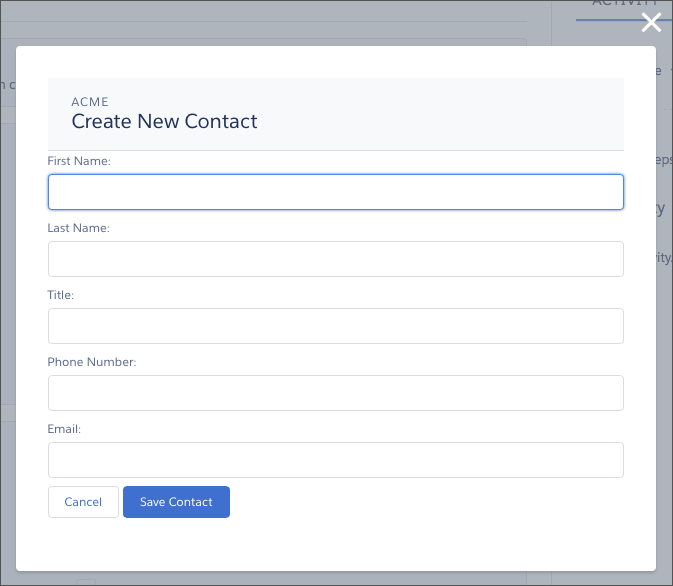
The component definition begins by implementing both the force:lightningQuickActionWithoutHeader and the force:hasRecordId interfaces. The first makes it available for use as an action and prevents the standard controls from displaying. The second adds the interface’s automatic record ID attribute and value assignment behavior, when the component is invoked in a record context.
1<aura:component controller="QuickContactController"
2    implements="force:lightningQuickActionWithoutHeader,force:hasRecordId">
3
4    <aura:attribute name="account" type="Account" />
5    <aura:attribute name="newContact" type="Contact"
6        default="{ 'sobjectType': 'Contact' }" /> <!-- default to empty record -->
7    <aura:attribute name="hasErrors" type="Boolean"
8        description="Indicate if there were failures when validating the contact." />
9
10    <aura:handler name="init" value="{!this}" action="{!c.doInit}" />
11
12    <!-- Display a header with details about the account -->
13    <div class="slds-page-header" role="banner">
14        <p class="slds-text-heading--label">{!v.account.Name}</p>
15        <h1 class="slds-page-header__title slds-m-right--small
16            slds-truncate slds-align-left">Create New Contact</h1>
17    </div>
18
19    <!-- Display form validation errors, if any -->
20    <aura:if isTrue="{!v.hasErrors}">
21        <div class="recordSaveError">
22            <ui:message title="Error" severity="error" closable="true">
23                The new contact can't be saved because it's not valid.
24                Please review and correct the errors in the form.
25            </ui:message>
26        </div>
27    </aura:if>
28
29    <!-- Display the new contact form -->
30    <div class="slds-form--stacked">
31
32        <div class="slds-form-element">
33            <label class="slds-form-element__label"
34                for="contactFirstName">First Name: </label>
35            <div class="slds-form-element__control">
36              <ui:inputText class="slds-input" aura:id="contactFirstName"
37                value="{!v.newContact.FirstName}" required="true"/>
38            </div>
39        </div>
40        <div class="slds-form-element">
41            <label class="slds-form-element__label"
42                for="contactLastName">Last Name: </label>
43            <div class="slds-form-element__control">
44              <ui:inputText class="slds-input" aura:id="contactLastName"
45                value="{!v.newContact.LastName}" required="true"/>
46            </div>
47        </div>
48
49        <div class="slds-form-element">
50            <label class="slds-form-element__label" for="contactTitle">Title: </label>
51            <div class="slds-form-element__control">
52              <ui:inputText class="slds-input" aura:id="contactTitle"
53                value="{!v.newContact.Title}" />
54            </div>
55        </div>
56
57        <div class="slds-form-element">
58            <label class="slds-form-element__label"
59                for="contactPhone">Phone Number: </label>
60            <div class="slds-form-element__control">
61              <ui:inputPhone class="slds-input" aura:id="contactPhone"
62                value="{!v.newContact.Phone}" required="true"/>
63            </div>
64        </div>
65        <div class="slds-form-element">
66            <label class="slds-form-element__label" for="contactEmail">Email: </label>
67            <div class="slds-form-element__control">
68              <ui:inputEmail class="slds-input" aura:id="contactEmail"
69                value="{!v.newContact.Email}" />
70            </div>
71        </div>
72
73        <div class="slds-form-element">
74            <ui:button label="Cancel" press="{!c.handleCancel}"
75                class="slds-button slds-button--neutral" />
76            <ui:button label="Save Contact" press="{!c.handleSaveContact}"
77                class="slds-button slds-button--brand" />
78        </div>
79
80    </div>
81
82</aura:component>- account—holds the full account record, after it’s loaded in the init handler
- newContact—an empty contact, used to capture the form field values
- hasErrors—a Boolean flag to indicate whether there are any form validation errors
The component’s controller has all of the interesting code, in three action handlers.
1({
2    doInit : function(component, event, helper) {
3
4        // Prepare the action to load account record
5        var action = component.get("c.getAccount");
6        action.setParams({"accountId": component.get("v.recordId")});
7
8        // Configure response handler
9        action.setCallback(this, function(response) {
10            var state = response.getState();
11            if(component.isValid() && state === "SUCCESS") {
12                component.set("v.account", response.getReturnValue());
13            } else {
14                console.log('Problem getting account, response state: ' + state);
15            }
16        });
17        $A.enqueueAction(action);
18    },
19
20    handleSaveContact: function(component, event, helper) {
21        if(helper.validateContactForm(component)) {
22            component.set("v.hasErrors", false);
23
24            // Prepare the action to create the new contact
25            var saveContactAction = component.get("c.saveContactWithAccount");
26            saveContactAction.setParams({
27                "contact": component.get("v.newContact"),
28                "accountId": component.get("v.recordId")
29            });
30
31            // Configure the response handler for the action
32            saveContactAction.setCallback(this, function(response) {
33                var state = response.getState();
34                if(component.isValid() && state === "SUCCESS") {
35
36                    // Prepare a toast UI message
37                    var resultsToast = $A.get("e.force:showToast");
38                    resultsToast.setParams({
39                        "title": "Contact Saved",
40                        "message": "The new contact was created."
41                    });
42
43                    // Update the UI: close panel, show toast, refresh account page
44                    $A.get("e.force:closeQuickAction").fire();
45                    resultsToast.fire();
46                    $A.get("e.force:refreshView").fire();
47                }
48                else if (state === "ERROR") {
49                    console.log('Problem saving contact, response state: ' + state);
50                }
51                else {
52                    console.log('Unknown problem, response state: ' + state);
53                }
54            });
55
56            // Send the request to create the new contact
57            $A.enqueueAction(saveContactAction);
58        }
59        else {
60            // New contact form failed validation, show a message to review errors
61            component.set("v.hasErrors", true);
62        }
63    },
64
65	handleCancel: function(component, event, helper) {
66	    $A.get("e.force:closeQuickAction").fire();
67    }
68})
The first action handler, doInit, is an init handler. Its job is to use the record ID that’s provided via the force:hasRecordId interface and load the full account record. Note that there’s nothing to stop this component from being used in an action on another object, like a lead, opportunity, or custom object. In that case, doInit will fail to load a record, but the form will still display.
- Prepares the server action to save the new contact.
- Defines a callback function, called the response handler, for when the server completes the action. The response handler is discussed in a moment.
- Enqueues the server action.
- Closes the action panel by firing the force:closeQuickAction event.
- Displays a “toast” message that the contact was created by firing the force:showToast event.
- Updates the record page by firing the force:refreshView event, which tells the record page to update itself.
The handleCancel action handler closes the action panel by firing the force:closeQuickAction event.
The component helper provided here is minimal, sufficient to illustrate its use. You’ll likely have more work to do in any production quality form validation code.
1({
2	validateContactForm: function(component) {
3        var validContact = true;
4
5        // First and Last Name are required
6        var firstNameField = component.find("contactFirstName");
7        if($A.util.isEmpty(firstNameField.get("v.value"))) {
8            validContact = false;
9            firstNameField.set("v.errors", [{message:"First name can't be blank"}]);
10        }
11        else {
12            firstNameField.set("v.errors", null);
13        }
14        var lastNameField = component.find("contactLastName");
15        if($A.util.isEmpty(lastNameField.get("v.value"))) {
16            validContact = false;
17            lastNameField.set("v.errors", [{message:"Last name can't be blank"}]);
18        }
19        else {
20            lastNameField.set("v.errors", null);
21        }
22
23        // Verify we have an account to attach it to
24        var account = component.get("v.account");
25        if($A.util.isEmpty(account)) {
26            validContact = false;
27            console.log("Quick action context doesn't have a valid account.");
28        }
29
30        // TODO: (Maybe) Validate email and phone number
31
32        return(validContact);
33	}
34})
Finally, the Apex class used as the server-side controller for this component is deliberately simple to the point of being obvious.
1public with sharing class QuickContactController {
2
3    @AuraEnabled
4    public static Account getAccount(Id accountId) {
5        // Perform isAccessible() checks here
6        return [SELECT Name, BillingCity, BillingState FROM Account WHERE Id = :accountId];
7    }
8
9    @AuraEnabled
10    public static Contact saveContactWithAccount(Contact contact, Id accountId) {
11        // Perform isAccessible() and isUpdateable() checks here
12        contact.AccountId = accountId;
13        upsert contact;
14        return contact;
15    }
16
17}