


Lightning Aura Components Developer Guide
 j
jNewer Version Available
Configure Components for Record-Specific Actions
force:hasRecordId is a marker interface. A marker interface is a signal to the component’s container to add the interface’s behavior to the component.
The recordId attribute is set only when you place or invoke the component in an explicit record context. For example, when you place the component directly on a record page layout, or invoke it as an object-specific action from a record page or object home. In all other cases, such as when you invoke the component as a global action, or create the component programmatically inside another component, recordId isn’t set, and your component shouldn’t depend on it.
Example of a Component for a Record-Specific Action
This extended example shows a component designed to be invoked as a custom
object-specific action from the detail page of an account record. After creating the
component, you need to create the custom action on the account object, and then add
the action to an account page layout. When opened using an action, the component
appears in an action panel that looks like this: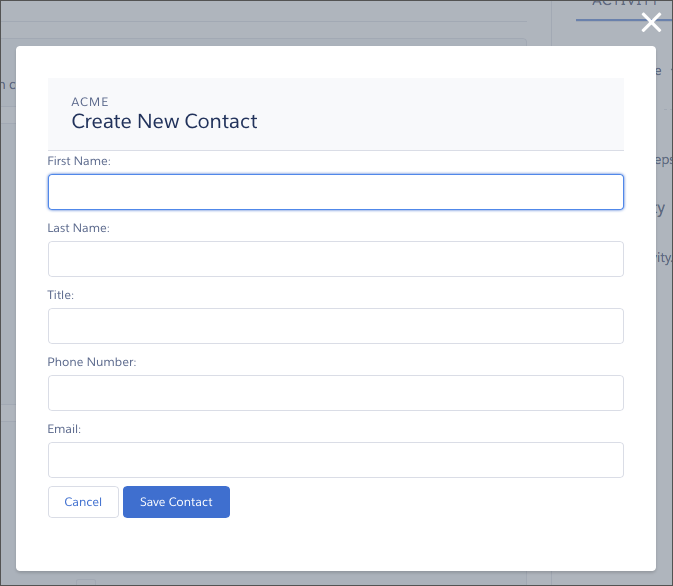
The component definition begins by implementing both the force:lightningQuickActionWithoutHeader and the force:hasRecordId interfaces. The first makes it available for use as an action and prevents the standard controls from displaying. The second adds the interface’s automatic record ID attribute and value assignment behavior, when the component is invoked in a record context.
- account—holds the full account record, after it’s loaded in the init handler
- newContact—an empty contact, used to capture the form field values
The component’s controller has all of the interesting code, in three action handlers.
The first action handler, doInit, is an init handler. Its job is to use the record ID that’s provided via the force:hasRecordId interface and load the full account record. Note that there’s nothing to stop this component from being used in an action on another object, like a lead, opportunity, or custom object. In that case, doInit will fail to load a record, but the form will still display.
- Prepares the server action to save the new contact.
- Defines a callback function, called the response handler, for when the server completes the action. The response handler is discussed in a moment.
- Enqueues the server action.
- Closes the action panel by firing the force:closeQuickAction event.
- Displays a “toast” message that the contact was created by firing the force:showToast event.
- Updates the record page by firing the force:refreshView event, which tells the record page to update itself.
The handleCancel action handler closes the action panel by firing the force:closeQuickAction event.
The component helper provided here is minimal, sufficient to illustrate its use. You’ll likely have more work to do in any production quality form validation code.
Finally, the Apex class used as the server-side controller for this component is deliberately simple to the point of being obvious.