Salesforce DX Developer Guide (Beta)
 j
jNewer Version Available
Salesforce DX Project Structure and Source File Format
File Extensions
When you convert existing Metadata API source to Salesforce DX project format, we create an XML file for each bit. All files that contain XML markup now have an .xml extension. You can then look at your source files using an XML editor. To sync your local projects and scratch orgs, Salesforce DX projects use a particular directory structure for custom objects, custom object translations, Lightning components, and documents.
For example, if you had an object called Case.object, Salesforce DX provides an XML version called Case.object-meta.xml. If you have an app call DreamHouse.app, we create a file called DreamHouse.app-meta.xml. You get the idea. For Salesforce DX projects, all source files have a companion file with the “-meta.xml” extension.
Source Transformation
It’s not uncommon for Metadata API source files to be quite large, making it difficult to find what you want. If you work on a team with other developers who make changes or updates to the same source Metadata API source file at the same time, you have to deal with merging multiple updates to the file. If you’re thinking that there has to be a better way, you’re right.
Before Salesforce DX, all custom objects and object translations were stored in one large Metadata API source file.
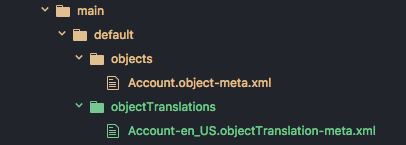
Salesforce DX solves this problem by providing a new source shape that breaks down these large source files to make them more digestible and easier to manage with a version control system.
A Salesforce DX project stores custom objects and custom object translations in intuitive subdirectories. This source structure makes it much easier to find what you want to change or update. And you can say goodbye to messy merges.
Custom Objects
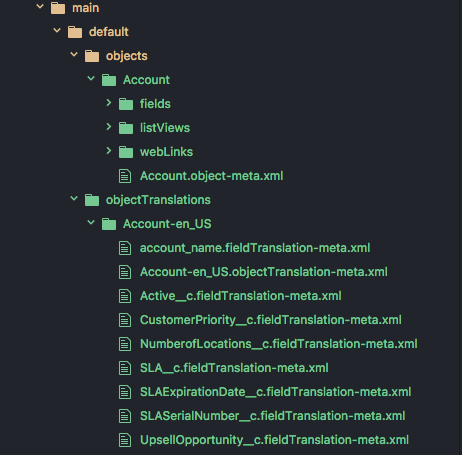
When you convert your source to Salesforce DX project format, your custom objects are placed in the <package directory>/main/default/objects directory. Each object has its own subdirectory that reflects the type of custom object. Some parts of the custom objects are extracted into in these subdirectories:
- businessProcesses
- compactLayouts
- fields
- fieldSets
- listViews
- recordTypes
- sharingReasons
- validationRules
- webLinks
The parts of the custom object that are not extracted are placed in a file.
- For objects, <object>.object-meta.xml
- For fields, <field_name>.field-meta.xml
Custom Object Translations
Custom object translations reside in the <package directory>/main/default/objectTranslations directory, each in their own subdirectory named after the custom object translation. Custom object translations and field translations are extracted into their own files within the custom object translation’s directory.
-
For field names, <field_name>.fieldTranslation-meta.xml
-
For object names, <object_name>.objectTranslation-meta.xml
The remaining pieces of the custom object translation are placed in a file called <objectTranslation>.objectTranslation-meta.xml.
Lightning Components
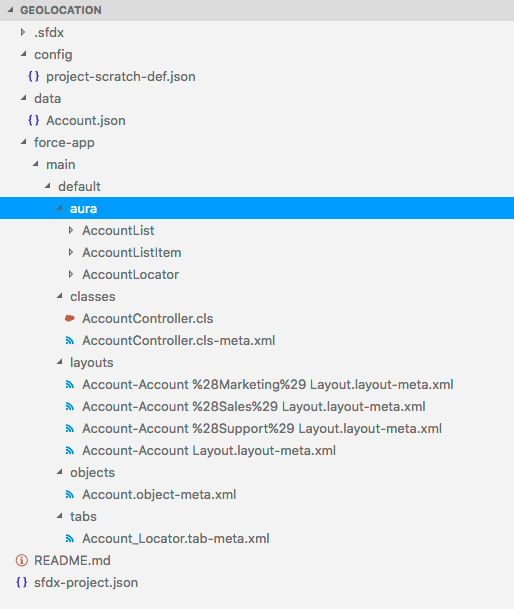
Lightning bundles and components must reside in a directory named aura under the <package directory> directory.
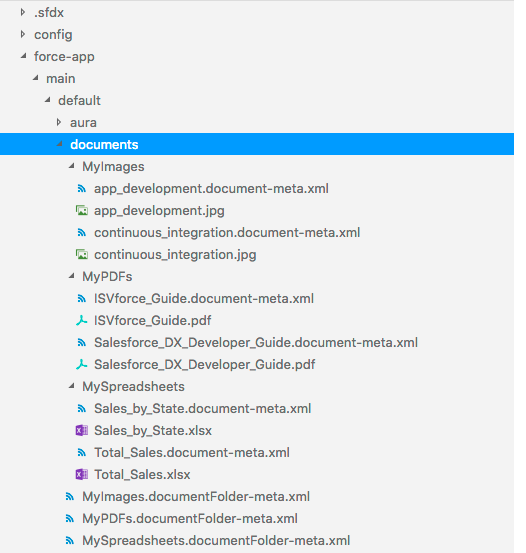
Documents
Documents must be inside the directories of their parent document folder. The parent document folder must be in a directory called documents. Each document has a corresponding Metadata API XML file that you can view with an XML editor.