Newer Version Available

This content describes an older version of this product. View Latest

Define and Deploy Custom Big Objects

You can define custom big objects with the Metadata API. After you define and deploy a custom big object, you can view it in the Setup UI.
Available in: Enterprise, Performance, Unlimited, and Developer Editions

Define a Custom Big Object

Define a custom big object through the Metadata API by creating XML files that contain its definition, fields, and index.
  • object files—Create a file for each object to define the custom big object, its fields, and its index.
  • permissionset/profile files—Create a permissionSet or profile file to specify permissions for each field. These files are not required, but is required to grant access to users. By default, access to a custom big object is restricted.
  • package file—Create a file for the metadata package to specify the contents.

While custom big objects use the “CustomObject” metadata type, some parameters are unique to big objects and others are not applicable. The specific metadata parameters that apply to big objects are outlined in this document.

Note

Naming Conventions for Custom Big Objects

Object names must be unique across all standard objects, custom objects, external objects, and big objects in the org. In the API, the names of custom big objects have a suffix of two underscores immediately followed by a lowercase “b” (__b). For example, an external object named “HistoricalInventoryLevels” is seen as HistoricalInventoryLevels__b in that organization's WSDL. We recommend that you make object labels unique across all objects in the org - standard, custom, external and big objects.

CustomObject Metadata

Field Name Field Type Description
deploymentStatus DeploymentStatus (enumeration of type string) Custom big object’s deployment status (Deployed for all big objects)
fields CustomField[] Definition of a field in the object
fullName string Unique API name of a field
indexes Index[] Definition of the index
label string Object’s name as displayed in the UI
pluralLabel string Field plural name as displayed in the UI

CustomField Metadata

Field Name Field Type Description
fullName string Unique API name of a field.
label string Field name as displayed in the UI.
length int Length of a field in characters (Text and LongTextArea fields only).
pluralLabel string Field plural name as displayed in the UI.
precision int Number of digits for a number value. For example, the number 256.99 has a precision of 5 (number fields only).
referenceTo string Related object type for a lookup field (lookup fields only).
relationshipName string Name of a relationship as displayed in the UI (lookup fields only).
required boolean Specifies whether the field is required. All fields that are part of the index must be marked as required.
scale int Number of digits to the right of the decimal point for a number value. For example, the number 256.99 has a scale of 2 (number fields only).
type FieldType Field type. Supports DateTime, Lookup, Number, Text, and LongTextArea.

Uniqueness is not supported for custom fields.

Note

Index Metadata

Represents an index defined within a custom big object. Use this metadata type to define the composite primary key (index) for a custom big object.
Field Name Field Type Description
fields IndexField[] The definition of the fields in the index.

IndexField Metadata

Defines which fields make up the index, their order, and sort direction. The order in which the fields are defined determines the order fields are listed in the index.

Field Name Field Type Description
name string Required. The API name for the field that’s part of the index. This value must match the value of the fullName value for the field in the fields section and be marked as required.
sortDirection string Required. The sort direction of the field in the index. Valid values are ASC for ascending order and DESC for descending order.

Create Metadata Files for Deployment

The following XML excerpts create metadata files that you can deploy as a package. Each Customer Interaction object represents customer data from a single session in an online video game. The index is defined by the Account__c , Game_Platform__c , and Play_Date__c fields, and a lookup field relates the Customer Interactions to the Account object.

Customer_Interaction__b.object
1<?xml version="1.0" encoding="UTF-8"?>
2<CustomObject xmlns="http://soap.sforce.com/2006/04/metadata">
3    <deploymentStatus>Deployed</deploymentStatus>
4
5    <fields>
6        <fullName>In_Game_Purchase__c</fullName>
7        <label>In-Game Purchase</label>
8        <length>16</length>
9        <required>false</required>
10        <type>Text</type>
11        <unique>false</unique>
12    </fields>
13    
14    <fields>
15        <fullName>Level_Achieved__c</fullName>
16        <label>Level Achieved</label>
17        <length>16</length>
18        <required>false</required>
19        <type>Text</type>
20        <unique>false</unique>
21    </fields>
22    
23    <fields>
24        <fullName>Lives_This_Game__c</fullName>
25        <label>Lives Used This Game</label>
26        <length>16</length>
27        <required>false</required>
28        <type>Text</type>
29        <unique>false</unique>
30    </fields>
31    
32    <fields>
33        <fullName>Game_Platform__c</fullName>
34        <label>Platform</label>
35        <length>16</length>
36        <required>true</required>
37        <type>Text</type>
38        <unique>false</unique>
39    </fields>
40    
41     <fields>
42        <fullName>Score_This_Game__c</fullName>
43        <label>Score This Game</label>
44        <length>16</length>
45        <required>false</required>
46        <type>Text</type>
47        <unique>false</unique>
48    </fields>
49
50    <fields>
51        <fullName>Account__c</fullName>
52        <label>User Account</label>
53        <referenceTo>Account</referenceTo>
54        <relationshipName>Game_User_Account</relationshipName>
55        <required>true</required>
56        <type>Lookup</type>
57    </fields>
58
59    <fields>
60        <fullName>Play_Date__c</fullName>
61        <label>Date of Play</label>
62        <required>true</required>
63        <type>DateTime</type>
64    </fields>
65
66    <fields>
67        <fullName>Play_Duration__c</fullName>
68        <label>Play Duration</label>
69        <required>false</required>
70        <type>Number</type>
71        <scale>2</scale>
72        <precision>18</precision>
73    </fields>
74
75    <indexes>
76        <fullName>CustomerInteractionsIndex</fullName>
77        <label>Customer Interactions Index</label>
78        <fields>
79            <name>Account__c</name>
80            <sortDirection>DESC</sortDirection>
81        </fields>
82        <fields>
83            <name>Game_Platform__c</name>
84            <sortDirection>ASC</sortDirection>
85        </fields>
86        <fields>
87        <name>Play_Date__c</name>
88        <sortDirection>DESC</sortDirection>
89        </fields>        
90    </indexes>
91    
92    <label>Customer Interaction</label>
93    <pluralLabel>Customer Interactions</pluralLabel>
94</CustomObject>
package.xml
1<?xml version="1.0" encoding="UTF-8"?>
2<Package xmlns="http://soap.sforce.com/2006/04/metadata">
3    <types>
4        <members>*</members>
5        <name>CustomObject</name>
6    </types>
7    <types>
8        <members>*</members>
9        <name>PermissionSet</name>
10    </types>
11    <version>41.0</version>
12</Package>
Customer_Interaction_BigObject.permissionset
1<?xml version="1.0" encoding="UTF-8"?>
2<PermissionSet xmlns="http://soap.sforce.com/2006/04/metadata">
3     
4    <label>Customer Interaction Permission Set</label>
5     
6    <fieldPermissions>
7        <editable>true</editable>
8        <field>Customer_Interaction__b.In_Game_Purchase__c</field>
9        <readable>true</readable>
10    </fieldPermissions>
11     
12    <fieldPermissions>
13        <editable>true</editable>
14        <field>Customer_Interaction__b.Level_Achieved__c</field>
15        <readable>true</readable>
16    </fieldPermissions>
17     
18    <fieldPermissions>
19        <editable>true</editable>
20        <field>Customer_Interaction__b.Lives_This_Game__c</field>
21        <readable>true</readable>
22    </fieldPermissions>
23     
24     
25    <fieldPermissions>
26        <editable>true</editable>
27        <field>Customer_Interaction__b.Play_Duration__c</field>
28        <readable>true</readable>
29    </fieldPermissions>
30     
31    <fieldPermissions>
32        <editable>true</editable>
33        <field>Customer_Interaction__b.Score_This_Game__c</field>
34        <readable>true</readable>
35    </fieldPermissions>
36     
37
38</PermissionSet>

Deploy Custom Big Objects as a Metadata Package
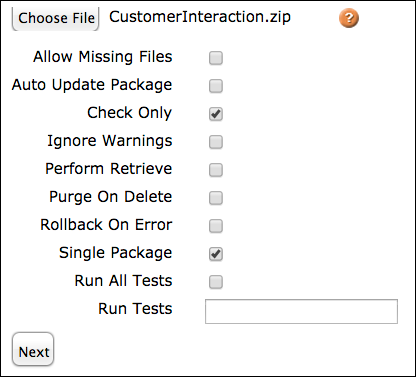
Use the Metadata API to deploy a custom big object. You can use several different tools, like Workbench or the Force.com Migration Tool, to deploy. When building a package to deploy a custom big object, make sure the object file is in a folder called “objects” and the permissionset file is in a folder called “permissionsets”. package.xml must be in the root directory, and not in a folder within the package.

You can run a test deployment by using the checkOnly deployment option. In Workbench, select the Check Only option on the Deploy screen.

Note

Checkboxes in Workbench

View a Custom Big Object in Setup

After you’ve deployed your custom big object, you can view it by logging in to your organization and, from Setup, entering Big Objects in the Quick Find box, then selecting Big Objects.
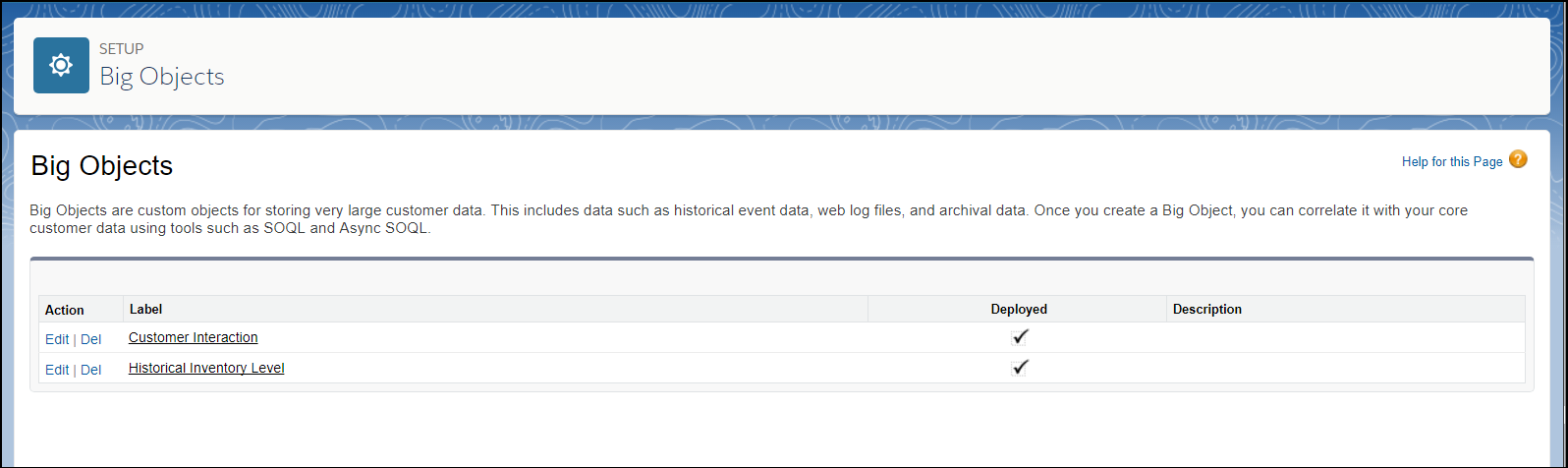
List of big objects

Click the name of a big object, to see its fields and relationships.
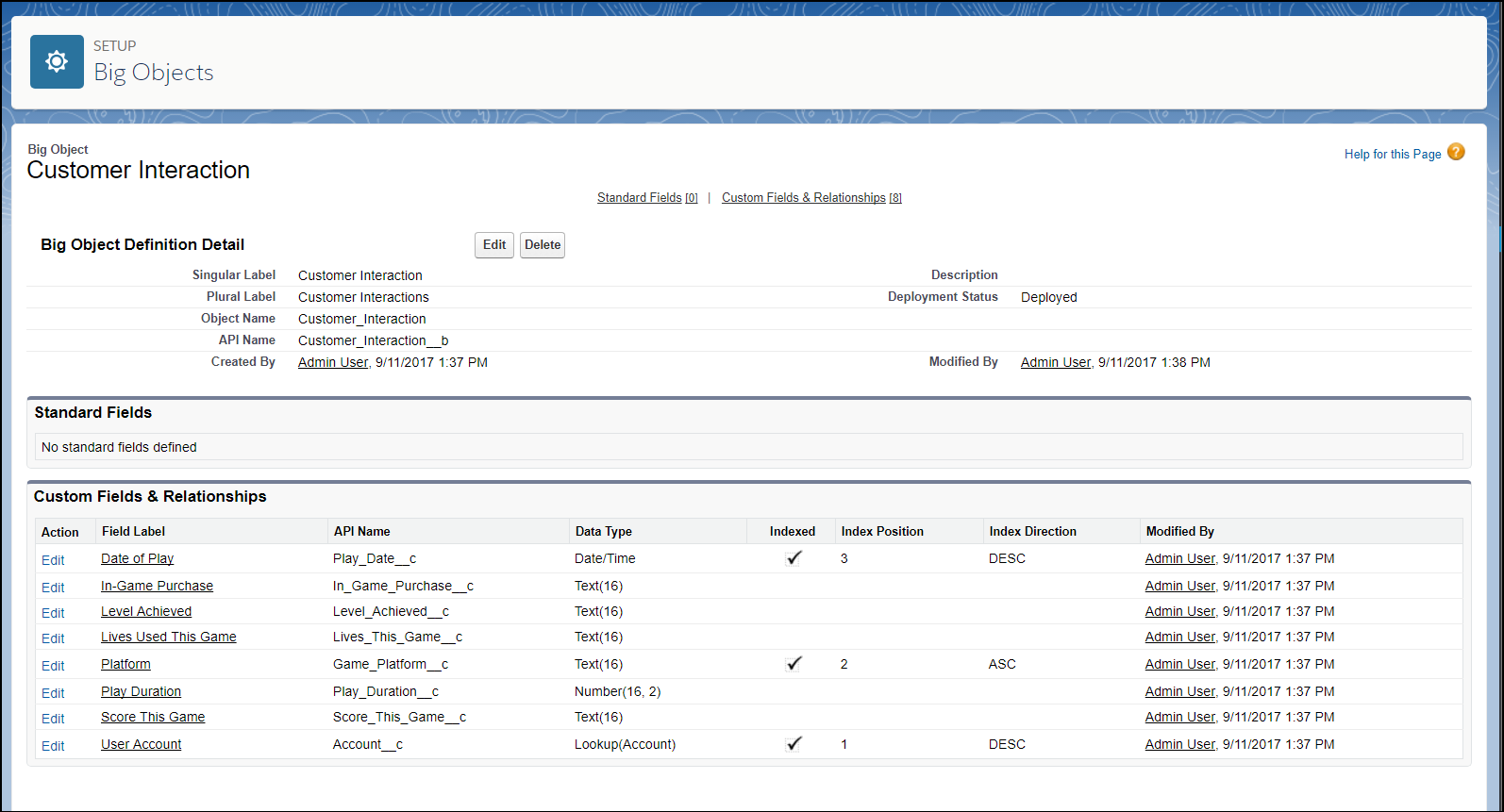
Big object detail view