


Force.com Platform Fundamentals
 j
jTry It Out: Define a Manual Sharing Rule
Let's pretend that we're a recruiter like Mario and we need to share a particular candidate record that we own with another role, group, or user:
- On the detail page for the candidate, click Sharing.
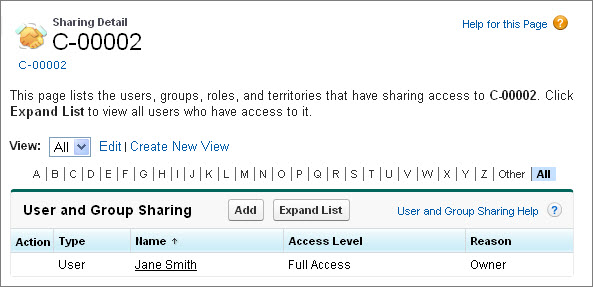
Since we own this candidate record, we get to see details about who else can see the record and why. If we didn't own this record, there would be a message about not having sufficient privileges.
- Click Add.
- In the Search drop-down list, choose whether we want to manually share the record with a user, public group, role, or role and subordinates.
- In the Available list, select the user, public group, or role that should have access to the record, and click Add.
- In the Access Level drop-down list, specify whether the user, public group, or role should have read or read/write access to the record.
- Click Save.
Not too hard! When we roll out our Recruiting app to users, we'll have to train our recruiters to take these steps for the position, candidate, and job application records that their hiring managers and interviewers need to access. Once this training is complete, we will have implemented all of the required sharing and security settings that we discussed at the beginning of the chapter—well done!