


Lightning Components Developer Guide
 j
jNewer Version Available
Dynamically Update a Flow Screen with a Lightning Component
Example
This component (c:flowDynamicScreen) displays a custom script component and a group of radio buttons. The component gets the contact's existing phone number from the flow, and uses that value to fill in the script.

If the user selects the No radio button, the component displays an input field, where the user can enter the new phone number.
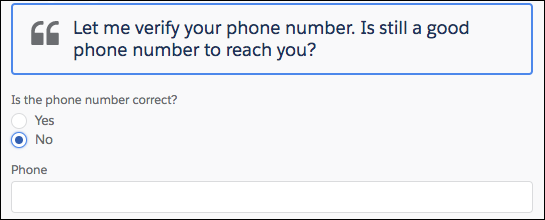
c:flowDynamicScreen Component
1<aura:component access="global" implements="lightning:availableForFlowScreens">
2   <aura:attribute name="oldPhone" type="String" />
3   <aura:attribute name="newPhone" type="String" />
4   <aura:attribute name="radioOptions" type="List" default="[
5      {'label': 'Yes', 'value': 'false'},
6      {'label': 'No', 'value': 'true'} ]"/>
7   <aura:attribute name="radioValue" type="Boolean" />
8
9   <!-- Displays script to guide the agent's call -->
10   <div class="script-container">
11      <div class="slds-card__header slds-grid slds-p-bottom_small slds-m-bottom_none">
12         <div class="slds-media slds-media_center slds-has-flexi-truncate" >
13            <div class="slds-media__figure slds-align-top">
14               <h2><lightning:icon iconName="utility:quotation_marks"
15                  title="Suggested script" /></h2>
16            </div>
17            <div class="slds-media__body">
18               <!-- Inserts the user’s current number, pulled from the flow, into the script -->
19               <ui:outputRichText class="script" value="{!'Let me verify your phone number.
20                  Is ' + v.oldPhone + ' still a good phone number to reach you?'}"/>
21            </div>
22         </div>
23      </div>
24   </div>
25   <!-- Displays a radio button group to enter the customer’s response -->
26   <div class="slds-p-top_medium slds-p-bottom_medium">
27      <lightning:radioGroup aura:id="rbg_correct" name="rbg_correct"
28         label="Is the phone number correct?"
29         options="{! v.radioOptions }" value="{! v.radioValue }" />
30      <!-- If the current number is wrong,
31         displays a field to enter the correct number -->
32      <aura:if isTrue="{!v.radioValue}">
33         <lightning:input type="tel" aura:id="phone_updated" label="Phone"
34            onblur="{!c.handleNewPhone}" class="slds-p-top_small"/>
35      </aura:if>
36   </div>
37</aura:component>
c:flowDynamicScreen Style
1.THIS.script-container {
2   border: t(borderWidthThick) solid t(colorBorderBrand);
3   border-radius: t(borderRadiusMedium);
4}
5
6.THIS .script {
7   font-size: 1.125rem; /*t(fontSizeTextLarge)*/
8   font-weight: t(fontWeightRegular);
9   line-height: t(lineHeightHeading);
10}
c:flowDynamicScreen Controller
When the user tabs out, or otherwise removes focus from the Phone field, the controller sets the newPhone attribute to the input value, so that you can reference the new number in the flow.
1({
2   handleNewPhone: function(cmp, event, helper) {
3      cmp.set("v.newPhone", cmp.find('phone_updated').get('v.value'));
4   }
5})
defaultTokens.tokens
The script in c:flowDynamicScreen uses tokens to stay in sync with the Salesforce Lightning Design System styles.
1<aura:tokens extends="force:base" >
2</aura:tokens>