


Visualforce Developer Guide
 j
jNewer Version Available
Accessing Data with List Controllers
Once you have associated a page with a list controller, you can refer to the set of records
using expression language syntax. For example, to create a simple table of accounts, create a
page with the following
markup: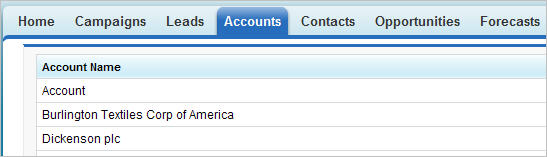
1<apex:page standardController="Account" recordSetVar="accounts" tabstyle="account" sidebar="false">
2  <apex:pageBlock >
3    <apex:pageBlockTable value="{!accounts}" var="a">
4      <apex:column value="{!a.name}"/>
5    </apex:pageBlockTable>
6  </apex:pageBlock>
7</apex:page>As with queries in the Lightning Platform API, you can use expression language syntax to retrieve data from related records. As with standard controllers, you can traverse up to five levels of child-to-parent relationships and one level of parent-to-child relationships.
When using a standard list controller, the returned records sort on the first column of data, as defined by the current view, even if that column is not rendered. When using an extension or custom list controller, you can control the sort method.