Newer Version Available

This content describes an older version of this product. View Latest

RecordAction

Represents a relationship between a record and a guided action, such as a flow. Create a RecordAction for every flow you want associated with a particular record. Available in API version 42.0 and later.

Access to the RecordAction object is determined by a user’s access to the associated parent record.

Note

Supported Calls

create(), delete(), describeLayout(), describeSObjects(), getDeleted(), getUpdated(), query(), retrieve(), undelete(), update(), upsert()

Fields

Field Details
ActionDefinition
Type
picklist
Properties
Create, Filter, Group, Nillable, Restricted picklist, Sort, Update
Description
Required in Lightning Flow for Service implementations that use version 44.0 of the API. The API name of the guided action to associate with the record; for example, the API name of a flow. Use this field instead of FlowDefinition.
FlowDefinition
Type
picklist
Properties
Create, Filter, Group, Nillable, Restricted picklist, Sort, Update
Description
Optional in Lightning Flow for Service implementations using version 42.0 or 43.0 of the API. An upgrade to Winter ’19, which uses API version 44.0, copies FlowDefinition to ActionDefinition. For versions 42.0 and 43.0, this field is the API name of the flow that's associated with the record.
FlowInterviewId
Type
reference
Properties
Create, Filter, Group, Nillable, Sort, Update
Description
Optional. The flow interview ID of the paused or completed flow. This field can’t be set in Process Builder.
IsMandatory
Type
boolean
Properties
Create, Defaulted on create, Filter, Group, Sort, Update
Description
Optional. Specifies whether the action is mandatory. The default value is false.
Order
Type
int
Properties
Create, Filter, Group, Sort, Update
Description
Required. The order of the flow among all flows associated with this record.
Pinned
Type
picklist
Properties
Create, Defaulted on create, Filter, Group, Nillable, Restricted picklist, Sort, Update
Description
Required. Specifies whether the flow is pinned to the top or bottom of the Guided Action List component. Users can’t delete pinned flows from the Guided Action List; however, they can be deleted using the API. The default value is None.
  • Top
  • Bottom
  • None
RecordId
Type
reference
Properties
Create, Filter, Group, Sort, Update
Description
Required. Record associated with the flow.
Status
Type
picklist
Properties
Create, Defaulted on create, Filter, Group, Nillable, Restricted picklist, Sort, Update
Description
Required. The current state of the flow. The default value is New.
  • New
  • Started
  • Paused
  • Complete
This field can’t be set in Process Builder.

Usage

The RecordAction object works with the Guided Action List component in Lightning Experience. Although this junction object can be used to create relationships between records and flows in Salesforce Classic, those relationships can’t be displayed in Salesforce Classic.

API version 44.0 adds a field, ActionDefinition, so that a RecordAction in future releases can support other types of guided actions in addition to flows. API version 44.0 maintains the FlowDefinition field to support processes that reference this field in earlier API versions. Upgrading an org to Winter '19, which uses API version 44.0, copies the FlowDefinition field to the ActionDefinition field. FlowDefinition will be deprecated in a future release, so use ActionDefinition.

Note

When a flow is deleted that’s referenced in an ActionDefinition or FlowDefinition, the RecordAction object is deleted. RecordAction objects are also deleted when the associated parent record is deleted. When a flow is completed, the associated RecordAction object is also deleted.

If you’re using the Guided Action List component to display RecordActions, the deleted RecordActions are removed from the list when the page is refreshed.

For more information about the Guided Action List component and how it works with RecordActions, see the Lightning Flow for Service Developer Guide.

Java Example

Here’s an example of how to associate flows to a record using the RecordAction object.
1public void associateNewCustomerFlowWithAccount(Account a) {
2   try {
3      RecordAction newRecordAction = new RecordAction();
4      newRecordAction.setRecordId(a.getId());
5      newRecordAction.setActionDefinition(New_Customer_Flow);
6      newRecordAction.setOrder(1);
7
8      SaveResult[] results = connection
9            .create(new SObject[] { newRecordAction });
10   } catch (ConnectionException ce) {
11      ce.printStackTrace();
12   }
13}

Data Model
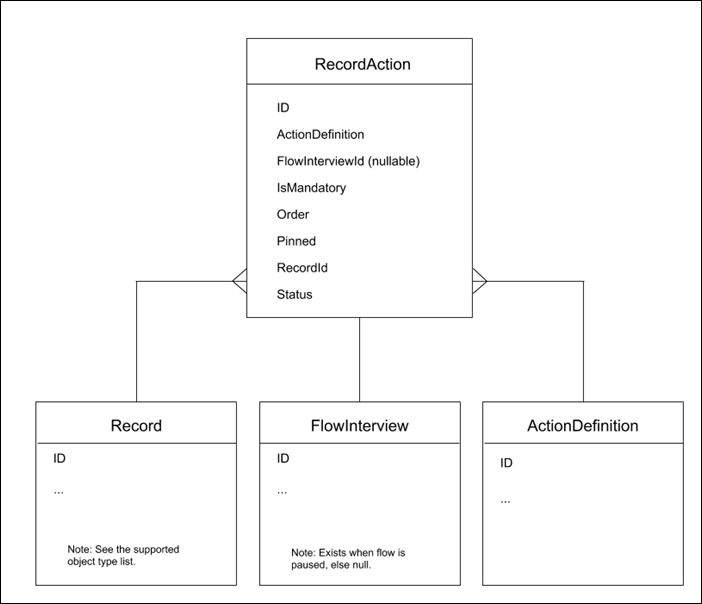
The RecordAction data model.