Lightning Communities Developer Guide
 j
jNewer Version Available
Use Custom Fonts in Your Community
- In Setup, enter Static Resources in the Quick Find box, and then select Static Resources.
-
Click New, upload the file, and give the static resource a name.
Keep a note of the resource name.
If your community has public pages, select Public in the Cache Control setting. If you don’t make the font resource publicly available, the page uses the browser’s default font instead.
-
In Community Builder, open the CSS editor by clicking Theme |
 | Edit CSS.
-
Use the @font-face CSS rule to reference the
uploaded font.
For example:
1@font-face { 2 font-family: 'myFirstFont'; 3 src: url('myPartnerCommunity/s/sfsites/c/resource/MyFonts/bold/myFirstFont.woff') format('woff'); 4}-
To reference a single font file, use the syntax path_prefix/s/sfsites/c/resource/resource_name, where path_prefix is the URL value added when you created the community, such as myPartnerCommunity.
For example, if you upload a file called myFirstFont.woff and name the resource MyFonts, the URL is myPartnerCommunity/s/sfsites/c/resource/MyFonts.
-
To reference a file in a .zip file, include the folder structure but omit the .zip file name. Use the syntax path_prefix/s/sfsites/c/resource/resource_name/font_folder/font_file.
So if you upload fonts.zip, which contains bold/myFirstFont.woff, and you name the resource MyFonts, the URL is myPartnerCommunity/s/sfsites/c/resource/MyFonts/bold/myFirstFont.woff.
-
-
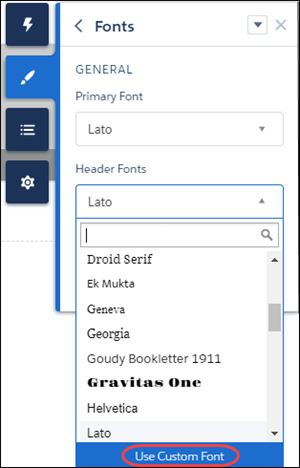
In the Theme panel, select Fonts, select the Primary Font or
Header Fonts dropdown list, and then click Use Custom Font.
-
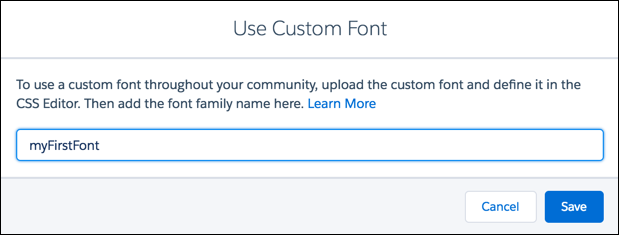
Add the font family name that you entered in the CSS editor—for example, myFirstFont—and save your changes.