


First-Generation Managed Packaging Developer Guide
 j
jWork with Patch Versions
Subscribers can install patch upgrades just like they would any other package version. However, you can also distribute a patch by using push upgrades.
When you create a patch, the patchNumber on a package's Version Number increments by one. For example, suppose that you release a package with the version number 2.0. When you release a patch, the number changes to 2.0.1. This value can't be changed manually.
Patch Development Organizations
Every patch is developed in a patch development org, which is the org where patch versions are developed, maintained, and uploaded. To start developing a patch, create a package version. See Create and Upload Patches in First-Generation Managed Packages. Patch development orgs are necessary to permit developers to change existing components without causing incompatibilities between existing subscriber installations.
A package development org can upload an unlimited number of patches. Only one patch development org can exist per major.minor release of your package. A patch development org for a package with a version number of 4.2 can only work on patches such as 4.2.1, 4.2.2, 4.2.3, and so on. It doesn’t work on version 4.1 or 4.3.
Integrating Patch Development
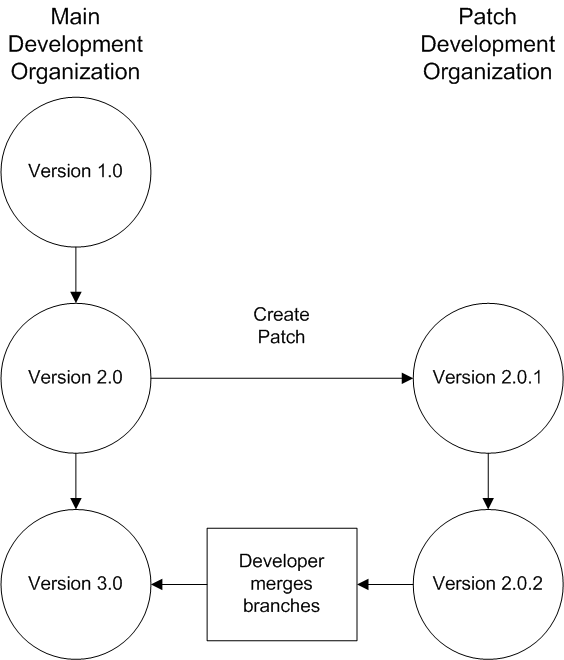
The following diagram illustrates the workflow of creating a patch and integrating any work into future versions:After version 2.0 is released, the developer creates a patch. The package version number in the patch development org starts at 2.0.1. As the main development org moves towards a released version of 3.0, a second patch is created for 2.0.2. Finally, the developer merges the changes between the main development org, and the patch development org, and releases the package as version 3.0.
Git source control is the best way to monitor your package versions. To learn about Git, complete the Git and GitHub Basics Trailhead module.
Version control is integrated into Visual Studio Code. See Salesforce Extensions for Visual Studio Code and Version Control in Visual Studio Code for details.