


 j
jFlows
Processes
Salesforce APIs
Pub/Sub API
Encrypting Platform Event Messages at Rest in the Event Bus
Previous Versions
Use flows to publish event messages from a Salesforce app as part of some user interaction, an automated process, Apex, or workflow action.
To publish event messages, add a Create Records element to the appropriate flow. Where you’d usually pick an object to create, select the custom platform event.
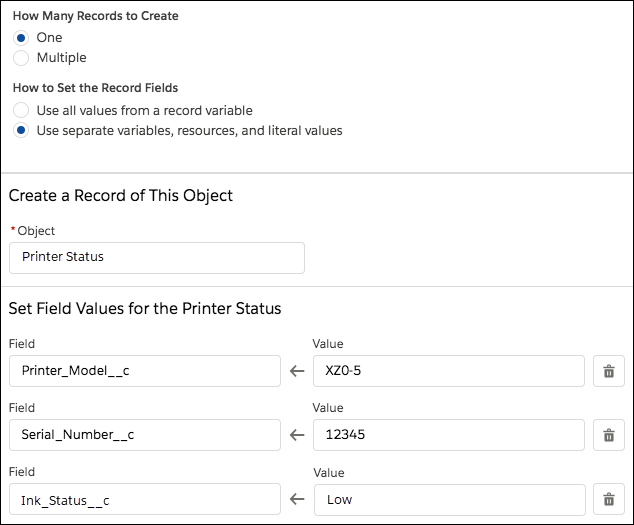
For example, here’s how to configure a Create Records element that publishes a Printer Status platform event message. This example assumes that the Printer Status platform event is defined in your org and that the event has these custom fields.
For How Many Records to Create, choose One.
For How to Set the Record Fields, choose Use separate variables, resources, and literal values.
For Object, enter Printer and select Printer Status.
Set these field values.
| Field | Value |
|---|---|
| Printer Model | XZO-5 |
| Serial Number | 12345 |
| Ink Status | Low |
Save and activate the flow.
See Also
j