Lightning Flow for Service Developer Guide
 j
jNewer Version Available
Integrate Chat with Lightning Flow for Service
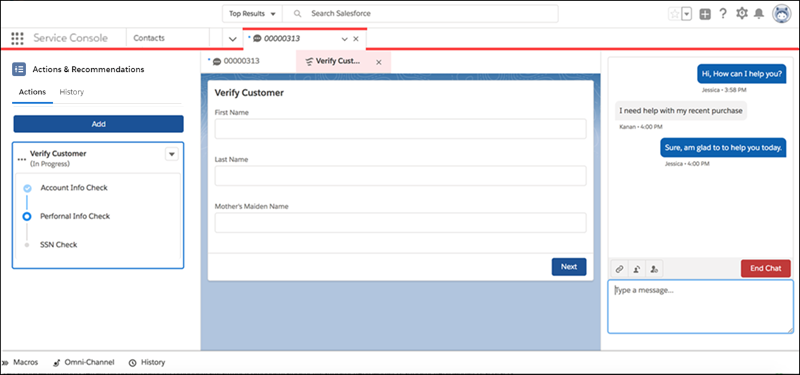
Customers who chat with you are often looking for quick and immediate resolutions to
their problems. Lightning Flow for Service helps your agents provide consistent and
efficient service. Agents can view your business processes in context of the customer chat
because actions are presented as subtabs of the Chat Transcript primary tab. Agents see the
appropriate actions to take right up front, without having to manually search for
them.
Lightning Flow for Service supports Chat in Lightning Experience, which uses
Omni-Channel routing.
-
Set up your actions.
Use Flow Builder to create individual flows. Create quick actions, and add them to the record page layout so that they can appear in the component.
-
Create an Actions & Recommendations deployment.
In the settings for the Chat channel, specify the actions that agents see by default. Specify which actions you want agents to complete first and last, and whether to autolaunch the first flow in the list. Optionally, select the actions that you want agents to see when they click Add.
-
Create a Lightning console record page.
- In Lightning App Builder, create a record page for the Chat Transcript object using the Console: Pinned Left and Right Sidebars page template.
- Add the Actions & Recommendations component to the left column, and specify the deployment name in component properties.
- Place the Chat Body component in the right column.