


Salesforce DX Developer Guide
 j
jNewer Version Available
Scratch Org Definition Configuration Values
Supported Editions
The Salesforce edition of the scratch org. Possible values are:
- Developer
- Enterprise
- Group
- Professional
Supported Features
You can enable these add-on features in a scratch org. Features aren’t case-sensitive. You can indicate them as all-caps, or how we define them here (for readability purposes). If a feature is followed by <value>, it requires that you specify a value as an incremental allocation or limit (see next section).
- ActionPlans
- AddCustomApps:<value>
- AddCustomObjects:<quantity> (Min 1: Max 30)
- AddCustomRelationships:<quantity> (Min 1: Max 30: Multiplier 5)
- AddCustomTabs:<value>
- AddDatacomCrmRecordCredit:<quantity> (Min 1: Max 30)
- AddInsightsQueryLimit:<quantity> (Min 1: Max 30: Multiplier 10)
- AddHistoryFieldsPerEntity:<value>
- AnalyticsAdminPerms
- API
- AuthorApex (see Note)
- CascadeDelete
- Chatbot (see Note)
- ChatterAnswers
- ChatterAnswersUser
- Communities
- ContactsToMultipleAccounts
- ContractApprovals
- CPQ
- CustomerSelfService
- CustomNotificationType
- DatacomDnbAccounts
- DatacomFullClean
- DebugApex
- DefaultWorkflowUser
- DeferSharingCalc (see Note)
- DevelopmentWave
- EinsteinAnalyticsPlus
- EinsteinAssistant
- EinsteinBuilderFree
- Entitlements
- EventLogFile
- ExternalIdentityLogin
- ExternalSharing (not available in Group Edition)
- FieldService
- FlowSites
- ForceComPlatform
- HealthCloudUser
- IndustriesManufacturing
- InsightsPlatform
- Interaction
- IoT
- JigsawUser
- Knowledge
- LightningSalesConsole
- LightningServiceConsole
- LiveAgent
- LiveMessage
- MarketingUser
- MaxApexCodeSize:<value>
- MaxCustomLabels:<value>
- MobileUser
- MultiCurrency
- OfflineUser
- Pardot
- PersonAccounts
- PlatformCache
- PlatformEncryption
- ProcessBuilder
- ProductsAndSchedules
- RecordTypes
- RetainFieldHistory
- SalesUser
- ServiceCloud
- ServiceUser
- SiteDotCom
- SiteForceContributor
- Sites
- StateAndCountryPicklist
- SurveyCreatorUser
- TerritoryManagement (see Note)
- TimeSheetTemplateSettings
- UiPlugin
- WavePlatform
- Workflow
1"features": ["MultiCurrency", "AuthorApex"],Scratch Org Feature Allocations and Limits
For some features, you need to specify a quantity you want to provision.
| Feature Name | Additional Allocation or Limit | Maximum | Notes |
|---|---|---|---|
| AddCustomApps | Allocation | 30 | Replaces CustomApps |
| AddCustomObjects | Allocation | 30 | |
| AddCustomRelationships | Allocation | 30 | Multiplier is 5. Setting the quantity to 5 increases the limit by 25. |
| AddCustomTabs | Allocation | 30 | Replaces CustomTabs |
| AddDatacomCrmRecords | Allocation | 30 | |
| AddInsightsQueryLimit | Allocation | 30 | Multiplier is 10. Setting the quantity to 6 increases the query limit by 60. |
| AddHistoryFieldsPerEntity | Allocation | 25 | |
| MaxApexCodeSize | Limit | To use a value greater than the default value of 10, contact Salesforce Customer Support. | Measured in millions. Setting this limit to 10 is equal to 10 million characters of code. |
| MaxCustomLabels | Limit | 15 | Measured in thousands. Setting the limit to 10 enables the scratch org to have 10,000 custom labels. |
1{
2  "orgName": "Acme",
3  "edition": "Enterprise",
4  "features": ["AddCustomApps:25", "MaxCustomLabels:10"]
5}
Scratch Org Settings
In Winter ’19 and later, scratch org settings are the format for defining org preferences in the scratch org definition. Because you can use all Metadata API settings, they are the most comprehensive way to configure a scratch org. If a setting is supported in Metadata API, it’s supported in scratch orgs. Settings provide you with fine-grained control because you can define values for all fields for a setting, rather than just enabling or disabling it.
For information on Metadata API settings and their supported fields, see Settings in Metadata API Developer Guide.
When converting existing org prefs to settings, the org prefs that start with “Is” have a corresponding setting that starts with “enable”. For example, “IsOrdersEnabled” is “enableOrders” that takes a Boolean value of true or false.
1{
2  "orgName": "Acme",
3  "edition": "Enterprise",
4  "features": ["Communities", "ServiceCloud", "Chatbot"],
5  "settings": {
6      "orgPreferenceSettings": {
7          "networksEnabled": true,
8          "s1DesktopEnabled": true,
9          "s1EncryptedStoragePref2": false
10      },
11      "omniChannelSettings": {
12          "enableOmniChannel": true
13      },
14
15      "caseSettings": {
16          "systemUserEmail": "support@acme.com"
17      }
18  }
19}
Here’s an example of how to configure SecuritySettings in your scratch org. In this case, to define session timeout, you nest the field values.
1{
2  "orgName": "Acme",
3  "edition": "Enterprise",
4  "features": [],
5  "settings": {
6      "orgPreferenceSettings": {
7          "s1EncryptedStoragePref2": false
8      },
9      "securitySettings": {
10          "sessionSettings":{
11             "sessionTimeout": "TwelveHours"
12      }
13  }
14}
Here’s an example of how to configure the IoT feature in your scratch org. It requires a combination of indicating the IoT feature and IoT scratch org settings.
1{
2  "orgName": "Acme",
3  "edition": "Enterprise",
4  "features": [],
5  "settings": {
6      "orgPreferenceSettings": {
7          "s1EncryptedStoragePref2": false
8      },
9      "iotSettings": {
10          "enableIoT": true,{
11          "iotInsights": true
12      }
13  }
14}
Metadata Coverage Report
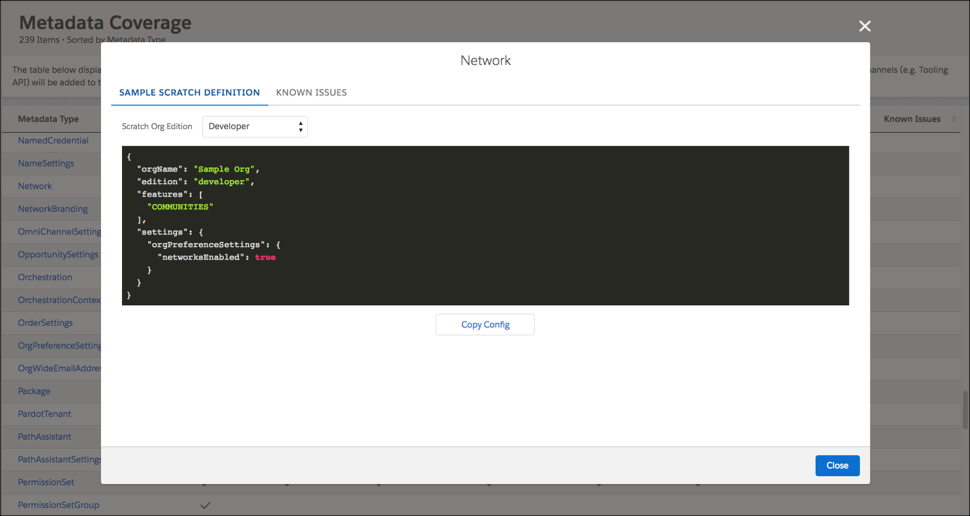
The Metadata Coverage report is now available from the Salesforce Developer site rather than from your org. You can select a release version from within the coverage report to view different release versions. We provide coverage information for Summer ʼ18/v43 onward.
The sample scratch definition is available starting in Winter ʼ19/v44. In this example, to work with the Network metadata type in a Developer Edition scratch org, your scratch org definition must include the Communities feature and the networksEnabled setting.
Supported Org Preferences
Before Winter ’19, you indicate scratch org settings using org preferences in the scratch org definition file. Use the scratch org settings format if creating a new scratch org definition file. We plan to deprecate org preferences in Winter ’20.
It’s now easier than ever to move to scratch org settings. If your scratch org definition file still contains org preferences, you see a warning message that provides the format for settings. Just copy and paste, and you’re good to go!
1WARNING: We're deprecating orgPreferences in Summer ’19. You can continue to use them
2until they are replaced by settings in Winter ’20. But why wait? Here's exactly what you need
3to update in the scratch org definition file.
4
5Replace the orgPreferences section:
6{
7    "orgPreferences" : {
8        "enabled": [
9          "S1DesktopEnabled"
10        ],
11        "disabled": [
12          "IsActivitiesRemindersEnabled"
13        ]
14    }
15}
16With settings:
17{
18    "settings": {
19        "orgPreferenceSettings": {
20            "s1DesktopEnabled": true
21        },
22        "activitySettings": {
23            "enableActivitiesReminder": false
24        }
25    }
26}Org preferences are settings that a user can configure in the org. For example, preferences control which Chatter, Knowledge, and Opportunities settings are enabled, among many others. These settings are enabled (or disabled) in the orgPreferences section of the configuration file, in JSON format.
1"orgPreferences": {
2    "enabled": ["S1DesktopEnabled", "ChatterEnabled", "IsOpportunityTeamEnabled"],
3    "disabled": ["IsOrdersEnabled"]
4}You can set the following org preferences in the configuration file. You indicate org preferences using upper camel case, as indicated in the following lists.
General Settings
- AnalyticsSharingEnable
- AsyncSaveEnabled
- ChatterEnabled
- DisableParallelApexTesting
- EnhancedEmailEnabled
- EventLogWaveIntegEnabled
- LoginForensicsEnabled
- NetworksEnabled
- NotesReservedPref01
- OfflineDraftsEnabled
- PathAssistantsEnabled
- S1DesktopEnabled
- S1EncryptedStoragePref2
- S1OfflinePref
- SelfSetPasswordInApi
- SendThroughGmailPref
- SocialProfilesEnable
- Translation
- VoiceEnabled
Account Settings
- IsAccountTeamsEnabled
- ShowViewHierarchyLink
Activities Settings
- IsActivityRemindersEnabled
- IsDragAndDropSchedulingEnabled
- IsEmailTrackingEnabled
- IsGroupTasksEnabled
- IsMultidayEventsEnabled
- IsRecurringEventsEnabled
- IsRecurringTasksEnabled
- IsSidebarCalendarShortcutEnabled
- IsSimpleTaskCreateUIEnabled
- ShowEventDetailsMultiUserCalendar
- ShowHomePageHoverLinksForEvents
- ShowMyTasksHoverLinks
Contract Settings
- AutoCalculateEndDate
- IsContractHistoryTrackingEnabled
- NotifyOwnersOnContractExpiration
Entitlement Settings
- AssetLookupLimitedToActiveEntitlementsOnAccount
- AssetLookupLimitedToActiveEntitlementsOnContact
- AssetLookupLimitedToSameAccount
- AssetLookupLimitedToSameContact
- IsEntitlementsEnabled
- EntitlementLookupLimitedToActiveStatus
- EntitlementLookupLimitedToSameAccount
- EntitlementLookupLimitedToSameAsset
- EntitlementLookupLimitedToSameContact
Forecasting Settings
- IsForecastsEnabled
Ideas Settings
- IsChatterProfileEnabled
- IsIdeaThemesEnabled
- IsIdeasEnabled
- IsIdeasReputationEnabled
Knowledge Settings
- IsCreateEditOnArticlesTabEnabled
- IsExternalMediaContentEnabled
- IsKnowledgeEnabled
- ShowArticleSummariesCustomerPortal
- ShowArticleSummariesInternalApp
- ShowArticleSummariesPartnerPortal
- ShowValidationStatusField
Chat Settings
- IsLiveAgentEnabled
Marketing Action Settings
- IsMarketingActionEnabled
Name Settings
- IsMiddleNameEnabled
- IsNameSuffixEnabled
Opportunity Settings
- IsOpportunityTeamEnabled
Order Settings
- IsNegativeQuantityEnabled
- IsOrdersEnabled
- IsReductionOrdersEnabled
Personal Journey Settings
- IsExactTargetForSalesforceAppsEnabled
Product Settings
- IsCascadeActivateToRelatedPricesEnabled
- IsQuantityScheduleEnabled
- IsRevenueScheduleEnabled
Quote Settings
- IsQuoteEnabled
Search Settings
- DocumentContentSearchEnabled
- OptimizeSearchForCjkEnabled
- RecentlyViewedUsersForBlankLookupEnabled
- SidebarAutoCompleteEnabled
- SidebarDropDownListEnabled
- SidebarLimitToItemsIownCheckboxEnabled
- SingleSearchResultShortcutEnabled
- SpellCorrectKnowledgeSearchEnabled