


Analytics SAQL Reference
 j
jNewer Version Available
group
Syntax
1result = group data_stream_1 by rollup(field1, [field2]);-
rollup - Optional. Calculates totals of grouped data. Adds rows to
your query results with null values for dimensions and totaled results for
measures.
The rollup modifier must include all fields in the group statement. Not supported: q = group q by rollup('Type'), 'LeadSource'; Supported: q = group q by rollup('Type', 'LeadSource');
The rollup modifier supports these aggregates:- Count
- Sum
- Average
- Min
- Max
- Unique
Using rollup with other aggregates or windowing functions returns an error.
- field - Field by which data is grouped.
Example - Group by One Field
Suppose that you want to see how many opportunities each account owner has. Group by account owner:
1q = load "DTCOpps";
2q = group q by 'Account_Owner';
3q = foreach q generate 'Account_Owner' as 'Account_Owner', count() as 'count';
4q = order q by 'count' asc;
Example - Calculate Totals of Grouped Data
Suppose that you want to see the total value of opportunities by stage. Group by stage name, and roll up the group.
1q = load "opportunityData";
2q = group q by rollup('StageName');
3q = order q by ('Stage Name');
4q = foreach q generate
5    'StageName' as 'Stage Name',
6    sum('Amount') as 'sum_Amount';
The query results show total sum of amount for all opportunities below the sum of amount for each opportunity stage name grouping. The total row has a null value for a dimension.
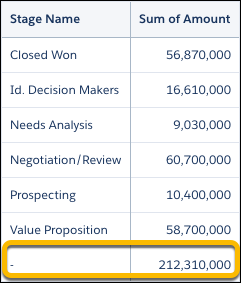
Sometimes, null values in place of labeled totals can confuse query results. Avoid this confusion by labeling the total All Stages using a case statement with a grouping() function.
1q = load "opportunityData";
2q = group q by rollup('StageName');
3q = order q by ('Stage Name');
4q = foreach q generate
5    (case
6        when grouping('StageName') == 1 then "All Stages"
7        else 'StageName'
8    end) as 'Stage Name';
Now the query results include labeled totals.
