Tableau CRM SAQL Reference
 j
jNewer Version Available
group-by
Syntax
1result = group data_stream by rollup(field1, [field2]);-
rollup—Optional. A subclause of group-by that calculates totals of grouped data. For each
set of grouped results, the query returns an additional row with a null value for the
dimension and the total results for the measure.
rollup must include all fields in the group statement. For example, this query rolls up the Type and Lead_Source fields.
1q = group q by rollup('Type', 'Lead_Source');This query throws an error because it rolls up Type but not Lead_Source.1q = group q by rollup('Type'), 'Lead_Source';The rollup modifier supports the following aggregate functions.- Count
- Sum
- Average
- Min
- Max
- Unique
Using rollup with other aggregate or windowing functions returns an error.
- data_stream—The data input to be grouped.
- field—Field by which data is grouped.
Example
This example groups by the account owner field to display the number of opportunities that each account owner has.
1q = load "DTCOpps";
2q = group q by 'Account_Owner';
3q = foreach q generate 'Account_Owner' as 'Account_Owner', count() as 'count';
4q = order q by 'count' asc;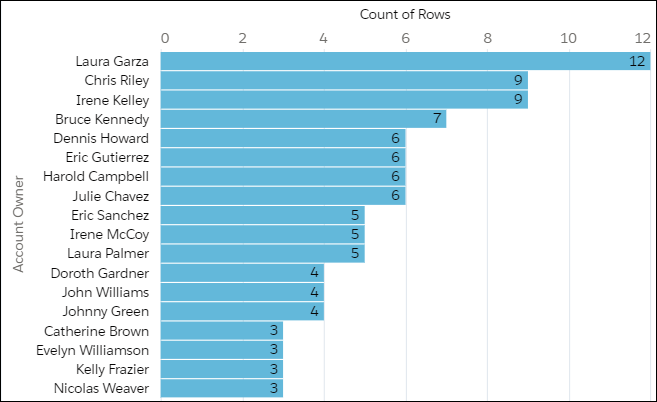
Example
This example groups by the Stage Name field. The query first shows the total sum for each stage name. It then rolls up the total sum for all opportunities.
1q = load "opportunityData";
2q = group q by rollup('StageName');
3q = foreach q generate
4    'StageName' as 'Stage Name',
5    sum('Amount') as 'sum_Amount'
6q = order q by ('Stage Name');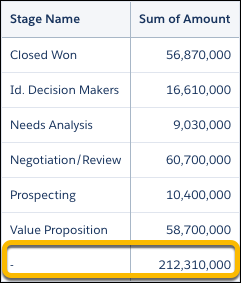
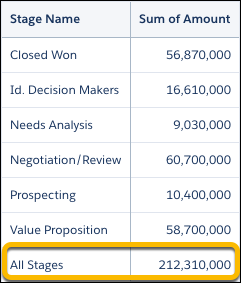
The value of the Stage Name column for the total Sum of Amount value is null. The inclusion of the null value can sometimes lead to confusion when performing other calculations on your data. Let’s add a label called All Stages to clarify that 212,310,000 represents the sum of all of stages.
1q = load "opportunityData";
2q = group q by rollup('StageName');
3q = order q by ('Stage Name');
4q = foreach q generate
5    (case
6        when grouping('StageName') == 1 then "All Stages"
7        else 'StageName'
8    end) as 'Stage Name',
9    sum('Amount') as 'sum_Amount';
To add the extra label, we use a case statement with the grouping() function. Here, we add a case statement that uses grouping() to check whether the Stage Name column has a null value returned from the rollup. If so, it labels the column "All Stages". Otherwise, it returns the stage name.