


Analytics SAQL Reference
 j
jNewer Version Available
Time-Based Filtering
Using Date Ranges in Filters
Use these filters to specify the date range you want to look at:
- Fixed date range, for example between August 1, 2018 and June 2, 2017
- Relative date range, for example between two years ago and last month
- Open-ended ranges, for example before 04/2/2018
- Add and subtract dates, for example all records from three months before yesterday
Example: Display Opportunities Closed This Month
Suppose that you want to see which opportunities closed this month. Your data includes the account name, the close date fields, and the epoch seconds field.
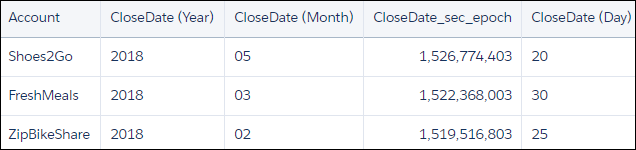
Use date() to generate the close date in date format. Then use relative date ranges to filter opportunities closed in the current month.
1q = load "OpsDates1";
2q = filter q by date(’CloseDate_Year’, ‘CloseDate_Month’, ‘CloseDate_Day’) in ["current month" .. "current month"];
3q = foreach q generate Account;
If the query is run in May 2018, the resulting data stream contains one entry:

To add the close date in a readable format, use toDate().
1q = load "OpsDates1";
2q = filter q by date('CloseDate_Year', 'CloseDate_Month', 'CloseDate_Day') in ["current month" .. "current month"];
3q = foreach q generate Account, toDate('CloseDate_sec_epoch') as 'Close Date';
The resulting data stream includes the full date and time of the close date.

You can also display just the month and day of the close date.
1q = load "OpsDates1";
2q = filter q by date('CloseDate_Year', 'CloseDate_Month', 'CloseDate_Day') in ["current month" .. "current month"];
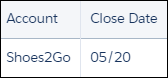
3q = foreach q generate Account, 'CloseDate_Month' + "/" + 'CloseDate_Day' as 'Close Date';
The resulting data stream contains the month and day of the close date.
Fixed Date Ranges
1dateRange(startArray_y_m_d, endArray_y_m_d)startArray_y_m_d is an array that specifies the start date
endArray_y_m_d is an array that specifies the end date
For example, return all records between October 2, 2014 and August 16, 2016:
1q = filter q by date('Created_Date_Year', 'Created_Date_Month', 'Created_Date_Day') in [dateRange([2014,10,2], [2016,8,16])];Relative Date Ranges
Use relative date ranges to answer questions such as "how many opportunities did each rep close in the past fiscal quarter"? To specify a relative date range, use the in operator on an array with relative date keywords. For example, return all records from one year ago up to and including the current year.
1q = filter q by date('Close_Date_Year', 'Close_Date_Month', 'Close_Date_Day') in ["1 year ago".."current year"];1q = filter q by date('Close_Date_Year', 'Close_Date_Month', 'Close_Date_Day') in ["2 quarters ago".."2 quarters ahead"];Return all records from the last two fiscal years, up to and including today.
1q = filter q by date('Close_Date_Year', 'Close_Date_Month', 'Close_Date_Day') in ["2 fiscal_years ago".."current day"];- current day
- n day(s) ago
- n day(s) ahead
- current week
- n week(s) ago
- n week(s) ahead
- current month
- n month(s) ago
- n month(s) ahead
- current quarter
- n quarter(s) ago
- n quarter(s) ahead
- current fiscal_quarter
- n fiscal_quarter(s) ago
- n fiscal_quarter(s) ahead
- current year
- n year(s) ago
- n year(s) ahead
- current fiscal_year
- n fiscal_year(s) ago
- n fiscal_year(s) ahead
Open-Ended Date Ranges
1q = filter q by date('Close_Date_Year', 'Close_Date_Month', 'Close_Date_Day') in [.."1 year ago"];You can also specify a closed relative date range. For example, return all records from three years ago up to and including today.
1q = filter q by date('Close_Date_Year', 'Close_Date_Month', 'Close_Date_Day') in ["3 years ago"..];Add and Subtract Dates
1q = filter q by date('Close_Date_Year', 'Close_Date_Month', 'Close_Date_Day') in ["current day - 1 year"..];1q = filter q by date('Close_Date_Year', 'Close_Date_Month', 'Close_Date_Day') in ["current day".."2 years ahead + 3 months"];